


DanielKay2012
Participating Frequently
April 28, 2026

P: (Win/MacOS) Photoshop 27.5 & later: Transform tool bounding box off center on warped text

  • April 28, 2026
  • 6 replies
  • 203 views

The bounding box of the transform tool is in the wrong location and not properly scaled when used on warped text. It does snap back to correct scale and location when a corner of it is selected but reverts once the transform is deselected again.

Photoshop version is 27.5
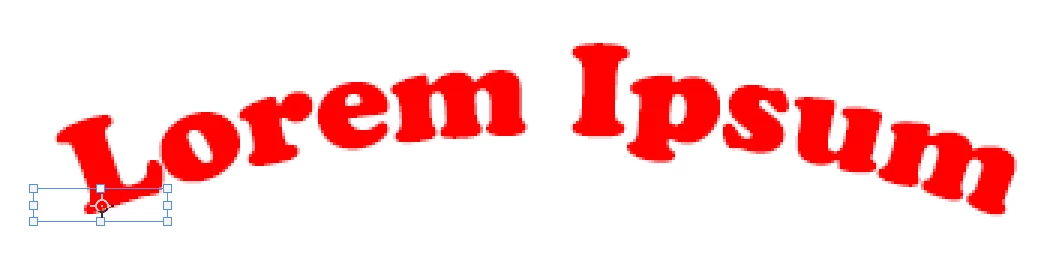
Off center and wrong scale bounding box on warped text


    6 replies

    marroycoyote
    Participant
    May 28, 2026

    @Sameer K I’m having the exact same issue.  I’ve tried uninstalling and reinstalling Photoshop, using Photoshop Beta, resetting preferences, etc.  Nothing works. Very frustrating.


    Sameer K
    Community Manager
    Community Manager
    May 29, 2026

    Thanks for the comment. Please go through the recent comments in this thread and supply the info requested for reproduction. 


    Best, 
    Sameer K

    marroycoyote
    Participant
    May 29, 2026

    @Sameer K here’s a screen recording of the glitch that has persisted for the last several days...

    DanielKay2012
    Participating Frequently
    May 27, 2026

    Update: Now on PS version 27.7 but the issue still persists

    Sameer K
    Community Manager
    Community Manager
    May 28, 2026

    Hey, ​@DanielKay2012. We’ve been unable to recreate this, and I’ve previously requested you to share a video of this behavior without using keyboard shortcuts, and also check if the issue exists in Photoshop (beta). 


    Thanks!
    Sameer K

    SpoilThemCreatively
    Participant
    May 19, 2026

    I have this SAME ISSUE and it’s driving me insane!!

    Trevor.Dennis
    Community Expert
    Community Expert
    May 19, 2026

    I’ve gone back to the beginning after seeing ​@SpoilThemCreatively ‘s ‘Me too’ post.  Right up front I nearly always use the beta version, so I’ve now tested it with the release version, albeit an update to V27.6  I’m seeing an issue using Free Transform on this text layer, which thinks it is bigger than it is.  I tried adding a layer style to see if there was errant content, but it was only revealed on the type that we can see.  I’ve also reset the Type tool, which made no difference.


    Resetting Preferences fixed it.  I take it that you have both tried resetting Preferences?


    I’ve tried really hard to find a workflow that leads to what you are seeing, but it is not happening for me.  So we might need to attract on of the Adobe employees who manage this forum.  ​@CShubert ​@Pete.Green ?

    Sameer K
    Community Manager
    Community Manager
    May 19, 2026

    Hey, ​@Trevor.Dennis. I also tested and responded a few days ago asking for a video showing the workflow where only menu items are used instead of shortcuts to see if I can reproduce this. 

    Feel free to tag myself, or Anshul for repro instances. 

    Thanks!
    Sameer K

    Trevor.Dennis
    Community Expert
    Community Expert
    April 28, 2026

    Thanks for the screen shots. That’s really helpful.  Can you clarify what you meant by ‘Selecting the corner’?  If I FT a Type layer, and make a selection of part of that Type layer

    ...and then right click and choose Transform Selection

    Then the Transform bounding box would reflect the selection.  Is that what happened with you?  If so, then that’s expected behaviour.


    If not, then can you describe your steps in detail?

    DanielKay2012
    Participating Frequently
    April 29, 2026

    With “selecting the corner” I mean when the text layer is selected then clicking one of the corners (the squares) of the transform tool rectangle overlaying the layer.

    Trevor.Dennis
    Community Expert
    Community Expert
    April 29, 2026

    Is this happening every time you use FT Warp?

    Does it only happen with Type layers?

    Does it happen if you make the layer a Smart Object?

    Have you tried resetting Preferences?

    I have tried to duplicate what you are seeing but have not been able to, and I have not seen anyone else talk about similar behaviour.  Perhaps a video might help?

    DanielKay2012
    Participating Frequently
    April 28, 2026

    Correction, thought it was fixed in 27.6 but it still has issues

    Trevor.Dennis
    Community Expert
    Community Expert
    April 28, 2026

    What do you see when you first use Transform on the entire Type layer?

    Can you show us a screen shot of the state?  Make it the entire workspace at full res, and the Type layer selected and Free Transform invoked.

    DanielKay2012
    Participating Frequently
    April 28, 2026

    Attached how the steps of it are looking from first select to what it looks like after warping the text and then selecting the corner of the transform box again.