yamato713108855
Community Expert
Community Expert
Aug 30, 2026 2:04 PM UTC
Investigating

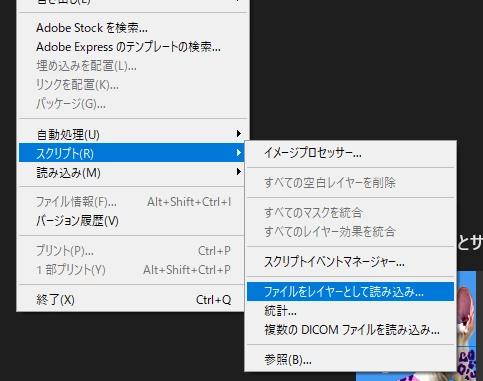
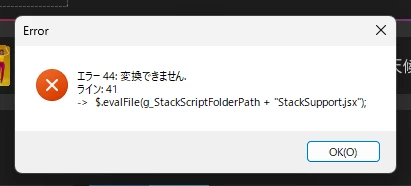
P: (Win) Photoshop 27.10 Script "Load Files into Stack" fails with an Error 44: Cannot convert.and cannot be executed

An error occurs when using "Load Files into Stack..." in Photoshop.
The issue persists even after resetting Photoshop preferences and reinstalling the application.

Are there any solutions?


Photoshop27.10(Japanese)、Win11


Pinned Reply By Eugene Tyson

Hi,

This is a known issue affecting Photoshop 2026 on Windows, and the error in your screenshot matches an existing bug report.

The problem appears to be related to the character encoding of a Photoshop support script called StackSupport.jsx. Some versions contain characters that Photoshop's scripting engine cannot interpret correctly on certain Windows language configurations.

An Adobe Community Manager has published a workaround.

Try the following:

  1. Close Photoshop.

  2. Navigate to this folder:

    C:\Program Files\Adobe\Adobe Photoshop 2026\Presets\Scripts\Stack Scripts Only

  3. Locate StackSupport.jsx and make a backup copy before changing anything.

  4. Open the original file in Notepad.

  5. Choose File > Save As and select UTF-8 with BOM under Encoding.

  6. Make sure the filename remains StackSupport.jsx and the file type is set to All Files, so it doesn't acquire a .txt extension.

  7. Save the modified file, replacing the original. You may need administrator permission to write to the Photoshop installation folder.

  8. Restart Photoshop and try File > Scripts > Load Files into Stack again.

Changing the encoding to UTF-8 with BOM has been reported to resolve this particular error.

If you prefer not to modify the installation files, another reported workaround is reverting Photoshop to version 27.9.1 through Creative Cloud.

You can follow the existing bug report here:

https://community.adobe.com/bug-reports-711/p-win-photoshop-27-10-script-load-files-into-stack-fails-with-an-error-44-cannot-convert-and-cannot-be-executed-1639530

This isn't necessarily a problem with your installation, and other users have reported that reinstalling Photoshop or resetting preferences doesn't fix it.

Let us know whether changing the file encoding resolves the issue.

14 replies

Community Expert
Oct 31, 2026 7:21 AM UTC

Hi,

This is a known issue affecting Photoshop 2026 on Windows, and the error in your screenshot matches an existing bug report.

The problem appears to be related to the character encoding of a Photoshop support script called StackSupport.jsx. Some versions contain characters that Photoshop's scripting engine cannot interpret correctly on certain Windows language configurations.

An Adobe Community Manager has published a workaround.

Try the following:

  1. Close Photoshop.

  2. Navigate to this folder:

    C:\Program Files\Adobe\Adobe Photoshop 2026\Presets\Scripts\Stack Scripts Only

  3. Locate StackSupport.jsx and make a backup copy before changing anything.

  4. Open the original file in Notepad.

  5. Choose File > Save As and select UTF-8 with BOM under Encoding.

  6. Make sure the filename remains StackSupport.jsx and the file type is set to All Files, so it doesn't acquire a .txt extension.

  7. Save the modified file, replacing the original. You may need administrator permission to write to the Photoshop installation folder.

  8. Restart Photoshop and try File > Scripts > Load Files into Stack again.

Changing the encoding to UTF-8 with BOM has been reported to resolve this particular error.

If you prefer not to modify the installation files, another reported workaround is reverting Photoshop to version 27.9.1 through Creative Cloud.

You can follow the existing bug report here:

https://community.adobe.com/bug-reports-711/p-win-photoshop-27-10-script-load-files-into-stack-fails-with-an-error-44-cannot-convert-and-cannot-be-executed-1639530

This isn't necessarily a problem with your installation, and other users have reported that reinstalling Photoshop or resetting preferences doesn't fix it.

Let us know whether changing the file encoding resolves the issue.

Translate
Participant
Oct 27, 2026 2:18 AM UTC

从creative cloud全新安装的photoshop 2026,在点击文件-脚本-将文件载入堆栈时,跳出如下弹窗,这是什么问题?


Translate
Participant
Oct 11, 2026 5:30 AM UTC

I’m having the same problem while using both v27.10 and v27.11 

Translate
Known Participant
Oct 8, 2026 12:02 PM UTC

在首頁的縮圖依然色彩過度飽和...…
而且腳本堆疊依第41行的bug依然存在


Translate
Participant
Oct 7, 2026 10:51 PM UTC

Problem “load files into stack … Error 44: cannot convert ...” persists even after the latest update to ver. 27.11. Is it still under investigation? Thanks for attention.

Translate
Participant
Sep 24, 2026 1:50 AM UTC

Photoshop 27.12.0 (Beta版本)將檔案載入堆疊出現錯誤.Error 錯誤 44: 無法轉換. 直線: 41 -> $.evalFile(g_StackScriptFolderPath + "StackSupport.jsx");

Translate
Known Participant
Oct 10, 2026 1:11 PM UTC

昨天更新PS V27.11依然沒有改


Translate
Participant
Sep 21, 2026 5:49 AM UTC

Open the StackSupport.jsx file with any text editor 

Ctrl+F to base64Decode function and you will see the comments written by whoever worked on this section.


Edit or remove the 3 “—” characters and save. Issue solved.

for example:


Translate
YiChen C
Participating Frequently
Sep 13, 2026 3:57 AM UTC

I’m having the same issue. Since updated LrC & Ps to the latest version, when I tried open multiple images to Ps, it popped up a message Error 44: cannot convert. Same message when I opened Ps and used Scrips to load files into stack. 

Translate
Community Expert
Sep 3, 2026 5:10 PM UTC

See here:


Moderators, ​@Sameer K  ,  please merge with existing thread:

P: (Win) Photoshop 27.10 Script "Load Files into Stack" fails with an Error 44: Cannot convert.and cannot be executed | Adobe DME


Translate
My System: Intel i7-8700K - 64GB RAM - NVidia Geforce RTX 3060 - Windows 11 Pro 26H2 -- LR-Classic 15 - Photoshop 27 - Nik Collection 9 - PureRAW 6 - Topaz Photo AI
Participant
Sep 3, 2026 4:31 PM UTC


I've tried changing the language in Photoshop and reinstalling it, but the error persists.

I'm trying to use the PhotoMerge feature, but I keep getting an error message.


I tried reset with this script https://helpx.adobe.com/photoshop/desktop/get-started/settings-and-preferences/reset-preferences.html

but it wasn’t help.


Im using windows 11, and Photoshop 2026

Translate