
Photoshop and Photoshop (Beta) crash on launch — OpenCLOn12.dll exception 0xc0000409 (possible Windows/NVIDIA driver conflict)
PRODUCT & VERSION
- Photoshop 2026, version 27.9.1.1
- Photoshop (Beta), version 27.11.0.3640 (auto-updated 8/19/2026, same day the crash started)
OPERATING SYSTEM
Windows 11, version 25H2 (build 26200.9168, after KB5121003 installed 8/12/2026)
HARDWARE
NVIDIA GeForce RTX 4060 Laptop GPU, Studio driver 610.88 (installed 7/28/2026 via NVIDIA app, currently the latest available version)
STEPS TO REPRODUCE
1. Double-click the Photoshop (or Photoshop Beta) icon.
2. The splash screen appears and reaches the "Measuring Memory" stage.
3. The application crashes/closes within 1-2 seconds, before the workspace loads.
EXPECTED RESULT
Photoshop opens normally to the workspace.
ACTUAL RESULT
The application crashes silently every single time, in both the stable and Beta builds, with an identical crash signature.
CRASH DETAILS (from Windows Event Viewer, Event ID 1000, Application Error)
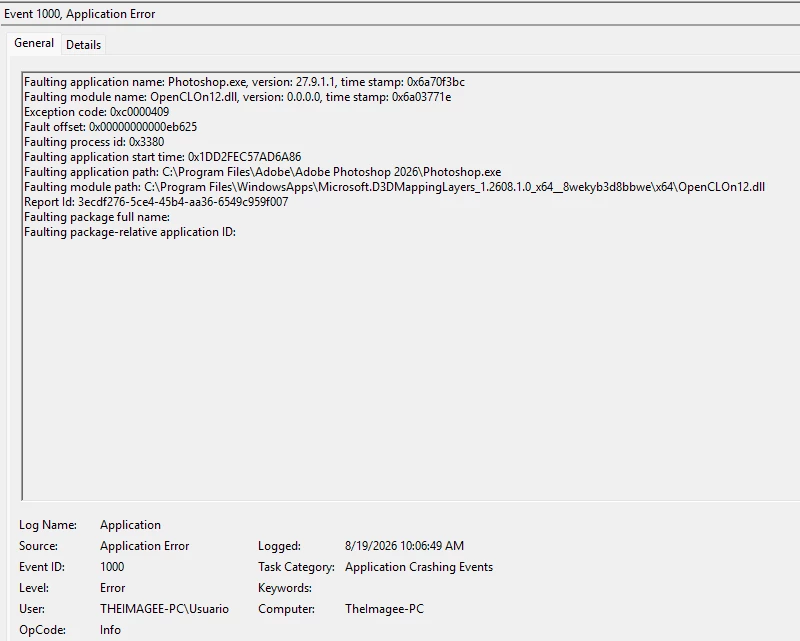
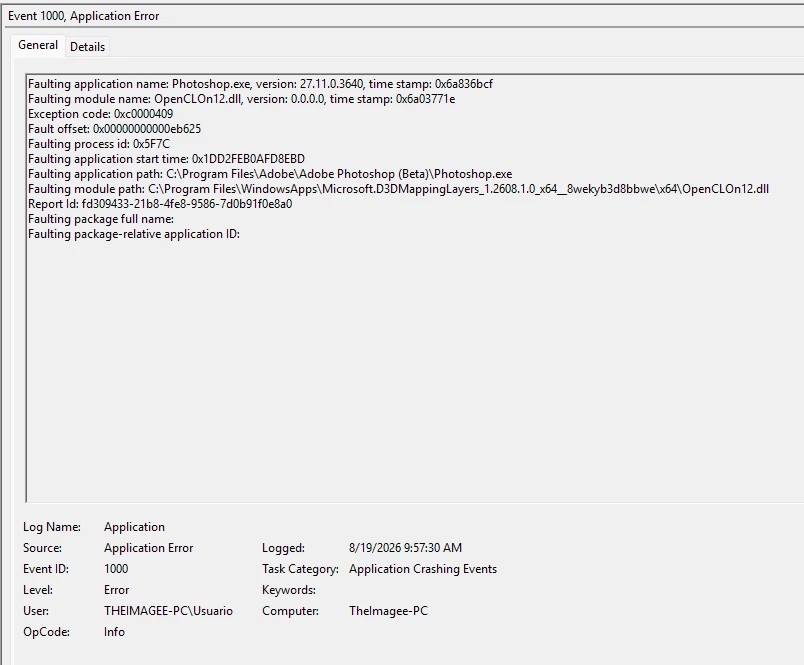
- Faulting module: OpenCLOn12.dll (version 0.0.0.0)
- Module path: C:\Program Files\WindowsApps\Microsoft.D3DMappingLayers_1.2608.1.0_x64__8wekyb3d8bbwe\x64\OpenCLOn12.dll
- Exception code: 0xc0000409 (stack buffer overrun)
- Fault offset: 0x00000000000eb625 (identical in both stable and Beta crash logs)
- Stable Photoshop.exe crash logged: 8/19/2026 10:06:49 AM
- Photoshop (Beta).exe crash logged: 8/19/2026 9:57:30 AM
TROUBLESHOOTING ALREADY PERFORMED
- Confirmed no custom ICC color profile is assigned to the display (rules out a wide-gamut/Display P3 OpenCL initialization issue).
- Confirmed the Microsoft "OpenCL, OpenGL and Vulkan Compatibility Pack" (which contains the faulting DLL) is fully up to date (v1.2608.1.0, last updated 8/17/2026) — no pending Microsoft Store updates.
- Confirmed the NVIDIA Studio driver is the latest available (610.88). "Roll Back Driver" is available in Device Manager, but this same driver was working without issue as recently as a few days ago.
- Found in Windows Update's driver history that a separate NVIDIA display driver package (version 31.0.15.2892, dated 8/12/2026) was installed automatically by Windows Update, alongside the manually-installed NVIDIA Studio driver — this may have left the graphics driver stack in a mixed/inconsistent state.
- Windows 11 update KB5121003 (installed 8/12/2026) is independently and widely reported by other users/outlets to cause graphics-driver-related instability (black screens, HDR issues, refresh rate problems) in unrelated apps and games, suggesting a possible system-level regression rather than an Adobe-specific bug.
- Both the stable and Beta builds crash with the exact same fault offset, which suggests the issue lies in the shared OpenCL-on-DirectX12 system component rather than in Photoshop's own code.
Attaching Event Viewer screenshots for both crashes below.


 AdChoices