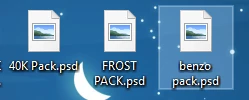
Participant
October 16, 2024

PSD file icons not showing

  • October 16, 2024
  • 3 replies
  • 922 views

How do i fix my psds showing up as this? happened when i updated to the 2025 ps from 2024 version.

thanks

3 replies

Known Participant
November 17, 2024

I am also having a similar issue. It happened on all my computers since updating to the latest version. All my PSDs have the Photoshop icon for the icon, which I don't like. I've tried resetting the extension and changing the defaults but it always falls back to the Photoshop icon. Everything appears fine in the registry and when inspecting the extension with a third-party app. It just always pulls the wrong icon and calls it a "PSD File" instead of "Adobe Photoshop Image". Something is wrong with the file type association.

shoomlah
Participant
November 12, 2024

Not sure if you've already fixed this, but I was also running into this same issue with the latest issue and solved it!

  • Go to Settings > Apps > Default Apps
  • Under "set a default for a file type or link type", enter .psd
  • Click on the button that shows up and choose Adobe Photoshop 2025 as your default app again. Voila!


This was driving me bonkers since it completely kneecapped my ability to quickly visually browse for psds in file explorer, so I'm so relieved to have it fixed. Hope it's helpful!