
Participant
April 5, 2025

25.2 update changed multicam behaviour

  • April 5, 2025
  • 2 replies
  • 172 views

Version 25.2.0 (Build 147) - PC - Windows 11 - RazerBlade17 / Corei7-12800H - 64 GB RAM - 3080Ti 16 GB VRAM

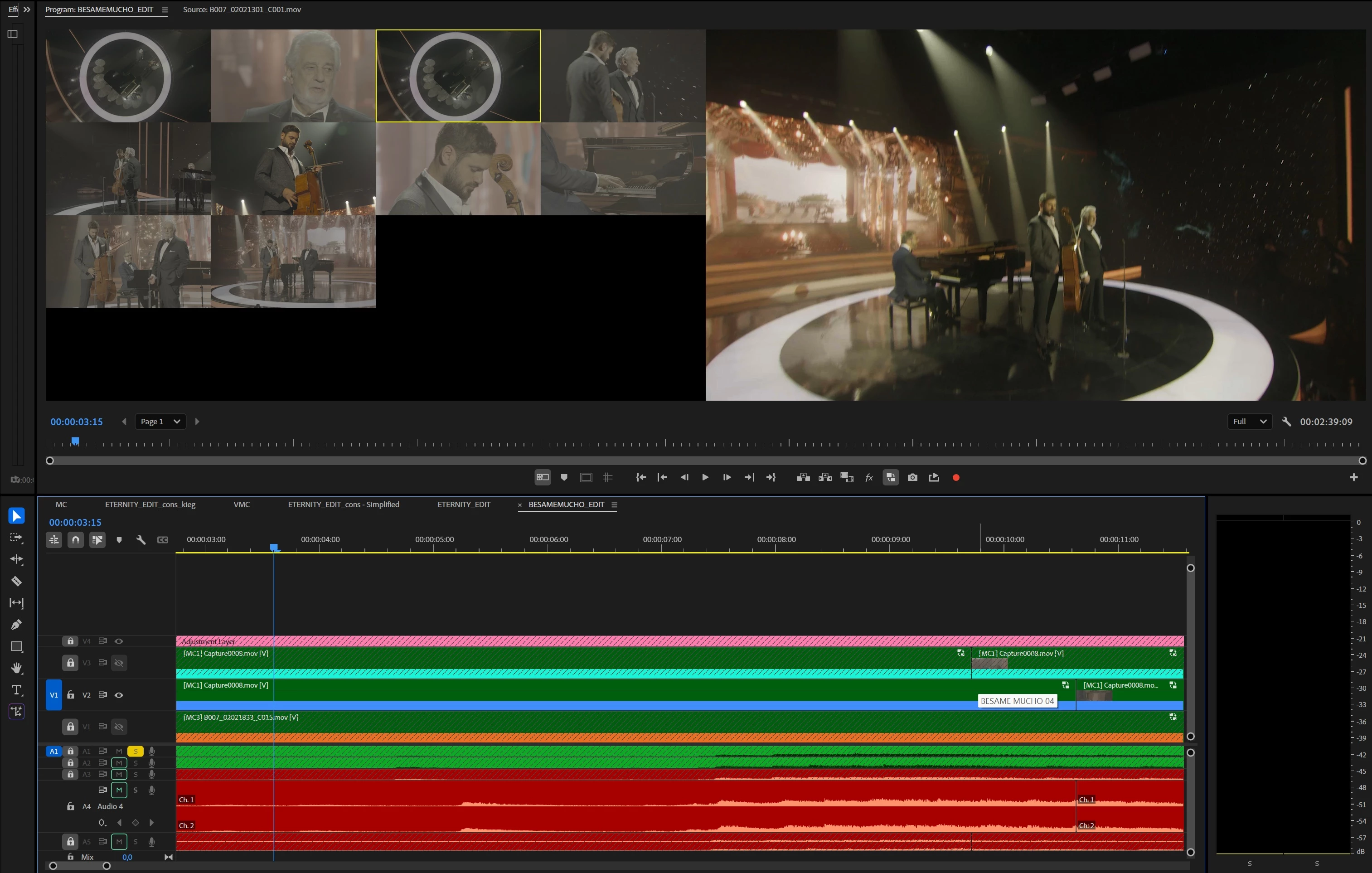
After the 25.2 update, multicam behaviours somehow changed. I'm frequently editing several multicam tracks in one timeline, on top of each other. Same music, several attempts. Before the update, I can able to change which video track I would like to see in the multicam panel (with the track selector). But right now, I can only see multicams on the video track 1, doesn't matter which track was selected. Does anyone have a solution for this?
2 replies

jamieclarke
Community Manager
Community Manager
April 7, 2025

Hi @LA Visual -   Thanks for submitting your bug report. We need a few more details to try to help with the issue.
Please see, How do I write a bug report?


In order to see the multicam selection you are viewing you need to have the same video track enabled.  From your screenshot if you want to view the multicam clip for V2 then enable track V2.  

You can also check the wrench menu and make sure "Multi-Camera Selection Top Down" is selected


Sorry for the frustration.

Participant
April 6, 2025

Any solution? Anybody?