
Participating Frequently
October 19, 2018

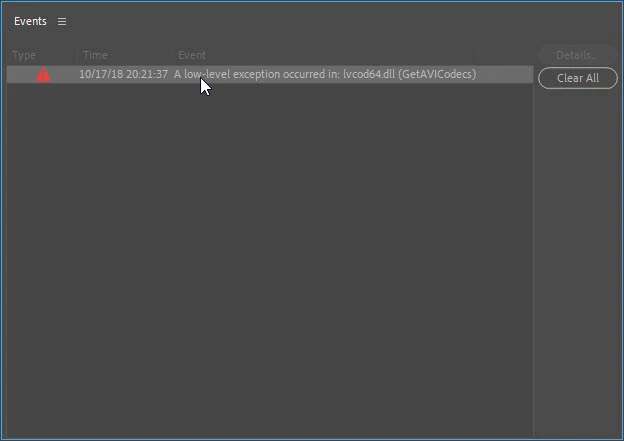
A low-level exception occurred in: lvcod64.dll (GetAVICodecs)

  • October 19, 2018
  • 64 replies
  • 49672 views

After upgrading to the 2019 version of Premiere Pro CC I'm getting this error when opening any project. I can edit the project but I don't know if any work that I'll be doing will be compromised by this error. I need a position about this problem to continue working in any project in the 2019 version.
This topic has been closed for replies.

64 replies

Shivangi_Gupta
Community Manager
Community Manager
October 22, 2018

Hi all,

Sorry to hear that you are facing this issue.

We have identified this as a known issue and we are working on a fix. Till then, please try these workarounds:

  • Uninstall all Logitech drivers from Device Manager.
  • Go to the folder C:/Windows/System32 and delete the file lvcode64.dll or lvcod64.dll.

Let us know if it helps.

Thanks,

Shivangi

Participant
October 22, 2018

This worked for me today. While I was unable to find the drivers the post said to delete I was able to find the file in the system32 folder and deleted it after closing Premiere Pro cc 2019. I am hoping this works until Adobe can update the scripts.

juanmario
Participating Frequently
October 20, 2018

Hi.

It seems that lvcod64.dll belongs to the installation of Logitech Webcam software.

As we know historically the loading of inadequate elements can cause problems in Premiere, as it happened with the K-Lite.

My recommendation is to verify possible updates of the product to know if this solves the problem or uninstall it.

Another solution would be to remove lvcod64.dll from the system but I do not know how you can impart this to the software.

Participant
October 22, 2018

Hi huanmario,

I have the same error message in PremierePro CC 2019 even if it doesn't seem to affect my work. Anyway, I have also a logitech webcam with all drivers updated, I have also try to unistall it but the error still occurs.

ThalesmAuthor
Participating Frequently
October 20, 2018

I'm very frustrated with the support from Adobe.

A low-level exception is popping up in several posts and in different circumstances.

We are not getting any response from Adobe technical people. Do they read any of those posts? Do they care?

The only suggestion that I can add to this issue is to uninstall Premiere version 2019 and continue to use version 2018 until someone from Adobe resolve this serious problem.

I spent already too many hours trying to solve it.


Mod note: Edited for content.

deanng85354345
Participant
October 20, 2018

Same here. Since the error started, I can't play preview video, work with graphics, or open the color panel. Everything just crashes, even after uninstalling and reinstalling the program.

Participating Frequently
October 20, 2018

Same with me! I've struggled for the past 2 days and i am a youtuber, I can't even do my work! I am really worried.

I've had 2 customer support helps, screen share my computer, so they can use it themselves and both have not been able to fix the issue.

I've updated to 2019 (problem happened with 2018), i've updated my 980 graphics card drivers, i've cleaned cache files, i've deleted premier pro and re downloaded it, but to no avail!

I am getting really frustrated now, i can't afford to miss uploading because of some crazy issue! So stressful!