
Accidentally pasting an insivible return (↵) in Premiere, causing issues
I'm copying various names from a Google sheet that represent various sequence names that have been decided on, and it appears that upon copying these names (by pressing CMD+A and CMD+C on each cell), they are coming with an invisible extra character at the end, a return/enter (↵).
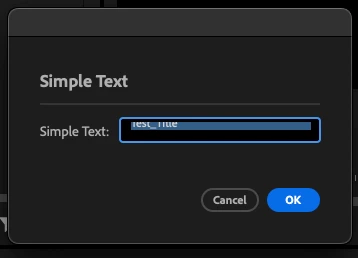
Normally, you can't name, say, a premiere sequence with a return/enter included. If you press the return key, it won't input anything. However, you are able to copy and paste this invisible symbol into many different places in Premiere that aren't normally allowed to accept this symbol, such as sequence names or in the "Simple Text" effect text box.
This appears to cause unintended behavior where it becomes hard to read or edit the text in places where you have accidentally included this invisible symbol.
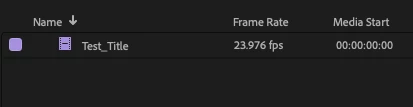
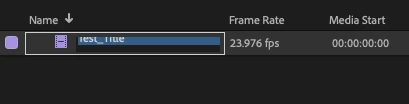
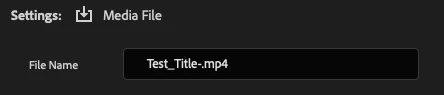
Here's a spot where I labeled a piece of footage as Test_Title(↵). You can see it looks normal in my project panel, but if I click on it and attempt to change the name, it offsets in a problematic way that makes it difficult to read or edit the text, and it isn't particularly easy to select the offending (↵) and delete it either, it's easiest to just select all, delete, and retype the title. However, this is extremely impractical for my senario, where I am copying hundreds of long strings of nearly random characters to title sequences with. This also applies in other places, such as the "Simle Text" text input box. And when you try to export something with this character included, Premiere replaces the invisible (↵) with a (-). I'm attaching an example of that below as well.
Could we please remove the ability to paste the invisible (↵) into these textboxes? Either that, or fix the behavior of these textboxes when a (↵) is pasted in. It is causing me a lot of issues as I have discovered this invisible character in hundreds of my sequences, and a new titling convention for my project needs me to retitle all of these sequences with a few extra characters, which led me to discover how difficult it was to edit these titles.
This has been happening to me since at least Premiere 24.6.4 (I'm pretty sure it was happening in some earlier 2024 versions as well), and is still happening to me in Premiere 25.1.0 (Build 73).
I'm on a Macbook Pro 16" 2021, Apple M1 Max chip, 64gb RAM, and Mac OS Sonoma 14.7.2.
Please help fix this unusual behavior!
*EDIT*
I've been asked to provide more information, but I'm not sure what else to provide. I was able to create this problem with a completely fresh, blank project. I can create an empty sequence or a black video file, and rename that with the offending invisible ↵ character, to recreate the error. Here is a GoogleSheet where you can select the cell with "Test_Title" in it, Cmd+A and Cmd+C to copy it (Cmd+A seems to be the step in the process that somehow allows ↵ to get selected), and then go create a blank premiere sequence and Cmd+V. Then, try to rename that sequence to anything else, and you should see the unexpected behavior.
*EDIT2*
It occured to me that I've been using a similar workflow before, and didn't run into this issue. I quickly booted up some other versions of Premiere, and found that I could not recreate this bug in Premiere 2022 or 2023. It's only happening for me in 2024 and 2025. And with 2024, I only have the most recent version installed, so it's possible that 2024.0 didn't have this bug yet, but it's definitely there by 2024.6.4.


 AdChoices