
December 15, 2025

After updating I get a dxcore.dll issue that is preventing me from opening premiere.

  • December 15, 2025
  • 5 replies
  • 342 views

After updating Premiere, I'm getting the error attached below:
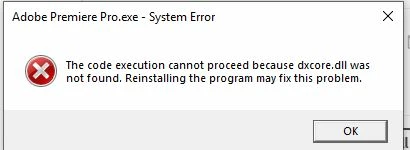
 

premiere issue.JPG


I've tried:

re installing premiere

re installing and updating graphics cards

re installing c++ micrsoft redistributable 


Any tips?

5 replies

December 17, 2025

I can't seem to figure out how to download a previous version? I don't see that as an option in Creative Cloud. 

December 17, 2025

Done, thanks. 

December 17, 2025

I've tried:

re installing premiere

re installing and updating graphics cards

re installing c++ micrsoft redistributable 

premiere issue.JPG


RAM - 16GB

GPU - Intel R Core TM i9-99005 CPU @ 3.6 GHz

Windows 10 Version 1809

December 17, 2025

I have the same issue with both Premiere Pro v25.6.3 and Media Encoder 25.6.  If I downgrade to older versions like Premiere Pro v25.4 and Media Encoder 25.4 everything works fine.

A solution would be nice.


IanB_360
Community Manager
Community Manager
December 15, 2025

Hi @12971057 

Welcome to the Premiere Pro Forum community. Thank you for taking the time to report a problem. It would help us if you could use the link here, How to Report a Problem, which has steps to provide more information that can help us identify the issue. 

Here to help.

Ian