
Participant
June 6, 2024

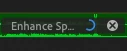
Audio Enhance progress bars in the way

  • June 6, 2024
  • 3 replies
  • 271 views

Is there a way to remove the audio enhance progress bar that appears on your audio showing the percentage left? I'm not sure who thought of this but it gets in the way when trying to make another adjustment to the audio like make a new cut in it
 

This topic has been closed for replies.

3 replies

Participant
June 11, 2024

I understand that this might not be classified as a bug, but it is frustrating. You can edit or cut audio while it's being enhanced, except in the area where the progress bar is displayed. This restriction would be more understandable if cutting audio during enhancement was entirely disabled, but it's only blocked where the progress bar is located. For small audio clips, this is particularly problematic because the progress bar often covers almost the entire length of the clip.

Ann Bens
Community Expert
Community Expert
June 11, 2024

It is not a bug its by design.

While it's enhancing the audio clip, you should not edit the clip, just wait until it is finished.

Kevin-Monahan
Community Manager
Community Manager
June 11, 2024

Thanks for the report, @DavisJackson. I will move this to the bugs forum. I hope they can fix this for you soon. @Adolfo H., can you look at this one? Another info you can provide @DavisJackson? See: How do I write a bug report?


Thanks,
Kevin

Kevin Monahan - Sr. Community & Engagement Strategist – Pro Video and Audio