
Participant
February 13, 2026

Audio Waveform not showing on Premiere Pro 26
  • February 13, 2026
  • 2 replies
  • 6 views

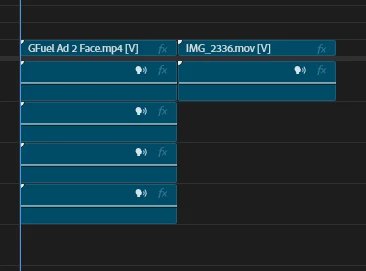
Pretty much what the title already says, sometimes Premiere loads up and reads the waveform (that wheel on top-right corner) but now it simply doesn’t read any audios from the videos I’m working on.


Things that I already tried to fix the problem:

  1. Sequence - Render Audio
  2. Reset preferences 
  3. Delete Peak Files
  4. Check and unchecking Show Audio Waveform

Keep in mind that the issues only shows up with Premiere 26 since I tried working on the 25 and it the waveform showed up there, so I think maybe Premiere 26 have some kind of weird bug to read audio files?


Any suggestions to what I could do to get the waveform back? 

    2 replies

    Peru Bob
    Community Expert
    Community Expert
    February 14, 2026

    Do other media work OK in that project?

    If not, try creating a new project and importing the old one into it.


    If other media work OK, try transcoding those clips in Handbrake or Shutter Encoder.

    https://handbrake.fr/downloads.php

    https://www.shutterencoder.com/


    Peru Bob
    Community Expert
    Community Expert
    February 14, 2026

    What are the media properties?

    Participant
    February 14, 2026

    Just attached both media properties. But they're not that weird, I mainly work with "youtube" videos, so they're mainly the most used for that like mp4, mov, mkv... 


    Some sound effects I also use are not showing their waveforms.

    Everything's still fine with PR2025.