
Participating Frequently
February 13, 2026

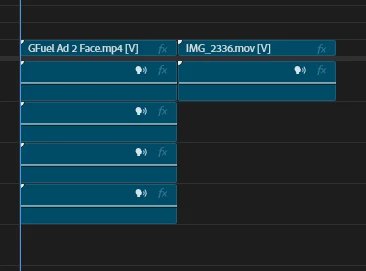
Audio Waveform not showing on Premiere Pro 26
  • February 13, 2026
  • 6 replies
  • 206 views

Pretty much what the title already says, sometimes Premiere loads up and reads the waveform (that wheel on top-right corner) but now it simply doesn’t read any audios from the videos I’m working on.


Things that I already tried to fix the problem:

  1. Sequence - Render Audio
  2. Reset preferences 
  3. Delete Peak Files
  4. Check and unchecking Show Audio Waveform

Keep in mind that the issues only shows up with Premiere 26 since I tried working on the 25 and it the waveform showed up there, so I think maybe Premiere 26 have some kind of weird bug to read audio files?


Any suggestions to what I could do to get the waveform back? 

    6 replies

    Participant
    March 3, 2026

    Same issue. Also fed up. As the price rises and Da Vinci stays free. Sigh...pushing me away, can’t waste hours that are supposed to be “billable,” working to make their software actually work! 

    jamieclarke
    Community Manager
    Community Manager
    March 4, 2026

    Hi ​@deborahs8976687 -   Thanks for submitting your bug report. We need a few more details to try to help with the issue. Please see, How do I write a bug report?

    Can you send a sample clip to jamiec@adobe.com 

    jamieclarke
    Community Manager
    Community Manager
    March 2, 2026

    Hi ​@jenkaralho -   Thanks for submitting your bug report. We need a few more details to try to help with the issue.  Please see, How do I write a bug report?


    Can you list your system specs from the link above.

    Do you have any third party panels or plugins installed?

    In your Preferences > Audio do you have “Generate waveforms automatically during import” checked or unchecked?  Also, do you have “Generate waveforms and conform audio using multithreading” checked or unchecked?


    Sorry for the frustration.

    Participating Frequently
    March 2, 2026

    Hello!

    • Issue Audio waveform not showing up in any of my new projects (and even some of the older projects) 
    • Steps to reproduce – Create project, create Sequence and then adding any video footage.
    • Expected result – When dragging the video footage to the timeline, Premiere will load it’s auto-tagging process and even create a .pek file next to the video folder, but it will not read the waveform (as shown in the title)
    • Actual result – No waveform. 
    • Screen recording –   
    • Adobe Premiere Pro version – 26.0.1
    • Operating system – Windows 11
    • GPU driver version (Windows only) – RTX 3060 Ti
    • Video format – 
    • Comparative information helps us understand more about when the issue occurs: 
      • Does it affect all projects or only some projects?

    Affects all my new projects. 

      • Does it affect new projects? 

    Yes. Especially them, what I did to kinda fix the problem is selecting the audio in the timeline, right click in it and then pressing Render and replace...

      • When did the problem begin? 

    Right after I updated from Premiere 25 to 26. Getting back to 25 fixes the problem.


    Do you have any third party panels or plugins installed? Yes. Quiver, Excalibur, Arrow, Spell Book, Premiere Composer, Logi Options+, Film Impact Dashboard and Envato.

    In your Preferences > Audio do you have “Generate waveforms automatically during import” checked or unchecked?  Also, do you have “Generate waveforms and conform audio using multithreading” checked or unchecked? Both are checked!


    jamieclarke
    Community Manager
    Community Manager
    March 2, 2026

    Hi ​@jenkaralho - Do you have effects on these clips or any of the essential sound panel filters?  If you create a brand new project and import one of these clips does it still not show audio waveforms?  

    Can you try and hold down "SHIFT" while launching Premiere and check the box

    "Reset app preferences" (Backup Preferences first)

    “Clear media cache files”


    Known Participant
    February 20, 2026

    This is Premiere Pro. They will never actually bother to fix this issue ever. I've seen it for the last 15 years. Pathetic really. 

    Participating Frequently
    March 2, 2026

    What I did to kinda fix it (but it still sucks) is selecting the audio in the timeline and pressing “Render and replace...”.

    Rooneyboytv
    Participant
    February 20, 2026

    i have the same problem, seems to be a bug, sometimes it helps restarting premiere pro, but im fed up with this. Going back to PP25

    Participating Frequently
    March 2, 2026

    For now try “Render and replacing...” the audio files. Just drag your video to the timeline, unlink them, select the audio, right click and then “Render and replace...”.


    It’ll fix the annoying problem for now. But I’m still waiting for an official fix.

    Peru Bob
    Community Expert
    Community Expert
    February 14, 2026

    Do other media work OK in that project?

    If not, try creating a new project and importing the old one into it.


    If other media work OK, try transcoding those clips in Handbrake or Shutter Encoder.

    https://handbrake.fr/downloads.php

    https://www.shutterencoder.com/


    Peru Bob
    Community Expert
    Community Expert
    February 14, 2026

    What are the media properties?

    Participating Frequently
    February 14, 2026

    Just attached both media properties. But they're not that weird, I mainly work with "youtube" videos, so they're mainly the most used for that like mp4, mov, mkv... 


    Some sound effects I also use are not showing their waveforms.

    Everything's still fine with PR2025.