GitRam+Studio
Participant
June 5, 2026

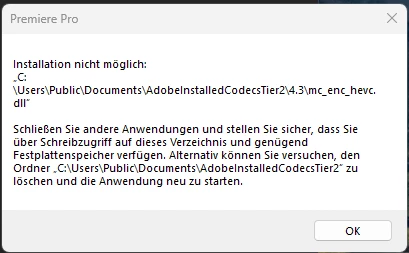
Beim Ziehen der Videodateien (mp4 erstellt mit META AI Brille) auf das Bearbeitungsband von Premiere Pro bekomme ich folgende Fehlermeldung: "installation nicht möglich c:\users\public\documents\adobeinstalledcodecstier2\4.3\mc_enc_hevc.dll

  • June 5, 2026
  • 3 replies
  • 37 views

Beim Ziehen der Videodateien (mp4 erstellt mit META AI Brille) auf das Bearbeitungsband von Premiere Pro bekomme ich folgende Fehlermeldung: "installation nicht möglich c:\users\public\documents\adobeinstalledcodecstier2\4.3\mc_enc_hevc.dll". Ich habe die neueste Adobe Premiere Pro installiert. Ich habe HAVEC-Codec von Windows 11 bereits installiert. Ich haben den Ordner "adobeinstalledcodecstier2\4.3" den Schreibschutz entfernt und in den Einstellungen des Ordners den Windows-User "Jeder" voll berechtigt. Zudem habe ich auch das PP-Programm als Administrator ausgeführt. Auch den Ordner 4.3 gelöscht und neu erstellt. Nichts hat geholfen!
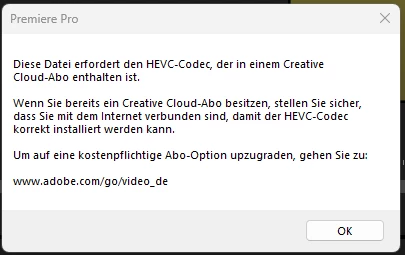


Ich brauche dringend Unterstütung. Ich kann so nicht Kundenaufträge abarbeiten!!!!


    3 replies

    Jonathan Editor
    Community Manager
    Community Manager
    June 5, 2026

    Hi ​@GitRam+Studio 

    After initial reproduction of the occurrence, the team needs further clarification:

    • How much disk space do you have on your system?
    • Have you experienced this issue before with this kind of footage?

    A troubleshooting tip is to launch Premiere while holding the Shift key. Check all four options in the dialog to see if the problem persists after a reset.

    Best,

    Jonathan Editor

    GitRam+Studio
    Participant
    June 5, 2026

    Hi, ich habe über 100 GB Festplatten Kapazität, ich habe auch mit anderen Videodateien dieses Formats das gleiche Problem. Den Tip mit Shift und vier Auswahlmöglichkeiten habe ich ebenfalls ausprobiert. Leider keine Verbesserung. 

    Jonathan Editor
    Community Manager
    Community Manager
    June 5, 2026

    Hi ​@GitRam+Studio,

    The team is currently investigating your report. Thank you for your patience.

    Best,
    Jonathan Editor

    Jonathan Editor
    Community Manager
    Community Manager
    June 5, 2026

    Hi ​@GitRam Studio,

    Welcome to the Premiere Pro forums! We are glad to see you here. Thank you for providing screenshots and information about folder access. We need a few more details to try to help with the issue. Please see, How do I write a bug report?

    Thanks for submitting your bug report. I hope we can help you soon. Sorry for the frustration!


    Thanks,

    Jonathan Editor

    GitRam+Studio
    Participant
    June 5, 2026

    dort steht aber nicht wie ich einen bugreport erstellen kann!


    GitRam+Studio
    Participant
    June 5, 2026

    Premiere Version ist: 26.2.2 (Build 3)

    Windows 11 Professional Version ist: 25H2 (Build 26200.8524)

    Grafikkarte von NVIDIA GeForce RTX 5070 mit der Treiber-Version: 32.0.15.9186

    Videoformat: *.mp4