
Inspiring
June 13, 2024

Captions embedded in Exported file when only sidecar file option selected

  • June 13, 2024
  • 7 replies
  • 583 views

Hi People,


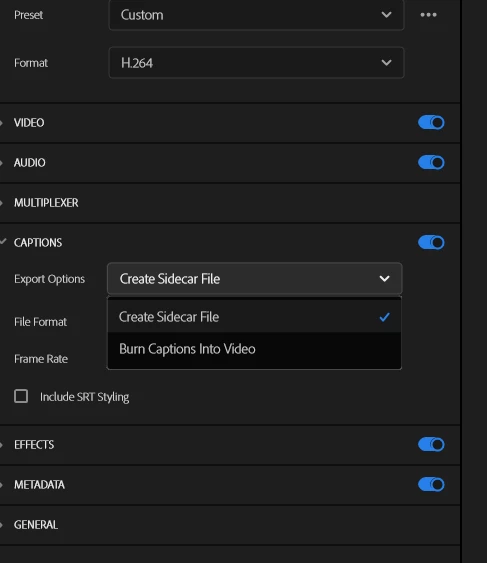
When I attempt to export a file which has subtitles/captions, I need to have the subtitles/captions as a separate sidecar file. When I select that as an option, I still get subtitles/captions in the exported video. So far the only way I can achieve my goal is to turn the Subtitles/Caption export option off and export the sidecar file from the Text Captions tab.


The Adobe Help file indicates that I should also have a 3rd option in the Captions export options but only have 2.


What am I missing or is this a long standing bug?


Andrew
 

This topic has been closed for replies.

7 replies

dinsypAuthor
Inspiring
June 14, 2024

Thanks so much for your response Stan. Helps me to understand what's happening. Much appreciated. Andrew

Stan Jones
Community Expert
Community Expert
June 14, 2024

Your VLC screenshot shows what you would see if you have a sidecar file. If  your goal is to export a sidecar file, you probably have it exported already.


Remember, as  I said, PR will not export an "embedded" caption stream in an .mp4 export. It either exports a sidecar or burns the captions in.


This is what I think you are seeing. Your exported file in the screenshot is "Boundary map considerations_1.mp4". You have, at some point, exported a sidecar file for this filename. VLC will automatically look for an SRT file matching the filename, and use it as a subtitle/caption sidecar file. You are not actually seeing "embedded" (e.g. closed caption/608 etc) subtitles, but a sidecar file.


One test for this is to import the file back to PR. You did this and you don't see captions because it is a separate sidecar file, not an embed, and the captions are also not burned in.


Another test is to go to the export directory and look to see if there is an srt file.


Some users have reported that they believe that captions are burned in when they select only sidecar but some of those turned out to be this oddity of VLC players.


Stan


dinsypAuthor
Inspiring
June 13, 2024

Thanks both.


VLC shows the subtitles embedded and shows a subtitle track:


But no subtitle is evident when importing the exported clip back into Premiere.


Andrew


Kevin J. Monahan Jr.
Community Manager
Community Manager
June 13, 2024

Thanks for the comment, @Stan Jones!


Cheers,
Kevin

Kevin Monahan - Sr. Community and Engagement Strategist – Adobe Pro Video and Audio
Stan Jones
Community Expert
Community Expert
June 13, 2024

Not at home. Have to keep it short. The third option is embed. You can't embed in H.264.


Import the export back to PR. Do you see the captions burned in there?


Stan

dinsypAuthor
Inspiring
June 13, 2024

Thanks for your quick response.

Premiere Pro version - 24.4.1 (International English)

OS - Windows 10 Enterprise

CPU - Intel 7

GPU - nVidia RTX 4090 Driver 555.99 (Studio version)

RAM - 32Gb

Hard Drive - WD SSD

High Quality 720p HD

Steps:

  1. Click on Export
  2. Under Settings, expand Captions
  3. Under Export Options, select Create Sidecar File
  4. Click Export

Expected result - the exported clip doesn't have subtitles as these are in the sidecar file.

Actual result - the exported clip has embedded subtitles as well as the separate sidecar file. Not able to include a completed clip sorry


Hope that helps.

Andrew

Kevin J. Monahan Jr.
Community Manager
Community Manager
June 13, 2024

Hello @dinsyp,

I'm Kevin, one of the moderators here. Can the team get more information about your case? See: How do I write a bug report?


I hope @Stan Jones might be able to comment.


Thanks,
Kevin

Kevin Monahan - Sr. Community and Engagement Strategist – Adobe Pro Video and Audio