
Participant
July 24, 2026

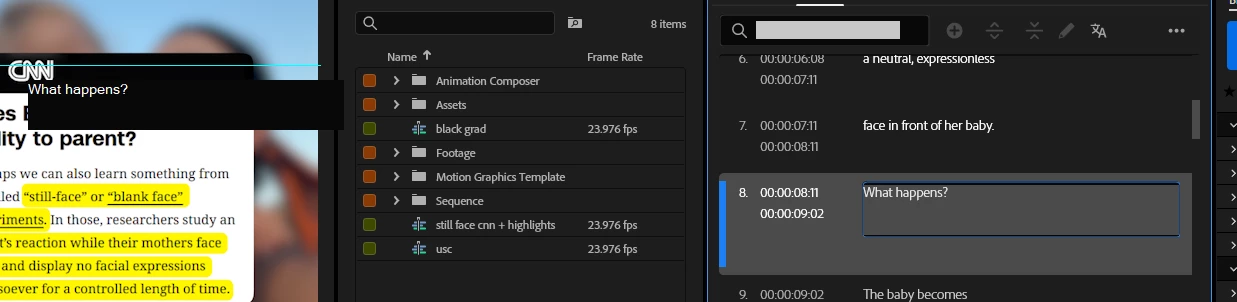
Captions panel is not working properly. It's not letting me edit captions. Only on the Program screen. Please FIX THIS. My videos ALWAYS require me to edit my captions. THIS IS SO INCONVENIENT AND IT'S SLOWING MY EDITING TIME DOWN..
  • July 24, 2026
  • 1 reply
  • 10 views

Captions panel is not working properly. It's not letting me edit captions. Only on the Program screen. Please FIX THIS. My videos ALWAYS require me to edit my captions. THIS IS SO INCONVENIENT AND IT'S SLOWING MY EDITING TIME DOWN.

    1 reply

    KatieToo
    Community Manager
    Community Manager
    July 24, 2026

    Hi ​@Reiner Hope 

    Thanks for stopping by the Premiere forums! Sorry to hear you’ve having issues and hope to help. 

    A little test you can try is to first duplicate your sequence (this is a must!) and open that copied sequence. You then select all your captions and under the top menu "Graphics and Titles" dropdown, you choose Upgrade Caption to Graphics. 

    Can you edit any text in the text panel, if you generate a Graphic clip with text or Convert Subtitles to Graphics this way?

    To help troubleshoot, we do need a few more details like if Mac (and what macOS) or PC (whether Windows 11/10, plus what driver version/build), which version/build of Premiere you’re having this issue and if known, what version Premiere was captions last working in, etc. with our bug report details.

    If you can, send us a short screen capture to show us exactly what it’s doing when you try to edit captions. You can most likely attach it here or give us a link to it. That would be quite helpful.

    Thanks for your post,
    Katie