



Bruno2672289295i7
Participating Frequently
September 18, 2026

dragging with "alt" on a clip on the timeline from the in point on the "source" window is NOT replacing the clip like it used to. Only by quitting and Premiere and opening again it starts working

  • September 18, 2026
  • 7 replies
  • 34 views

When I try to pull the In selection while scrubbing the footage on “Source” (video or audio) to replace the clip, like in the image attached, it doesnt work at all (3-point editing)
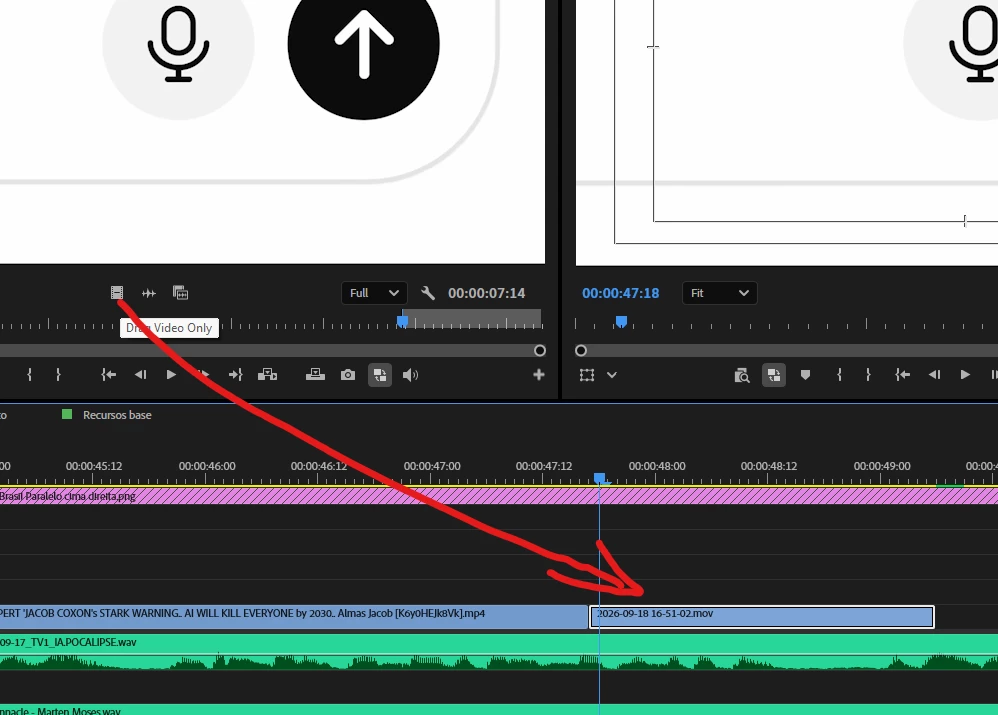
 

    7 replies

    Bruno2672289295i7
    Participating Frequently
    September 18, 2026
    • I'm running the latest version: 26.5.1
    • Windows 11
       
    • GPU :

        NVIDIA GeForce RTX 4060

        Driver version:    32.0.15.9579
        Driver date:    3/4/2026
        DirectX version:    12 (FL 12.2)
        Physical location:    PCI bus 1, device 0, function 0

        Utilization    1%
        Dedicated GPU memory    2.4/8.0 GB
        Shared GPU memory    1.0/15.9 GB
        GPU Memory    3.4/23.9 GB


    The problem is persisting through all the 3 latest updates I believe, and it's on all my projects not an isolated problem

    KatieToo
    Community Manager
    Community Manager
    September 21, 2026

    @Bruno2672289295i7 Thank you for providing those details. Our team tried testing this issue on windows 11 in the latest Premiere v26.5.1, but the issue did not recreate. Wondering if you’re trying to alt drag from the full source monitor or from the video only icon? Or if there’s anything else missing. 

    Some additional questions:

    1. While the issue is active, does clicking another Premiere panel and then pressing and releasing Alt restore the expected behavior?
    2. Does Alt-dragging a clip already in the Timeline to duplicate it work?
    3. When the issue occurs, does normal dragging from the Source Monitor's Video Only or Audio Only icon work without holding Alt?
    4. Are any other monitors such as dual or externals or input utilities connected or running, such as Wacom software, Stream Deck, remote-desktop software, or keyboard remappers?


    Could you possibly take a short screen recording of that alt-drag not working and that restarting resets the behavior? You may want to also include a simplified project file with a sample clip. Often times, that is very helpful for us to see exactly what might be going on and to help to recreate the issue for our report. I can DM you our private Dropbox upload link for this if you’d like.

    Sorry for any frustration and much appreciated!
    Katie

    Bruno2672289295i7
    Participating Frequently
    September 21, 2026

    Here's a recording of an example. It just replaces with the beggining of the video. Also “Fit to Frame”

    is not working

    Bruno2672289295i7
    Participating Frequently
    September 18, 2026

    This is unecceptable!

    KatieToo
    Community Manager
    Community Manager
    September 18, 2026

    Hi ​@Bruno2672289295i7 

    Thanks for stopping by the Premiere forums and letting us know about your “Alt” source clip replacing issue. In order to better troubleshoot, we need to ask for a few more details like if Mac (and what macOS) or PC (whether Windows 11/10, plus what driver version & build), what version & build of Premiere are you using, how’s your media stored (NAS/External) with our bug report details.

    • Premiere Version: Find the exact version/build of Premiere you’re current using.
    • Operating System: Specify Windows or macOS, along with the version.
    • Mac Chip (Mac Only): Please let us know what M-series chip you have. If Intel please include GPU.
    • GPU and Driver (Windows only): Please let us know your video card and driver version. We recommend updating to the most recent version; for NVIDIA users, we strongly recommend the Studio version of the driver.

    Also, if you could please let us know the following, this is also helpful to know:

    • Does it affect all projects or only some? What about new, empty projects?
    • Do you recall which Premiere this was last working in, and what might have changed? Any plugins, update to computer, etc.
    • When did the problem first begin?

    Hope to help!
    Katie