
Known Participant
May 8, 2025

Duplicate frame markers not appearing V_25.2.3(build 4)

  • May 8, 2025
  • 11 replies
  • 933 views

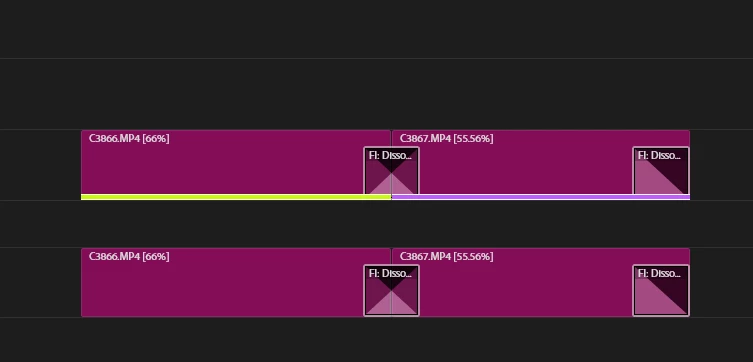
Duplicate frame markers not appearing when duplicating clips within the same timeline or copying and pasting edited clips from another timeline.

I've attached a screen recording for your reference.
1. Open an existing project in Adobe Premiere Pro with a clip in the timeline.
2. Duplicate the clip within the same timeline.
3. Check for duplicate frame markers.
4. Copy an edited clip from another timeline that contains the same clip.
5. Paste the edited clip into the existing timeline.
6. Check for duplicate frame markers.


Expected Result
Duplicate frame markers should appear for both duplicated clips within the same timeline and pasted clips from another timeline.

Actual Result
No duplicate frame markers appear in either scenario.


Adobe Premiere Pro Version
Version 25.2.3(build 4)

Operating System
Windows 11 (24H2)

GPU Driver & Version 
RTX 2060_Studio driver v576.02
Video Format
AVC_High 4:2:2@L4.2Variabl_46.8-50.0 Mb/s_50.000 FPS

11 replies

Participant
September 26, 2025

And a little addition to my post/video: the duplicate frame markers only shows on one of the clips (the newly placed/pasted one), so the whole function is kind of useless anyway at the moment.

Participant
September 26, 2025

It's also completely broken in my timelines as well, not being the case before CC 2025 I remember. Honestly it's super annoying and really crucial in my edit workflow. What I notice: the length of the colored marker/bar of the duplicate stays the same as how long it was when it was imported/placed/pasted the first time. I made a short creencaptures to visualise it. I really hope you can fix this bug.


Participant
September 17, 2025

This is still a problem and very inefficent. I am only seeing this happen with video clips - audio clips are showing duplicates on both instances as normal. Please fix, thank you.

Known Participant
August 29, 2025

I had a long chain about this issue back a year or two ago, it DID get fixed, but I am on 25.4.1 (latest as of this writing) and for sure happening again.  Duplicate frames not getting marked.  Or if they are, and you remove the duplicate, the clips still appear as if there is a duplicate somewhere.  Happening most of the time.  Only way to 'fix' is to EXTRACT and PASTE many/all clips - it seems to figure our duplicate frames correctly then - which was the same 'fix' from a year or two ago.  It was nice not worrying about this for awhile.  Big bummer for certain project I am working on, changing workflow to accomodate, again.

Amal MPAuthor
Known Participant
July 23, 2025

@Rach McIntire What is the status of this bug report?

VD
Amal MPAuthor
Known Participant
May 10, 2025

@Stan Jones 

Exactly, for a few clips, finding duplicates is manageable. However, as timelines become more complex and multiply, the 'Show Duplicate Frame Markers' feature's inaccuracies can be frustrating and undermine trust in its reliability.

VD
Stan Jones
Community Expert
Community Expert
May 9, 2025

@Amal MP,


Thanks for the screen recording.


I tested again, this time using the stacked panel/pancake editing you show. The first time I Ctrl+C/Ctrl+V to a different sequence, I "think" there was no duplicate marker when there should have been. After that, I could not create any errors. I also dragged with the mouse and Alt+drag, and changed tracks.


Stan


Amal MPAuthor
Known Participant
May 9, 2025

@Stan Jones 

Hi Stan Jones,

The issue is intermittent and unpredictable, occurring on both simple and complex projects. I've attached a screen recording for reference.

VD
Stan Jones
Community Expert
Community Expert
May 9, 2025

@Amal MP,


I see your screenrecording. I'm not sure how you are copying/pasting, vs moving. But it demonstrates the lack of the duplicate frame marker.


I tried to replicate in 2 very simple sequences with the same clip in each. I duplicate the clip in sequence 1. Duplicate frame markers show. I copy it from sequence 2 and paste into sequence 1. Duplicate frame markers show.


Do you see the problem in a simple test like that?


Win 10; PR 25.2.3.


Stan


Amal MPAuthor
Known Participant
May 8, 2025

@Rach McIntire Thanks for getting back. 'Show Duplicate Frame Markers' is checked, and I've noticed this bug in both new and existing projects.

VD