

archiesully
Participant
February 7, 2023

Dynamic link color difference

  • February 7, 2023
  • 12 replies
  • 1514 views

Premiere 23.0

After Effects 23.1


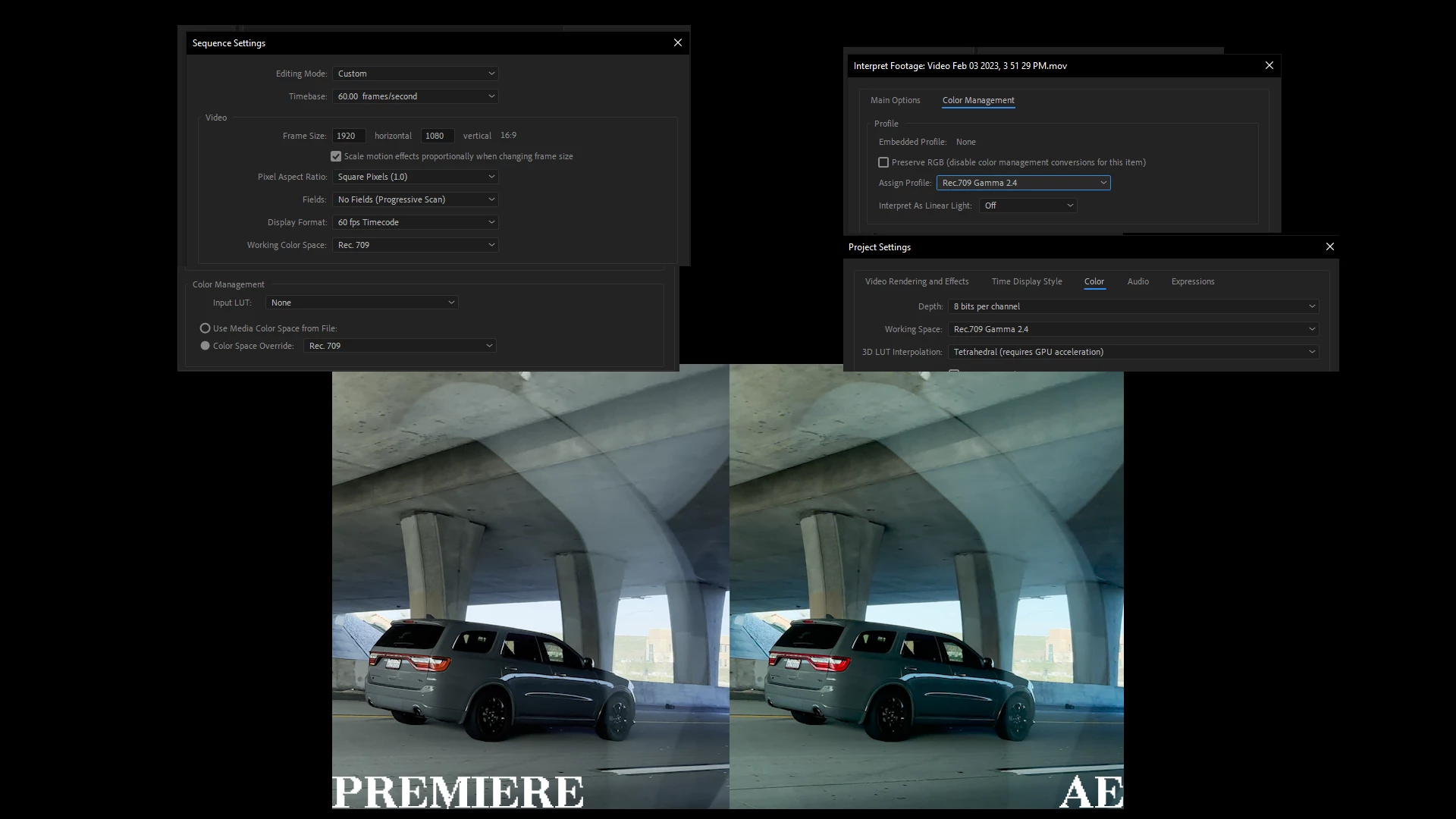
When using dynamic link the color in my footage changes, everything is set correctly within the color space options to my knowledge they're all in rec 709 everywhere where a color space option is available, shown in my image down below.


I'm pretty sure this footage was shot on a Samsung phone however I've had this exact same issue with Apple phones too. I've had this issue for a long time it's not something new or exclusive to this set of footage or these versions of software. 


Any help is appreciated, thank you.
 

This topic has been closed for replies.

12 replies

Participating Frequently
October 10, 2024

What the heck. So this is a bug? I'm getting so sick of Premiere. Every year it's something else. And they keep going up in price. What am I paying for...

Kevin J. Monahan Jr.
Community Manager
Community Manager
July 22, 2024

Hi @archiesully,

Thanks for creating this bug report. I apologize for the lack of a response from the Premiere Pro developers. I hope they will comment on this issue soon. Sorry for the frustration.


Thanks,
Kevin

Kevin Monahan - Sr. Community and Engagement Strategist – Adobe Pro Video and Audio
R Neil Haugen
Legend
July 22, 2024

That YouTube I mentioned is by Adobe's top staffer working with the "Hollywood" crowd, so it's actually "official" just ... why in Hades don't they actually provide online written documentation of how to do this stuff?


And from a couple other staffers, while most  things are possible color-space wise between them, there are a couple things that aren't.


The work to upgrade Premiere is in process, I know that much. But how far along, and how soon we'll get a unified color management between them, no clue whatsoever.

Everyone's mileage always varies ...
archiesully
Participant
July 22, 2024

honestly have no clue why I still pay for this software its a spit in the face that they still haven't fixed this, I've spoken to people at adobe about it too and still nothing... 

Known Participant
July 22, 2024

Thanks, but isn't this just a bit embarrassing for Adobe? I really shouldn't have to rely on watching youtube tutorials to do something that should work as is

R Neil Haugen
Legend
October 9, 2023

Karl Soule has a YouTube on managing color across dynamic link working. I'd recommend watching it.


Depending on what your media and sequence color settings are, there are two different ways to handle it.


For one, you need to open Ae, then from Ae call up the sequence to start it. With the other, "standard" dynamic link processing will get correct color.

Everyone's mileage always varies ...
Known Participant
October 9, 2023

This never got fixed, did it? I'm sitting here on 10/9/2023 and the color difference in Dynamic Linked clips is horrible. Why even have Dynamic Link if the color is this bad? Seriously Adobe?

archiesully
Participant
February 11, 2023

bump

archiesully
Participant
February 8, 2023

Yeah I have this same issue with v23.1 I've just downgraded to v23 due to stability issues with Nvidia drivers with v23.1


Also I'm still having this issue with the latest version of after effects that was updated today v23.2


I'm sure the issue is to do with HDR footage I'm working with Rec. 2100 HLG and even when I override the color space to rec 709 in both premiere and after effects as well as turning up the bits to 16 the colors between the two are inconsistent 

Participating Frequently
February 8, 2023

Try with Premiere Pro latest update and let us know.

thanks,

Suraj Shinde