

_nicdean
Community Expert
Community Expert
January 10, 2025

Enhance Speech breaks Team Projects

  • January 10, 2025
  • 4 replies
  • 466 views

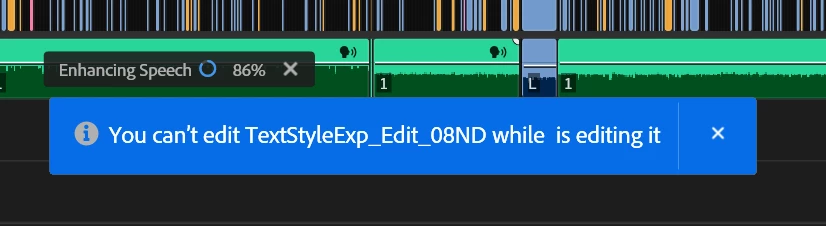
Can't use Enhance Speech with Team Projects. 


The sequence becomes locked to (View Only) because Enhance Speech begins processing and counts as a user. Once it it finished processing, Team Projects thinks that a real user made some change and locks users out of it. Bricks a sequence. Awesome.


4 replies

jamieclarke
Community Manager
Community Manager
January 13, 2025

Updating Status to Acknowledged

Adobe Employee
January 10, 2025

Hi @_nicdean,
Sorry for your troubles and thank you for your detailed information - I'm able to reproduce the issue on my end and will log an internal bug. 


_nicdean
Community Expert
_nicdeanCommunity ExpertAuthor
Community Expert
January 10, 2025
  • Issue - above
  • Adobe Premiere Pro version number: 25.1.0
  • Operating system - Windows 10 19045.5247
  • System Info: CPU, GPU, RAM, HD: irrelevant
  • Video format: irrelevant
  • Workflow details: Team Project + Enhance Speech
  • Steps to reproduce - (Very important!):
    • Create a Team Project with multiple users
    • Edit a sequence and use Enhance Speech on audio
    • Publish changes, close project
    • Reopen project
    • Enhance Speech processes as a "user" and locks you out of the sequence because it has been "edited by a blank user"
    • No way to remove Enhance Speech, because the sequence and attached nests become locked to View Only
    • Only workaround is to duplicate the sequence and edit the duplicate. This sequence then bricks the next time the project is opened.
  • Expected result - Not this
  • Actual result -  Above
jamieclarke
Community Manager
Community Manager
January 10, 2025

Hi @_nicdean -  Thanks for submitting your bug report. We need a few more details to try to help with the issue.
Please see, How do I write a bug report?

Sorry for the frustration.