
Participant
September 9, 2024

Facing Problem Working with 10 bit 120 fps

  • September 9, 2024
  • 4 replies
  • 373 views

I have AsusZ790 Creator MB With i9 13900k, 4060Ti GPU, 32gb DDR5 Ram

So While Working on Premiere Pro

1. We face Black VHS Strips in the Source Window

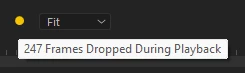
2. Playback is Not Smooth, more than 200 Frame Drops During 5 sec playback
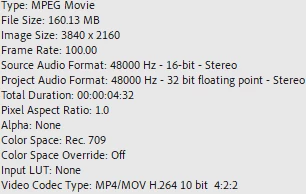
my footage Details
 3. Scene Edit Detection Not Working Properly


This topic has been closed for replies.

4 replies

Kevin J. Monahan Jr.
Community Manager
Community Manager
September 9, 2024

Hello @Sam@007,

quote

 3. Scene Edit Detection Not Working Properly


By @Sam@007


Is this an A/V clip or video only? Let the team know.


Thanks,
Kevin

Kevin Monahan - Sr. Community and Engagement Strategist – Adobe Pro Video and Audio
Kevin J. Monahan Jr.
Community Manager
Community Manager
September 9, 2024

Hi @Sam@007,

Thanks for filing the bug report.


Hello @R Neil Haugen,

Thanks for your input. Yes, I see that MediaInfo indicates 100fps. Perhaps @Sam@007 might adjust their workflow. What do you think, Sam?


Anything else you can tell the team about your system, media, and workflow? See, How do I write a bug report?


I hope we can help you. Sorry for the hassle.


Thanks,
Kevin

Kevin Monahan - Sr. Community and Engagement Strategist – Adobe Pro Video and Audio
R Neil Haugen
Legend
September 9, 2024

I asked, just to make sure ... as you list in your title that it's 120fps, but ... is it really?

Everyone's mileage always varies ...
R Neil Haugen
Legend
September 9, 2024

So you're using UHD ... 3840x2160 pixel count ... 10 bit 422 long-GOP media. What's the framerate of that media?

Everyone's mileage always varies ...