Participant
November 18, 2025

Graphics Templates bug

  • November 18, 2025
  • 4 replies
  • 71 views

I used to set some templates to make sure ,all of my footages are the same.

But recently it just don't work.

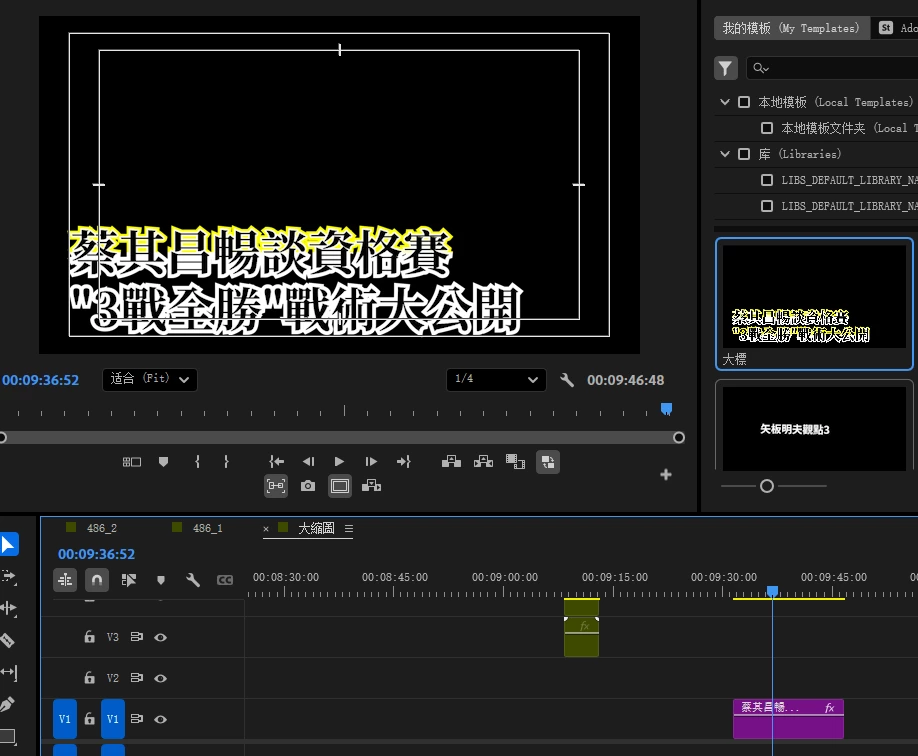
As my screen shot,when the template drag on timeline,the text appearance setting doesn't fit.
 

4 replies

Participant
November 20, 2025

OK, check your email,thank you.

jamieclarke
Community Manager
Community Manager
November 19, 2025

Hi @fashionable_fantasy8941 - Can you email the project to jamiec@adobe.com 

Participant
November 19, 2025

Use the template below to provide us with information: 

  • Issue – Graphics Templates 
  • Steps to reproduce  
    1.  use type tool to create an Item A
    2. click "Item A" and select "export as motion graphics template"

    3. drag "Item A" graphics template in sequence
    4. and you'll find the graphics and the program doesn't match.
  • Expected result  the graphics and the program should be the same
  • Actual result  As the picture I upload before,you can see in the templates,both content has 50% yellow 50% white on the stroke,but when it's on timeline in squence, the second line of my contene only has white stroke but noyyellow stroke,but frist line just what i setting for.
  • Operating system – Windows / pr pro 25.5.0
  • GPU driver version (Windows only) – RTX 4050 laptop gpu
  • Comparative information helps us understand more about when the issue occurs: 
    • affect all project
jamieclarke
Community Manager
Community Manager
November 18, 2025

Hi @fashionable_fantasy8941 -  Thanks for submitting your bug report. We need a few more details to try to help with the issue.
Please see, How to Report a Problem.

Sorry for the frustration.
