
Participant
April 28, 2025

ligature font tidak berfungsi di adobe premiere pro.
  • April 28, 2025
  • 3 replies
  • 516 views


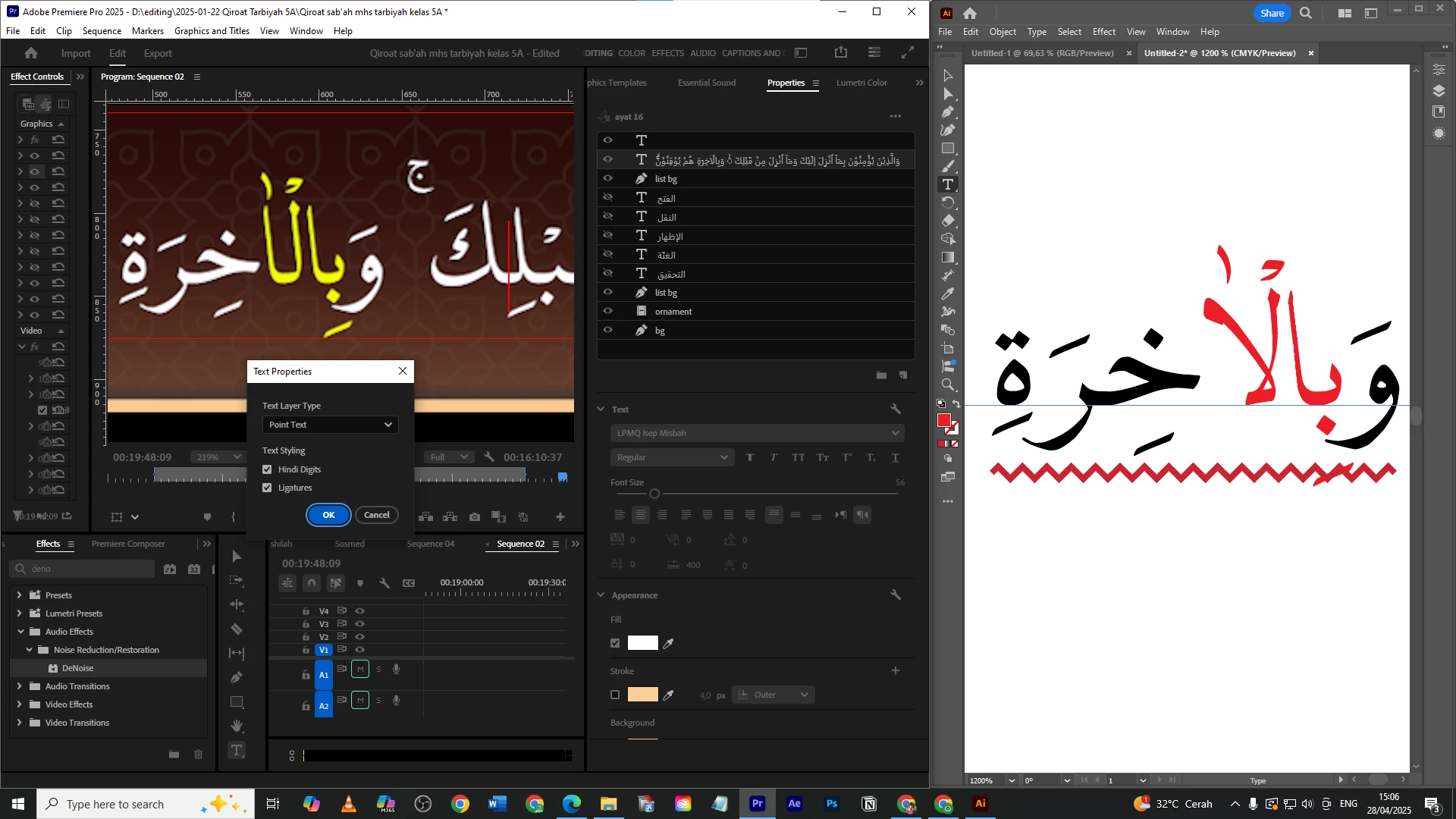
i have a problem with the ligature in premiere pro when writing arabic.

the problem is, when i write "lam alif", the ligature doesn't work properly. even though i have turned on the ligature feature.

i tried it in adobe illustrator and it turns out there is no problem.

but what i wonder is, this doesn't happen in all fonts. there are fonts that have the ligature "lam alif" correct and some have problems. coincidentally the font i want to use has problems.

the font name is LPMQ Isep Misbah

3 replies

Participant
April 29, 2025

Thank you very much, it turns out that was where the problem was.

I used to handle this issue using the "legacy title" feature, but it's no longer available. Hopefully, Adobe will add a feature like the one in Illustrator. 

Community Expert
April 29, 2025

Premiere Pro doesn't support some advanced type features of Illustrator. I did some tests and found that, for this specific font, you should enable "Contextual Alternates" inside of Illustrator for that text to be drawn right, enabling - disabling Ligatures (fi icon) does nothing...


PPro doesn't have this option.

Participant
May 6, 2025

Hi, unfortunately, this is so frustrating. It's been so long and Adobe just can't fix their font engine in Premiere Pro. It's crazy we get better font engines in free programs like capcut. So basically, I am using KFGQPC font designed for writing the Quran, and it is rendered with no issue in other Adobe programs like Illustrator but in Premiere Pro some of the words are not displayed correctly as they should as you can see in the photos. I don't think there is a fix to this. I believe the problem is just with font Engine in Premiere Pro. Why don't they just use the same engine in all their programs, like in Illustrator it's working perfectly fine.

This is the text in Illustrator:


This is the text in Premiere Pro 

IanB_360
Community Manager
Community Manager
April 28, 2025

Hi @iiq_jakarta 
and welcome to the Premiere Pro Forum community.  Thank you for taking your time to file a bug report. The team just needs a little more information to begin troubleshooting. The link here  How do I write a bug report has steps to providing more information about your bug that can help us identify the issue. 
Were here to help.

Ian