

Det Scholz
Known Participant
January 17, 2025

Marker Name / Comment cuts off in Timeline

  • January 17, 2025
  • 10 replies
  • 1057 views

 The marker name and/or comment is cut away when clip starts behind marker start.
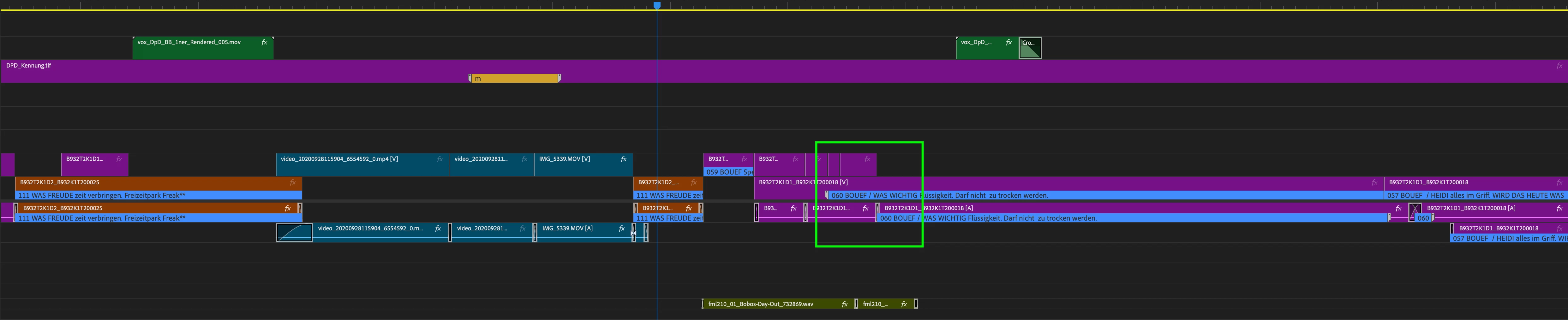
As you see in the screenshot above from Version 24 you always see the whole information of the marker.
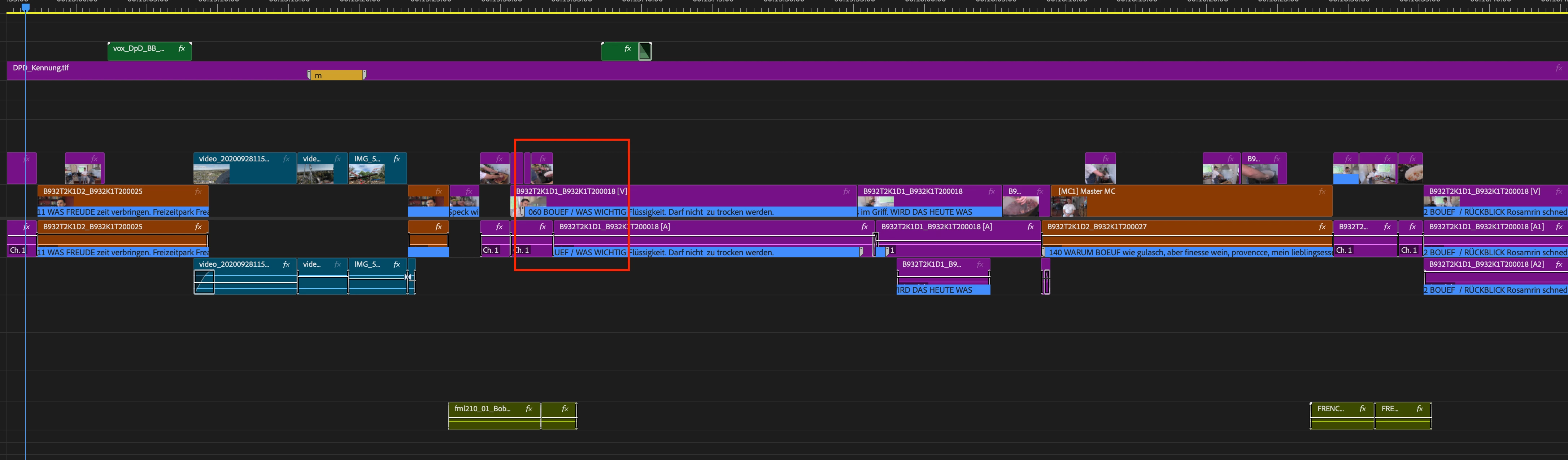
In Version 25.1 the information is incomplete.

Additionally when zooming into the timeline you see even less of the infos. 

10 replies

jamieclarke
Community Manager
Community Manager
August 14, 2025

Updating Status to Fixed in 25.4

Participant
August 4, 2025

Hello! When do you anticipate 25.4.0 build 42 to be available (not in beta version)? 

Det Scholz
Known Participant
June 7, 2025

Thank you for fixing it.

jamieclarke
Community Manager
Community Manager
June 5, 2025

This issue has been fixed in Premiere Pro Beta version 25.4.0 build 42 and later, and the fix will be included in the next stable release: Premiere Pro 25.4.0

Comninellis
Participating Frequently
May 19, 2025

Thank you @jamieclarke . Much appreciated!

jamieclarke
Community Manager
Community Manager
May 19, 2025

Hi @Det Scholz and @chris_3146 - I see your issue and am filing a bug report, we will keep you updated on the status.

Participant
May 21, 2025
Thank you so much! I really appreciate it. This happened suddenly for me,
not even on an upgrade so it's very perplexing.

--

*Lindsey Phillips*
[she/her] 330.719.4576
lindseyphillips.website <>
Participant
April 28, 2025

Hi, I've noticed a change in behavior in Premiere Pro 2025 in regards to Clip Marker Labels.


In previous versions of Premiere Pro, when you cut a clip which contained a clip marker, each cut would then show the Label for the marker visible on that clip. — Now in 2025, it only shows the clip marker label at the start of the marker. (Image attached)


This is causing some workflow issues for my team, and preventing us from using Premiere Pro 2025 for certain edits. Is there a way to fix this / revert the behavior to how it used to function?


Thanks in advance.

Participant
May 19, 2025

I also just encountered this problem, awful! I put markers on all my takes so I can know exactly which part of a take I am using when. Please fix this, Adobe!

Det Scholz
Known Participant
February 11, 2025

Hey @jamieclarke,

may you can give me a short feedback, if the cropped marker-info is already locked as a bug?


Steps to reproduce:

  1. set a clip marker with a duration
  2. write text in name or comment field of the marker
  3. set mark in after marker start
  4. cut clip in timeline
  5. enable "show clip Markers" in Timeline Display Settings

Result:

all marker text will be displayed in timeline (as in PP-version 24)

Expected:

text is cut of in relation to in point of clip in timeline

System info:

    Application: Premiere Pro (Beta) v25.2.0.108

    OS: macOS v15.3.1, RAM: 64,00 GB GB, CPUs (logical): 12


Comninellis
Participating Frequently
April 18, 2025

I am having the same problem. Similar to the OP here, I have a short ID at the start of my marker name, followed by a longer description. I too, am having trouble seeing the name of the marker and zooming in does not solve the problem.


Below are a few screenshots showing the glitch, a description of the problem as I understand it, and my system details.

(You can see that, once I have zoomed in, I can see very little of the title. This renders the markers ineffective for my use.)


There seem to be two key things at play from my perspective:

NAME FLOWS ACROSS MULTIPLE CLIPS - Previously, if you had multiple clips that contained the same marker, they would each show the very beginning of that marker. This did make it difficult to read the full text of the marker so I wonder if that was the reason for the change. Now, if several clips containing the same marker are next to each other on the timeline, the title "flows" across them, allowing much more of the title to be seen, but making it very difficult to locate the ID text at the beginning of the marker name for any one individual clip.

CENTER ALIGNED TEXT - When I attempt to zoom in to identify the ID at the start of the marker the text for the marker name adjusts as if the text is "center aligned", meaning when I zoom in as far as possible I am seeing the middle of the text. Previously, it behaved as if it were "right aligned", so that when you zoomed in you would see the very beginning of the text.


The combination of these two make it extremely difficult to locate the name of the marker on individual clips, which I would assume is not the intended result. 


🖥️️ COMPUTER HARDWARE:
Processor 12th Gen Intel(R) Core(TM) i9-12900 2.40 GHz
Installed RAM 64.0 GB (63.7 GB usable)
System type 64-bit operating system, x64-based processor


💾 OPERATING SYSTEM:
Edition Windows 11 Pro
Version 24H2
Installed on ‎3/‎21/‎2025
OS build 26100.3476
Experience Windows Feature Experience Pack 1000.26100.54.0


🎥 PREMIERE VERSION:

Version 25.1.0 (Build 73)

Any suggestions or solutions would be so appreciated.


Comninellis
Participating Frequently
April 18, 2025

Actually, if you just compare the behavior of the clip names on the timeline to the behavior of the marker names you can see the issue most clearly. Clip names are right-aligned and do not flow across clips. Marker names used to behave in the same way. It would be much better for my workflow if marker names continued to behave as clip names do.


You could best see the issue by adding a marker to a clip, ensuring both marker and clip names are visible, then cutting that clip into four smaller clips and zooming in and out to see the difference in how the text behaves.


Hope that helps. Thank you all for all you do. It's a great program. Just a few bugs now and again. Appreciate you all!

Det Scholz
Known Participant
January 17, 2025

Hey Jamie,

we are working with Mac Studio with M1 with OS 14.5 and also OS 15.2.

Premiere V25.1.

In the Public-Beta 15.2.0 Build 80 the behaviour is the same.

jamieclarke
Community Manager
Community Manager
January 17, 2025

Hi @Det Scholz - 
Thanks for submitting your bug report. We need a few more details to try to help with the issue.
Please see, How do I write a bug report?
What system are you working on.


Can you try the beta current version 25.2.  I know there has been some improvement on the visibility of cut lines. I would expect different zoom levels to affect the visibility of the text.
Sorry for the frustration.