
Participant
September 10, 2026

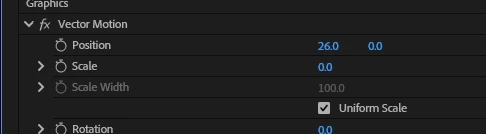
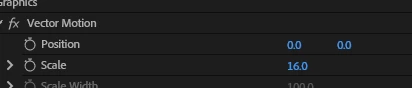
Motion control values (pos, scale) all reset to 0 randomly, premiere lets me change one value that then resets as soon as I change a different one (kinda like whack-a-mole)
  • September 10, 2026
  • 4 replies
  • 17 views

screenshot 1 is initial, screenshot 2 shows that “26” value reset to 0 after changing the Scale value.

    4 replies

    Ann Bens
    Community Expert
    Community Expert
    September 10, 2026

    When animating text do not use the vector motion but rather the transform effects of the text itself.

    Post screenshot entire effect controls and view of the program monitor.

    Participant
    September 10, 2026

    I was not using it to animate the text and yet the bug still showed, if the values shown are stuck at 0, the layer will not be visible (scale: 0, pos (x,y): 0,0)


    2 screenshots due to a large effects panel


    KatieToo
    Community Manager
    Community Manager
    September 10, 2026

    Hi ​@iridescence 

    Thanks for stopping by the Premiere forums! In order to better troubleshoot, we need to ask for a few more details like if Mac (and what macOS) or PC (whether Windows 11/10, plus what driver version & build), what version & build of Premiere are you using with our bug report details.

    • Premiere Version: Find the exact version/build of Premiere you’re current using.
    • Operating System: Specify Windows or macOS, along with the version.
    • Mac Chip (Mac Only): Please let us know what M-series chip you have. If Intel please include GPU.
    • GPU and Driver (Windows only): Please let us know your video card and driver version. We recommend updating to the most recent version; for NVIDIA users, we strongly recommend the Studio version of the driver.
    • Media Files: video, images, etc. and what types (can check under Media Properties)
    • Media Storage: Are your Scratch Disks set to your Documents folder or the same as project, and is this the same as the Media drive?

    Also, if you could please let us know the following, this is also helpful to know:

    • Does it affect all projects or only some? What about new, empty projects?
    • Do you recall which Premiere this was last working in, and what might have changed? Any plugins, update to computer, etc.
    • When did the problem first begin?

    Hope to help!
    Katie


    Participant
    September 10, 2026

    Premiere Pro 26.3.2 (Build 2)
    Windows 11
    Nvidia 4070 Ti running driver 6.1062
    Intel Core i7 13700k
    Simple h.264 4k60 timeline
    Scratch disks are set to same as project.
    This affects new projects as well even after premiere restart.
    I was using the same premiere when this problem was and was not happening.
    The problem first began this morning (9/10/2026 around 9am EST)

    I have found a workaround that works for now, it’s pressing the “reset to default” button for the entire vector motion tab of the graphic. The values still will not allow me to adjust them but now I can still adjust the text-specific vector motion values.