
Participant
August 17, 2023

My effects panel has changed order automatically, how do I change it back?

  • August 17, 2023
  • 2 replies
  • 191 views

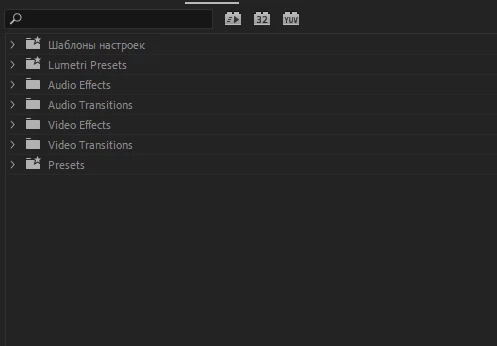
Hi! My 'effects panel' has somehow changed order automatically to being "upside down". This happened after I imported a bunch of new presets. Now the 'presets bin' has been put all the way down instead of being at the top and it annoys me a lot, because everytime I search for my presets I now have to also scroll all the way down to find them. Is there a way to fix this? I've tried to drag them to change order but it doesn't allow me to do so. This is how it looks now:
This topic has been closed for replies.

2 replies

Kevin J. Monahan Jr.
Community Manager
Community Manager
June 3, 2024

Hello @defaultxiet0q3ie339 and @Gabriel37754900t9nz,

Thanks for the report. I am not able to reproduce this one. Sorry about that.


Can you provide more details so the team can fix it? See: How do I write a bug report?


I hope they can fix this weird UI bug for you soon.


Thanks,
Kevin

Kevin Monahan - Sr. Community and Engagement Strategist – Adobe Pro Video and Audio
Participant
June 3, 2024

Same thing here. Super annoying. Interrupts workflow and muscle memory. Please provide a fix.