

Object Mask – Smooth creates pixelated edges after tracking and export
Issue:
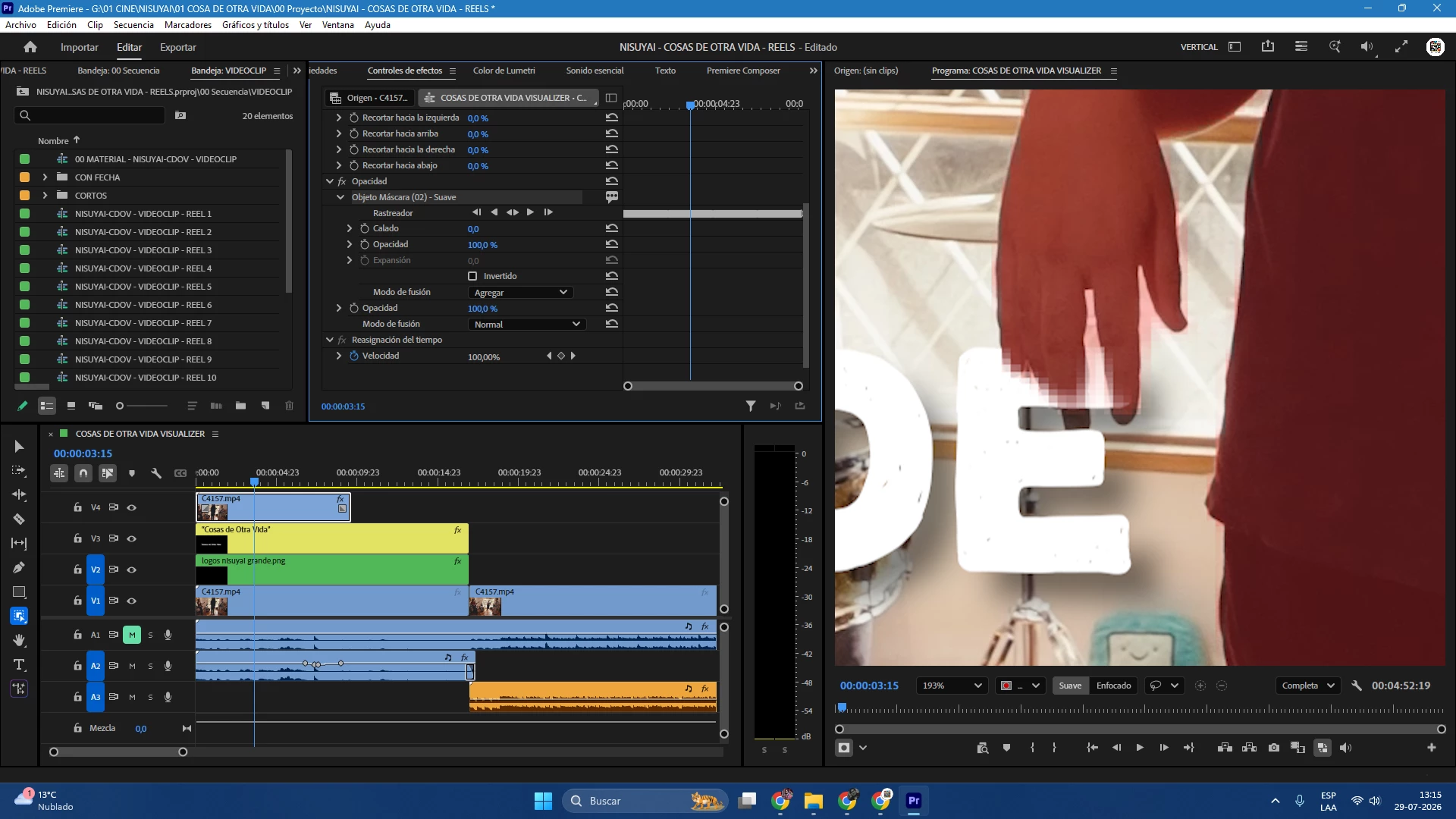
The automatic Object Mask generates low-resolution, pixelated and aliased edges around the subject. The problem is visible after tracking and remains in the exported video.
Steps to reproduce:
1. Import a video into Adobe Premiere Pro.
2. Place a graphic or text layer above the video.
3. Duplicate the original video and place it above the graphic.
4. Create an automatic Object Mask around the person.
5. Track the mask.
6. Export the sequence.
Expected result:
The Object Mask should preserve a clean and accurate edge around the person at the original video resolution.
Actual result:
The tracked mask creates visibly pixelated and blocky edges, especially around the hand and fingers. The pixelation is also present in the final export.
Additional information:
- Mask type: Object Mask – Smooth
- Feather: 0
- The problem is visible at full preview resolution and in the exported file.
- Increasing Feather only blurs the defective edge and does not improve the mask accuracy.


 AdChoices