
Participant
December 30, 2025

Opening projects v25.6.3 build 2 (3/4 open then gets stuck)

  • December 30, 2025
  • 11 replies
  • 452 views

I had a brown out yesterday.  i had photoshop illustrator and premiere dynamically linked.  the project files are on a QNAP server.  since the brown out I have not been able to open the project up, nor have I been able to open up any of the projects the were autosaved this month.   
 

2025-12-30_08h46_07.png


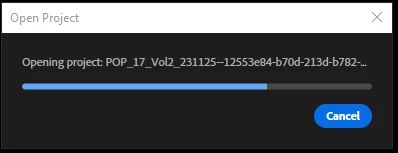
When I try to open the project the "open project" dialogue bar gets about 3/4 full and then just stops.  the software is working fin though because I can open open older projects.  I have never had it where not only is the main file corrupted but also all the auto saves for the last month.

I have been working on this project for a long time now and have missed 2 deadlines already.  Having to redo the last months of work make me not want to do the project anymore and I have to say that I have been fighting premiere bloat and bugs since 2017, I think this might be the very last project with Adobe. 

what I have tried so far without success. 
- opening a blank project and importing the project.
- trying to open it in an older version of premiere.
- uninstalling and reinstalling premiere.

I am out of ideas and out of hope.
can anyone help?

update:
premiere doesn't open any project, but i can start new ones.

11 replies

Community Manager
December 30, 2025

Hi @spatuelli
I'm sorry to hear you've had such a catastrophic issue with your project file.  Would you be able to share one of the corrupted projects and the auto-save from before the crash for us to take a look at?  What happens when you open the linked files in Illustrator?  Do they still open and work?  

Sorry for the frustration, and thanks for reaching out.

Peru Bob
Community Expert
Community Expert
December 30, 2025

There is no phone support.

Peru Bob
Community Expert
Community Expert
December 30, 2025

It may not be Premiere Pro.

It is more likely that the project files became corrupted.


Did you use the Cleaner Tool after uninstalling and before reinstalling?

https://helpx.adobe.com/creative-cloud/apps/troubleshoot/diagnostics-repair-tools/prepare-to-run-creative-cloud-cleaner-tool.html

spatuelliAuthor
Participant
December 30, 2025

nope,
beta version doesn't work either

do you know if adobe has a 800 number?


spatuelliAuthor
Participant
December 30, 2025

thank youi will consider that, 
however, that the powersupply has nothing to do with the fact that premiere is not working.


Peru Bob
Community Expert
Community Expert
December 30, 2025
Peru Bob
Community Expert
Community Expert
December 30, 2025
spatuelliAuthor
Participant
December 30, 2025

2025-12-30_10h25_29.png

Peru Bob
Community Expert
Community Expert
December 30, 2025

In the CC Desktop app.

Go to about 0:23 here:

https://www.youtube.com/watch?v=T6aEfcpsycE

spatuelliAuthor
Participant
December 30, 2025

where do I fing that?