
Participant
December 10, 2024

P: 25.1 - Copy and Paste of Audio Volume Clip Level Duplicates Volume Effect Bug

  • December 10, 2024
  • 12 replies
  • 1112 views

Issue -

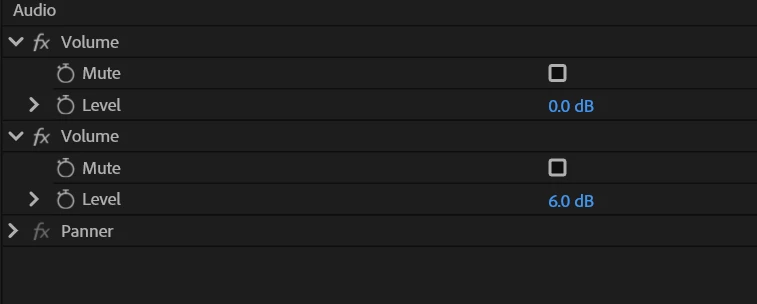
When copying volume information from one clip to another rather than just copy the dB settings of volume of the clip, a duplicate volume 'effect' is created making it cumbersome to match audio of multiple clips and readjust later


Adobe Premiere Pro version number: 25.1.0

Operating system - Windows 11


See image attached for result of pasting volume information to a new clip.

Copying 6db setting to new clip creates two instances of 'volume' with 0db and 6db when it should just be one instance of 6db after pasting.


Moderator note: Thread title changed for easy tracking.

12 replies

theimpehAuthor
Participant
December 11, 2024

Additional Info for Bug Report:


  • System Info: CPU, GPU, RAM, HD:
    • CPU - AMD Rysen 9 5900XT

    • GPU (Intel-based Macs and PCs) - Nvidia GeForce RTX 3060Ti

    • GPU driver (PC) - 30.0.15.6614
    • RAM - 64GB

    • Hard Drive (and, if external, how the drive is connected: USB 3, Thunderbolt, NAS, etc.). - All Drives Internal and External SSDS effected by issue

  • Video format: All video formats effected
  • Workflow details: All types of sequences
  • Steps to reproduce - (Very important!) Copy audio data, paste audio data onto another clip, every time
  • Expected result - Explained in orignal post
  • Actual result -  Explained in original post


Have reset preferences

Bug only occurs in latest version of Premiere 2025

IanB_360
Community Manager
Community Manager
December 10, 2024

Hi @theimpeh ,

Welcome to the Premiere Pro forums! We are glad to see you here. We need a few more details to try to help with the issue. Please see, How do I write a bug report?

Thanks for submitting your bug report. We look forward to helping you soon. Sorry for the frustration!

Thanks,

Ian