
Known Participant
October 30, 2024

P: Audio tracks won't lock or unlock individually. Can only lock or unlock all of them at once

  • October 30, 2024
  • 25 Antworten
  • 2146 Ansichten

Hi,


I am currently working in a teams project and after days of troubleshooting other issues, my project refuses to let me lock audio tracks properly. 

Whenever I try to lock a track the button gets stuck like this and doesn't actually lock
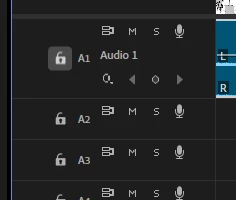
The only way to lock audio tracks is to hold shift and lock all of them at once. It goes the same the other way around, if all tracks are locked, I am unable to unlock one individually. The lock icon looks like this, again, without actually unlocking the track
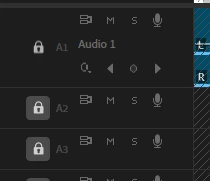
 

Was the locking audio tracks function done away with to make room for more generative AI "features" or am I doing something wrong?


Thanks,

Zack


moderator note: thread name updated


25 Antworten

Participant
September 26, 2025

Undocking the Timeline Panel did it for me - Solo Button now works as intended - even solves the Playhead playback CTI lag. While not the best solution, I hope Adobe looks into this.

Participant
September 24, 2025

I'm experiencing the same issue as this user - Audio Track Solo is not working properly at all. 
https://community.adobe.com/t5/premiere-pro-bugs/bug-in-audio-track-lock-and-solo/idc-p/15450745

Only on Team Projects
Adobe PPro V25.2.3 (Build 4)

Windows 10 Pro - 10.0.19045 (Build 19045)
NVIDIA GeForce GTX 1060 6GB - Studio Driver Version 576.80

It's a Team Project shared to me - I do not own the Team Project.
Collaborating on a Sequence the Editor created - the solo buttons do not work.
I tried creating my own sequence - it WORKS.
But when I copy over the audio and video from the editor's sequence - the solo buttons do not work again.
When I drag even a single audio clip into a new timeline I create - the Solo Function breaks.
It only happens in Team Projects. Regular PPro Projects do not have the same issue.

Screen Capture of Issue
https://www.youtube.com/watch?v=4Yw_w4eTiEs

Participant
August 8, 2025

I'm running the latest version of Premiere Pro (25.3), working in Team Projects.  Running Sonoma 14.6.1 on an Apple M1 Max. There is a very annoying bug that is costing me a lot of extra time.  Locking and unlocking audio tracks only works half the time.  I usually have to restart Premiere 2-3 times before I can lock and unlock tracks.  Also, the solo track button does not work at all.  This slows me down quite a bit, as I have to mute my other 12 tracks just to solo a track.  Adobe, please jump on these issues in the next update, please!

Community Manager
August 8, 2025

Hi @Cora Lewicki,

Thank you for reporting a problem and sorry you are experiencing issues. Does this issue look similar to that presented in this thread here?

Have you noticed if this happens when someone else is working on the Team project at the same time, or does it happen regardless if anyone else is on it?

Sorry for the frustration,
Dani

Participant
April 20, 2025

still same issue. close and open teamproject helps a little bit

Participant
April 17, 2025

I'm having the exact same issue.  This is a very annoying problem.  Any news on when this known bug will be fixed?  It was first reported in October.

Participant
April 1, 2025

Try holding down shift and click on the lock icon . it worked for me.

Participant
March 28, 2025

I'm on version 25.1.0 (Build 73)


The issue seems only to affect Team Projects.

Participant
March 28, 2025

When working in a Team Project, the audio track lock button has stopped working. When clicking on the button, its status changes but has no effect on the track.


Also, when right-clicking on an audio track in the timeline, the Audio Channels option is greyed out.


Processor AMD Ryzen 7 5800H with Radeon Graphics 3.20 GHz

Graphics card Nvidia GeForce RTX 3050 Ti
Installed RAM 16.0 GB (13.9 GB usable)
System type 64-bit operating system, x64-based processor

Edition Windows 11 Home
Version 23H2
OS build 22631.5039

Community Manager
March 28, 2025

Hi there,


We're sorry to hear about this. Let us know the version of Premiere Pro that you are using. Does this happen specifically when working with team projects or with regular projects as well?


Thanks,

Sumeet

Participant
February 20, 2025

+1 on this bug. please let us know when Adobe has fixed this. so frustrating.

Community Manager
December 12, 2024

Hi @MissionPictures ,
I have updated the status of this bug from NeedsMore Info to Acknowledged.  This means the team is working on it!

I hope we can find a solution soon. Sorry for the frustration!