
Known Participant
October 30, 2024

P: Audio tracks won't lock or unlock individually. Can only lock or unlock all of them at once

  • October 30, 2024
  • 25 replies
  • 2146 views

Hi,


I am currently working in a teams project and after days of troubleshooting other issues, my project refuses to let me lock audio tracks properly. 

Whenever I try to lock a track the button gets stuck like this and doesn't actually lock
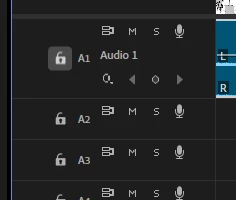
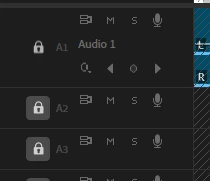
The only way to lock audio tracks is to hold shift and lock all of them at once. It goes the same the other way around, if all tracks are locked, I am unable to unlock one individually. The lock icon looks like this, again, without actually unlocking the track
 

Was the locking audio tracks function done away with to make room for more generative AI "features" or am I doing something wrong?


Thanks,

Zack


moderator note: thread name updated


25 replies

Participant
December 12, 2024

So I need to do this everytime I need to unlock and lock tracks? Or I guess you're saying convert it to a local project and then convert back to Team when not working on it anymore?

Participant
December 12, 2024

I don't understand what @Rach McIntire means by updating status? What's been updated? Is there a solution? I'm pretty stuck right now...

Participant
December 12, 2024
A workaround is to convert to a local project to make changes necessary via
Edit > Team Project > Convert, but that’s kind of a hack and this
definitely should be fixed somehow.
Participant
December 11, 2024

Same problem here, any solutions?

Participating Frequently
December 11, 2024

Same issues on my teams projects with premiere 24. It's killing me. Lock doesn't work on audio tracks, but work fine with video tracks. Also sometimes solo will work for a few minutes, then randomly stop working. (Side note, why doesn't premiere have shortcuts to solo specific tracks? Would die for that feature)

zack_3303Author
Known Participant
December 6, 2024

Has there been any updates to this @Rach McIntire? My project has been broken like this for a couple months now and I have a deadline coming up with a client

Participating Frequently
November 21, 2024

I am alost having this same issue in a Team Project.  Any resolutions?

Participant
November 13, 2024

I'm having the same issue in a team project.

Participant
November 12, 2024

@Rach McIntire Try this one!

Community Manager
November 12, 2024

Hi @Daniel25828635g4yv ,
Thanks for the gif.  Are you able to upload a higher res version?

zack_3303Author
Known Participant
November 12, 2024

This only seems to happen in Teams projects