
Known Participant
October 30, 2024

P: Audio tracks won't lock or unlock individually. Can only lock or unlock all of them at once

  • October 30, 2024
  • 25 replies
  • 2146 views

Hi,


I am currently working in a teams project and after days of troubleshooting other issues, my project refuses to let me lock audio tracks properly. 

Whenever I try to lock a track the button gets stuck like this and doesn't actually lock
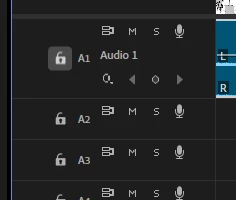
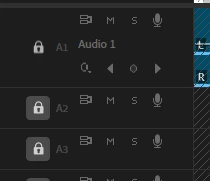
The only way to lock audio tracks is to hold shift and lock all of them at once. It goes the same the other way around, if all tracks are locked, I am unable to unlock one individually. The lock icon looks like this, again, without actually unlocking the track
 

Was the locking audio tracks function done away with to make room for more generative AI "features" or am I doing something wrong?


Thanks,

Zack


moderator note: thread name updated


25 replies

Participant
November 12, 2024

 GIF attached - Track lock does not work for audio tracks as it does for video.  Nothing has changed in workflow since this latest update besides being in a Team Project.

Version: 25.0 (Team Project)

Apple M1 Pro, 16GB Ram
OS: Sequoia 15.1


Community Manager
November 12, 2024

Hi @zack_3303 ,
I am having trouble reproducing this issue.  Is it only in a Team project this happens, or if you make a regular project, does it happen there as well?
Best,
Rach

zack_3303Author
Known Participant
November 4, 2024

Adobe Premiere Verion number 25.0.0

Operating System: Windows 10 Pro version 22H2

CPU: AMD Ryzen 5 3600X 6-Core Processor 3.80 GHz

GPU: Nvidia Geforce RTX 3070

GPU Driver 32.0.15.6094

RAM: 64gb

Harddrive: WDC WDS100T2B0B


Video Format: 1920x1080, 30fps, square pixels


I am working on a Teams project I am using with a few other people. I converted to Teams recently, after regrettably downloading Premiere 2025 to match versions with my other editors.

While working on the project I noticed I am unable to have proper control over locking and unlocking audio tracks. Tracks can only be unlocked/locked all at once and I have no control over locking individual tracks, slowing my workflow.


Let me know if you need any more info

IanB_360
Community Manager
Community Manager
October 31, 2024

Hi @zack_3303 

Welcome to the Premiere Pro forums! We are glad to see you here. We need a few more details to try to help with the issue. Please see, How do I write a bug report ?

Thanks for submitting your bug report. I hope we can help you soon. Sorry for the frustration!

Thanks,

Ian

zack_3303Author
Known Participant
October 30, 2024

Its worth noting the mute, solo and sync lock buttons on audio tracks don't work either