



outtaxhere
Participant
May 30, 2024

P: Dark Exposure and Vertical Lines in Footage on Playback

  • May 30, 2024
  • 11 replies
  • 3270 views

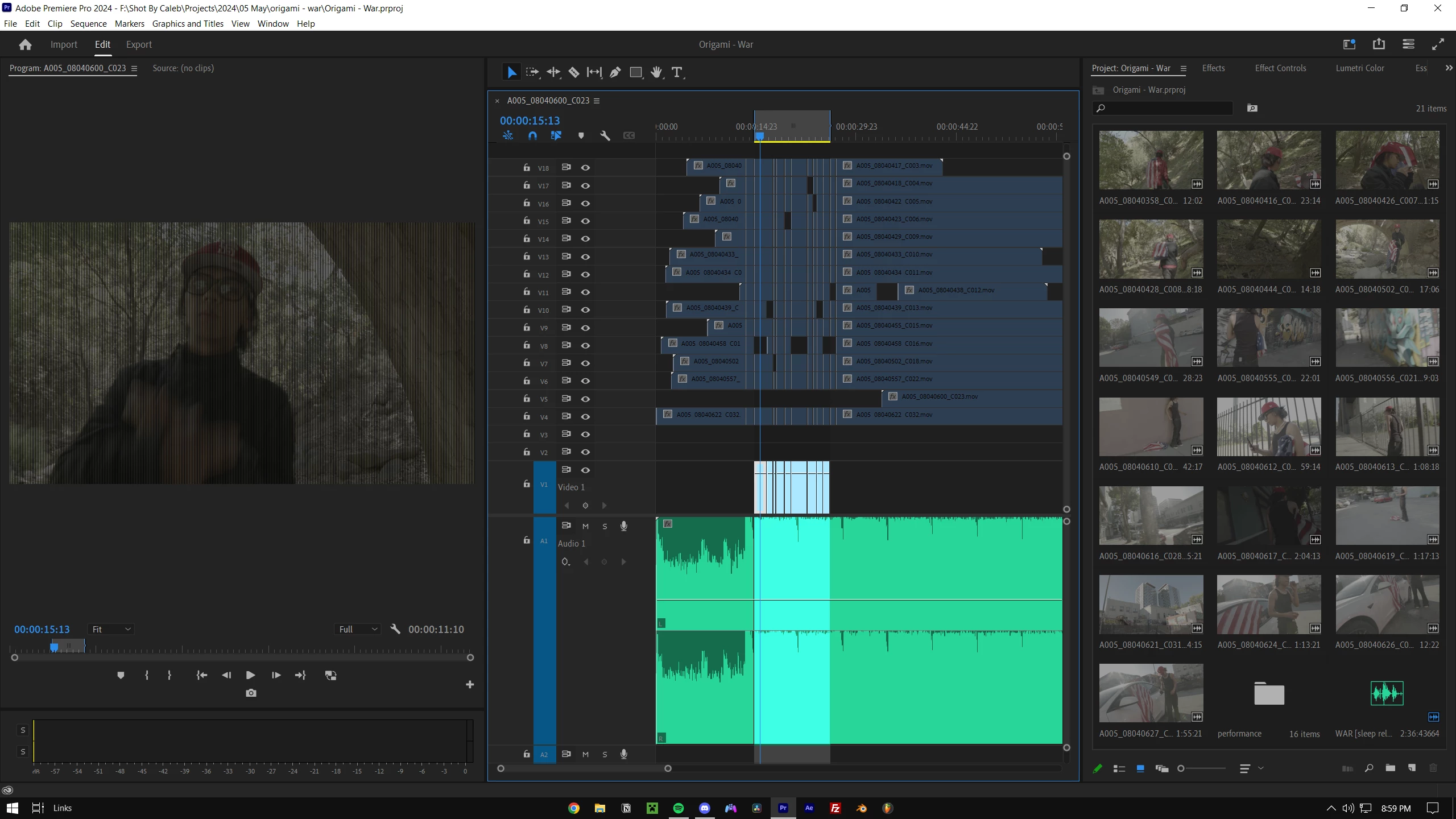
I've been getting vertical lines and dark frames working with MOV files in Premiere Pro and After Effects, pictured below. I'm not using any effects. After exporting, It still shows frames where the exposure is lower too. Any idea what I can do?
This topic has been closed for replies.

11 replies

Participant
September 12, 2024

Hello recently i changed from my mac to my pc and had the same problems with the proress video but updating my nvidia drivers to latest version, i mean the nvidia studio drivers, this fixed the issue

posted this after fixing the issue


nvidia rtx 3070

i7

Community Manager
July 18, 2024

Hi everyone, NVIDIA has recently released a new Studio driver (v560.70) with improvements around preview issues. Could you please try installing it to check if it fixes the preview issue? Let us know if it helps.


Thanks,

Sumeet

Kevin J. Monahan Jr.
Community Manager
Community Manager
July 18, 2024

Hello @outtaxhere,

Some others have fixed the issue by installing the correct NVIDIA Studio driver. How is your case going? Please let us know with more info. See How do I write a bug report?


I hope your issue has subsided. Let the community know your status.


Thanks,
Kevin

Kevin Monahan - Sr. Community and Engagement Strategist – Adobe Pro Video and Audio
zackb25810313
Participant
June 27, 2024

Just popping in to say I was having this same issue with my GeForce 3090.   I'm going to try your solutions.

Participant
June 26, 2024

I realise this is likely an Nvidia issue - has Nvidia indicated when this will be resolved in a future update? Moving to 24.1+ at present time not a viable fix at this stage for some productions.

Participant
June 12, 2024

Nvidia GeForce RTX 3070 was affected. Rolling back to the 552.22 driver update was the solution.

Participant
June 12, 2024

We have 2 computers that both have Nvidia GeForce RTX 30f0, so that model is affected, too. Rolling back the studio driver to a previous version, 552.22, was the solution.

Participating Frequently
June 7, 2024

Premiere Pro versions 23.1 through 24.0.3 have garbage (dimmed video or black vertical lines) in Source and Program Monitor previews when Nvidia Driver 555.85 or 555.99 is used. But not all Nvidia cards that support these driver will have this problem. I am reproducing this with an Nvidia GeForce RTX 3080 but finding the same driver not to fail with a Nvidia GeForce GTX 1080 Ti for example. And also note that the following file formats preview with this issue:

  • PrRes 422, 422 Proxy/ LT/ HQ
  • QuickTime DNxHR/DNxHD
  • QuickTime P2 1080i/p 50Hz/60Hz DVCProHD
  • QuickTime DV
  • Microsoft DV
  • Microsoft Uncompressed UYVY 422 8bit
  • DNxHR/DNxHD .MXF


Note: The default sequence render preview file format is ProRes 422 so you may only see this issue in the rendered previews. 


Solutions to this Problem:

  • Install the Nvidia driver prior to version 555.85 or 555.99

OR

  • Continue to use Nvidia driver version 555.85 or 555.99 and update Premiere Pro to version 24.1 or newer.
Participant
June 7, 2024

I've also encountered the same issue. I've done a clean install of the NVIDIA Studio Driver as well, but it didn't work for me. My current workaround is to use OpenCL for now instead of CUDA for Mercury Playback.


I hope this gets fixed soon.

Kevin J. Monahan Jr.
Community Manager
Community Manager
May 31, 2024

Hello @outtaxhere,

Thanks for the report. The team will require more info from you. Please format your follow up in this format: How do I write a bug report?

Hi @jeffery347966600fms,


I hope the team can assist you ASAP.


Thanks,
Kevin

Kevin Monahan - Sr. Community and Engagement Strategist – Adobe Pro Video and Audio