
Inspiring
October 21, 2024

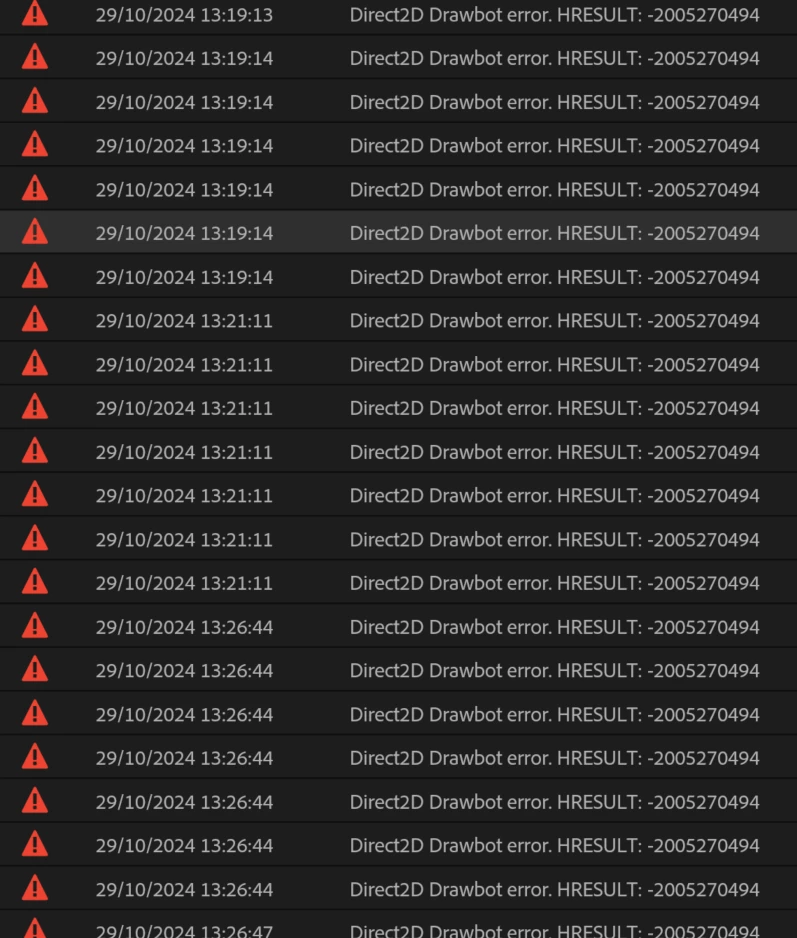
P: Hundreds of Direct2D Drawbot error. HRESULT: -2005270494

  • October 21, 2024
  • 49 replies
  • 17963 views

I'm getting hundreds of these errors, and every time they happen the UI freezes for a second or two.
 

Not entirely sure what build I'm running but it's 25.0. Here is the extremely useful about box:


Any ideas? Thanks!


49 replies

Community Manager
December 26, 2024

Updating bug status

Adobe Employee
December 20, 2024

Note:
1-This error code -2005270494 corresponds to a GPU Device not currently being available. That could be because Premiere or another app was overusing resources, or the current GPU driver has a problem. If someone hitting this one can share specific repro on how such a case is observed, that would greatly help us narrow down the culprit.

More support to handle for these error cases, describe with meaningful user errors, and better react to them is being worked on, but durable fixes (e.g. recovery mechanisms and prevention) often revolve around reliably reproducing such cases to ensure there are not related problems.

If a user consistently hits the GPU Device error of -2005270494 , I'd recommend trying with UI GPU acceleration disabled in near term + sharing a minimal repro.


2-@tmuka - The "Invalid Image File" issue is likely some kind of problem with an image provided by the application (e.g. for some UI content) or somehow in your project. Please spin up a dedicated thread on that, and loop me in on it. I would expect that sort of thing should have a pretty simple repro(e.g. showing some UI or making use of some imported content).


3- To @Stan Jones 's case of GDI resources leak - The Progress dashboard indeed had a GDI resource leak affecting a range of audio-processing scenarios. The fix for that is present in the Beta builds, and will be present in the next release version. 

Disabling GPU UI acceleration should work as a general mitigation or avoiding repro on the progress dashboard are mitigations in meantime.

If someone observes a GDI leak which doesn't involve the Progress dashboard, please start a separate thread, share repro context and loop me in.

Stan Jones
Community Expert
Community Expert
December 18, 2024

@Suwan369762057z9w,


Are you experiencing the GDI maxing out?

https://community.adobe.com/t5/premiere-pro-bugs/p-hundreds-of-direct2d-drawbot-error-hresult-2005270494/idc-p/15044592#M42678


If so, you can try to avoid the UI element that is driving it. For me, it was having the Progress Dashboard open when transcribing.


Stan


Participant
December 17, 2024

I too am getting drawbot error after updating to 25.1. I tried every solution provided by technical support but nothing worked. it really messes up the workflow especially when I am working on big projects for work.


Specs: windows 11, GeForce RTX 2070, RAM 48GB intel core i7-10th gen 


Participating Frequently
December 17, 2024

I may be posting in the wrong thread, my HRESULT error is actually "Invalid Image file."  Please feel free to move my response out of this thread.


I wondered if it was an issue with my old project, but I closed all projects, created a new empty test project, reset my Workspace "Editing" to default, and clicked around to switch from Assembly, Editing, Color, Audio, Effects, Captions, and back and forth generated the errors. 


My GDI Objects didn't get anywhere near 10k (got up to 700 within a few minutes of clicking around the empty project), but my laptop performance with Premiere open is lag city.  But, for comparison, Task Manager itself has almost 3k GDI Objects, so maybe that's not the issue.  I do wonder if it's some sort of issue with the system deciding whether to use the onboard ARC or discrete Nvidia graphics.  


I'm currently using the (latest?) WHQL microsoft nvidia drivers v 32.0.15.6103 from 8/30/2024, and Intel ARC 32.0.101.6078 drivers from 9/13/2024. 


jamieclarke
Community Manager
Community Manager
December 17, 2024

Hi @tmuka - Can you open Task manager and find the details pane in the Column headers, right click "Select Columns" "GDI Objects" is one of the options. Monitoring from there allows for recognizing a growing leak much earlier than when something blows up.  any steps you can reproduce to let us know when the objects start to climb would be very helpful.

Participating Frequently
December 17, 2024

Just to let you know:
Using the latest NVIDIA Studio driver, the latest non-beta version of Premiere, an updated Windows 10, and some cleaned-up disk space on drive C:, I was able to edit for much longer without encountering this error.

That said, I’ve only worked on smaller projects so far, mainly shorts and social media content. Still, I managed to pass the magical 1-hour mark without any issues.

Maybe it's a driver issue? 

Participating Frequently
December 17, 2024

Sorry, I don't know exact steps to reproduce.  I'm just editing 2-3 minute talking head videos with some lower thirds and audio, without anything fancy or heavy.


I'm using the lastest version from Creative Cloud, Premiere 25.1.0 (build 73) on Windows 11 Pro on a new Dell XPS 16 with Intel Ultra 9 185H and RTX 4060.


I didn't have this specific issue on my 3 year old pc that was just replaced by my employer. 


I'm reluctant to install a beta version or change registry settings to resovle this as I don't want to make my system unstable as video editing is just one part of my job. 

jamieclarke
Community Manager
Community Manager
December 17, 2024

Hi @tmuka - Have you checked version 25.2 to see if it helps your issue? 

What OS are you using?  What version of Premiere?


Please share the steps to reproduce it, as this will help us investigate further.

Participating Frequently
December 17, 2024

Just wanted to chime in to say this same error is affecting me too even in my simple video project.  Premiere slows down to a glitchy mess before my video drivers crash.