
L.Ni
Participating Frequently
September 14, 2025

P: Imported xml timeline - motion properties disappeared

  • September 14, 2025
  • 20 replies
  • 1092 views

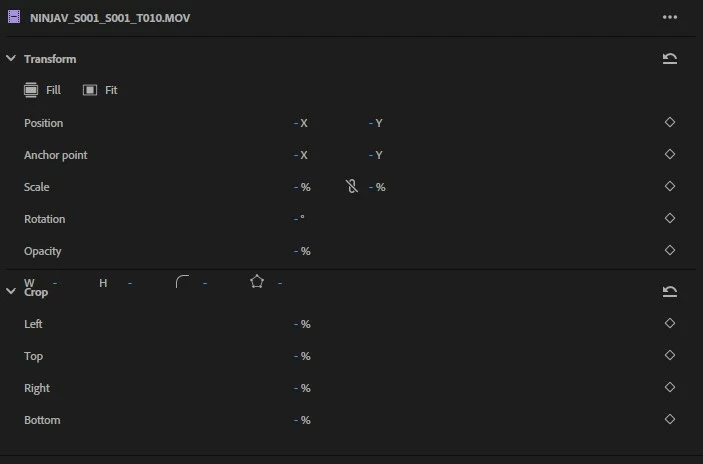
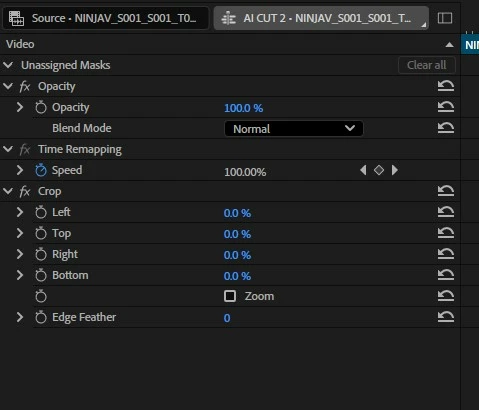
Issue: Clips in a timeline imported from a Resolve xml file appear with no motion properties. Properties are null in the properties panel. The twirl-down motion menu in the effect controls panel is gone entirely. Operations like "fill frame" or manipluating the null properties can cause crashes. This is when using Beta & main release.


Use case: I intend to use Resolves AI smart-switch feature to expedite a podcast edit. Then send to premiere for finishing. I have successfully imported the sequence with all edits appearing correctly. But I can't be certain I will be able to scale it to a 1080p timeline to match my gfx assets etc without it breaking. I'm hoping this is a simple case of a parameter needing to be specified in the xml but this is where my knowledge ends. Happy to provide more details.
 

20 replies

Participant
September 25, 2025

Thanks @John22368521k4cl!  That's a much easier work around. I tried it and it worked perfectly.  Great find!

Participating Frequently
September 25, 2025

See my post below.  Workaround is far less painful than adding a transform effect on every clip.

jamieclarke
Community Manager
Community Manager
September 23, 2025

Great news! The team was aware of this issue, and it has been fixed in Premiere Pro beta version 25.6.0 build 74 and later. The fix will be included in the next stable release, 25.6

Participating Frequently
September 23, 2025

Try this as a workaround...

In Premiere, open the problematic sequence created from the XML you imported from Resolve.  Export it as a Final Cut Pro XML (name it something else so you don't get confused).  Import the newly created XML.  The resulting sequence should now have Motion parameters in the effects tab.  At least it did for me.   Kind of an annoying extra step but doesn't take long.

Participant
September 22, 2025

Having the same issue. Exporting XML timeline from Resolve into Premiere delivers no Motion Properties.

Mac OS 15.6.1. Premiere Pro 25.5.0. Resolve 20.2.13.

Temp workaround is applying Video Effects>Transform onto every clip but still not ideal.

Participant
September 22, 2025

Our workflow is to record video through Atem mini pro and them we export timeline from Davinci to XML and import it into the Premier Pro and this is where problem begins, we cant edit properties because we are missing Motion in our video from that xml

photo as proof

do somebody know why is this happening?

jamieclarke
Community Manager
Community Manager
September 22, 2025

Hi @Lukáš38753644xjrl -  Thanks for submitting your bug report. We need a few more details to try to help with the issue.
Please see, How to Report a Problem.


Can you send the XML to jamiec@adobe.com 


Sorry for the frustration.

Participant
September 17, 2025

Same issue with xml from Resolve. I can´t see motion properties. Doing Match frame and replacing it works, but replace clip by clip is not a good solution

jamieclarke
Community Manager
Community Manager
September 17, 2025

Hi @L.Ni - Can you send the XML to jamiec@adobe.com 

I'm glad OTIO has helped your issue.

L.Ni
L.NiAuthor
Participating Frequently
September 16, 2025

Instead of xml, I tried again using the .itio format (into premiere beta) and this worked without issue. Resolve version is 20.2, build 13.

jamieclarke
Community Manager
Community Manager
September 15, 2025

Hi @L.Ni -   Thanks for submitting your bug report. We need a few more details to try to help with the issue.
Please see, How to Report a Problem.


What are your system specs?


What version of Resolve are you using?


Sorry for the frustration.