

BeratGL
Known Participant
July 14, 2026

P: Incorrect Preview Scaling when program monitor's set to 1/2 & 1/4 resolution. (Images & Masks)

  • July 14, 2026
  • 29 replies
  • 221 views

I've encountered a rendering/preview issue that appears to affect certain resolution elements when the Program Monitor playback and paused resolution are set to 1/4. (or the lowest possible resolution)

When scaling a PNG above 100 the preview becomes inaccurate compared to how it appears at Full resolution. As the scale increases (around 130% or higher), the image begins to behave as if Uniform Scale is disabled, appearing visibly stretched.

The issue becomes significantly worse when Film Impact effects are applied. the image's position is also shifted incorrectly.
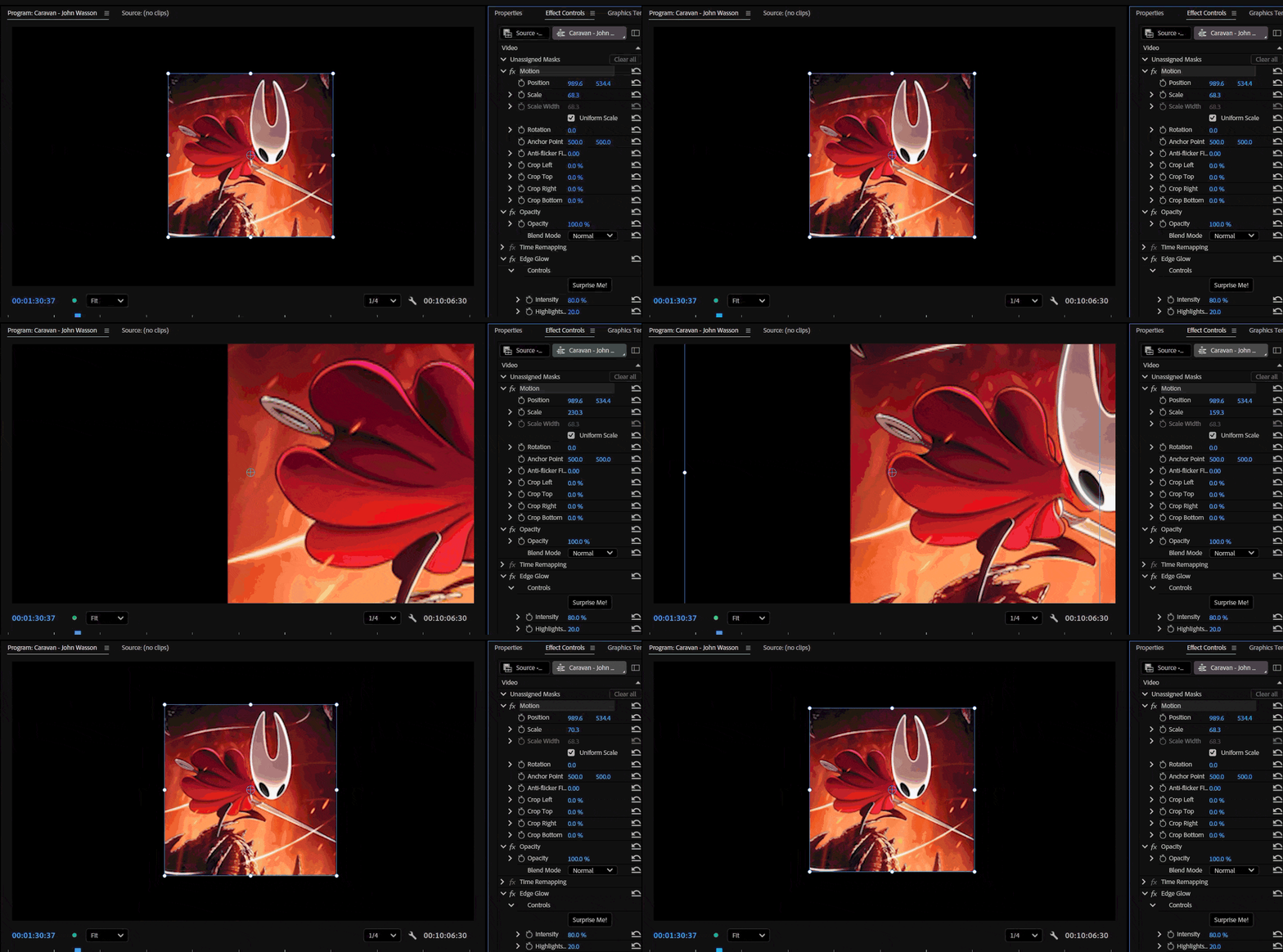
At 1/4 paused resolution & Edge Glow effect applied. (Ex-Film Impact effect)


Steps to Reproduce

  1. Import the attached PNG (or the provided sample project/assets).
  2. Place the PNG on a sequence.
  3. Increase its Scale above 100%.
  4. Set both Playback Resolution and Paused Resolution to 1/4.
  5. Compare the image to how it appears when the Program Monitor is set back to Full resolution.

Additional Tests

Test 1 - No Effects

  • Scale the PNG above 100%.
  • At 1/4 resolution, the preview no longer matches the Full-resolution preview.
  • Around 130% scale, the image appears stretched, almost as if Uniform Scale has been disabled. (only during playback)
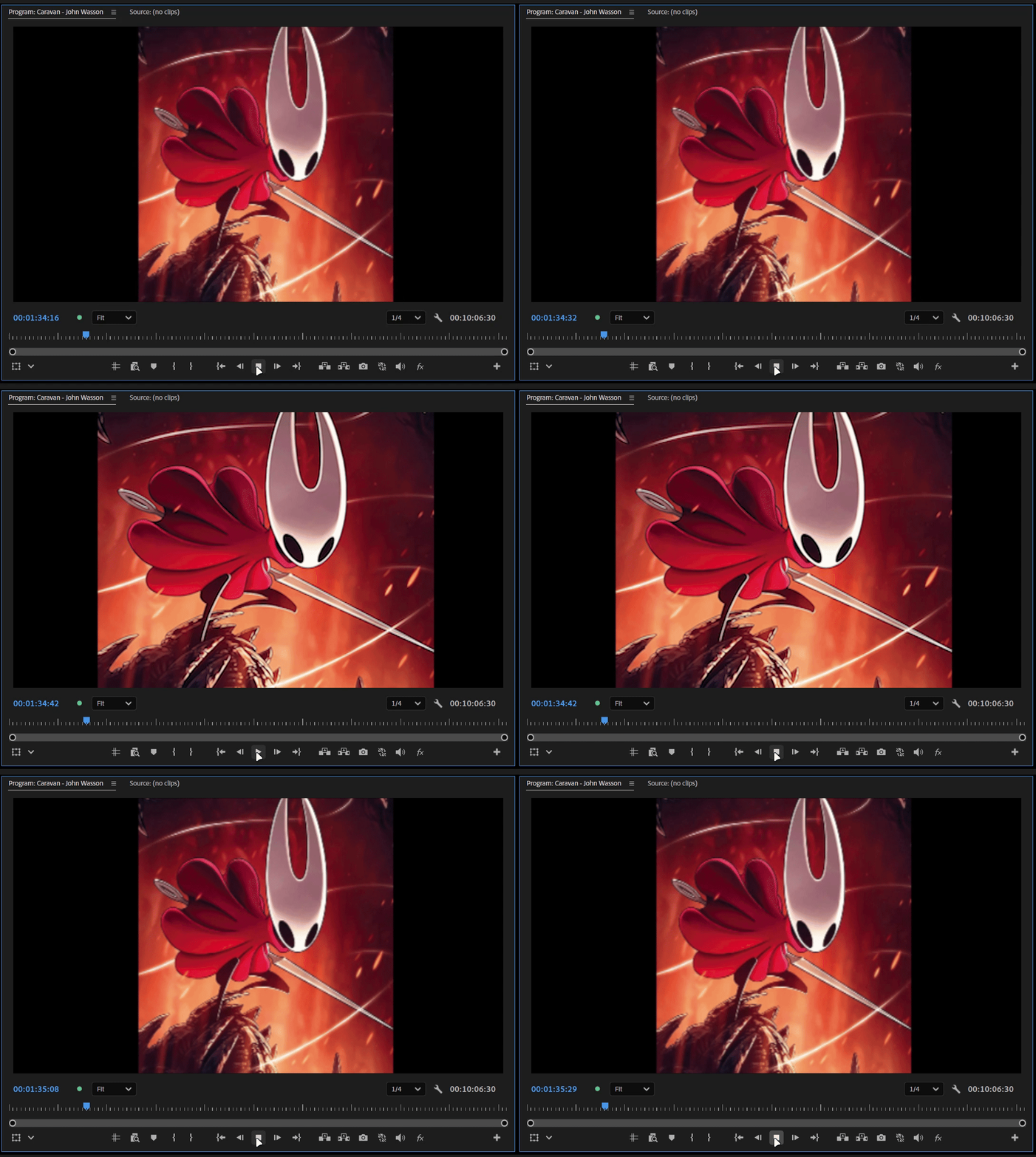
While playing and pausing around ¼ preview resolution. (no effect applied)

Test 2 - Native Premiere Effect

  • Apply Gaussian Blur (Legacy).
  • The scaling issue remains, but the image position stays correct.

Test 3 - Film Impact Effect

  • Apply a non-native Film Impact effect (for example, Edge Glow).
  • In addition to the scaling distortion, the image position shifts unexpectedly and may move partially or completely outside the frame.

Test 4 - Third-Party Effect

  • Apply a third-party effect such as S_Blur from Sapphire.
  • The preview becomes incorrect at any reduced Program Monitor resolution (1/2, 1/4, etc.).
  • The image again appears as though Uniform Scale is disabled.
  • Returning the Program Monitor to Full resolution immediately restores the correct appearance.

Test 5 - Masks

  • In vertical videos, masks also appear to shift position once the scale of the mask exceeds 100%.
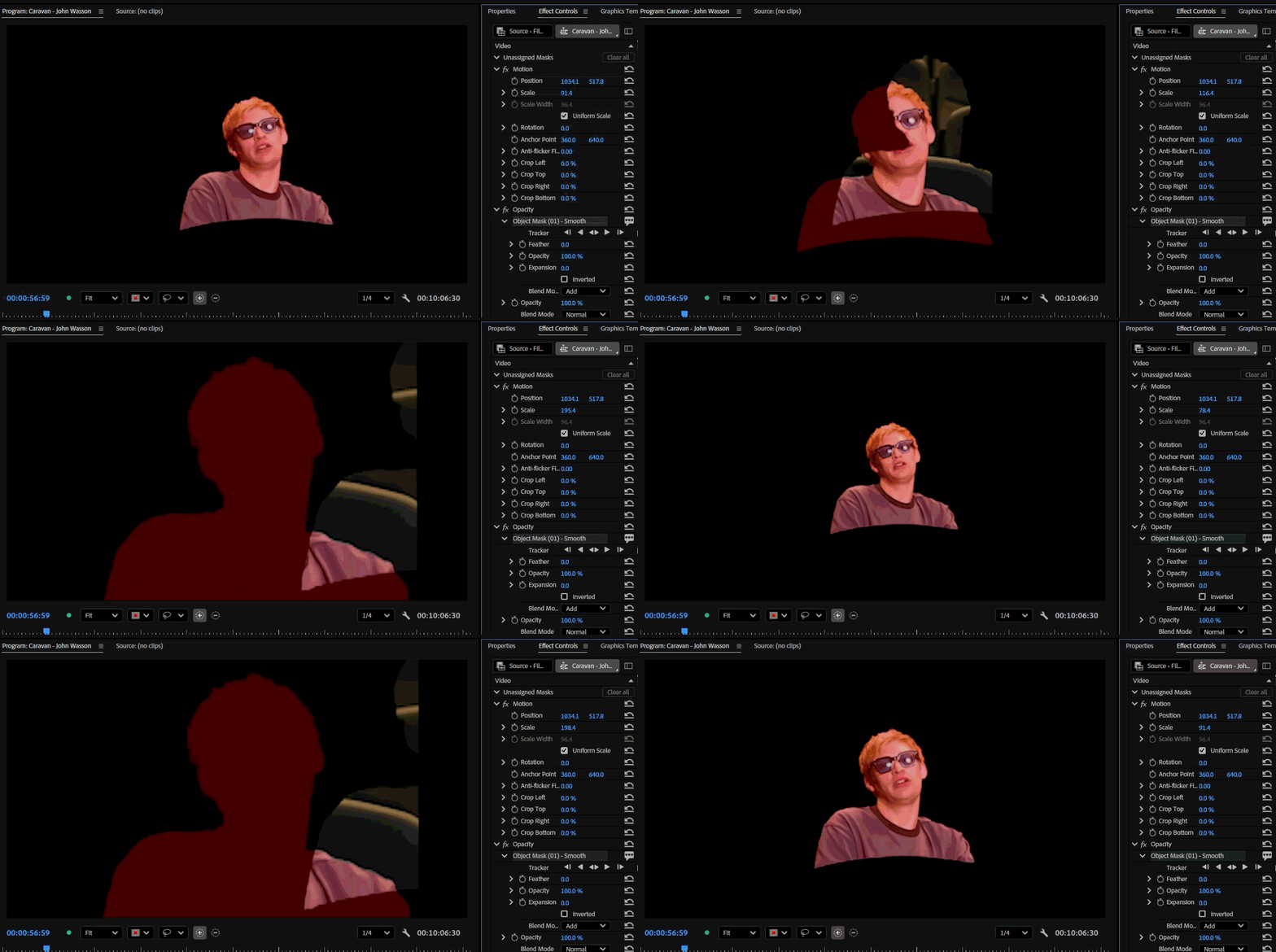
I will provide the footage. please mask the person and scale the mask above 100 at ¼ paused resolution.

Summary

At reduced Program Monitor resolutions (especially 1/4):

  • The image no longer matches its appearance at Full resolution. (when scale is 100+ )
  • Scaling becomes inaccurate.
  • Around 130% scale, the image appears stretched as if Uniform Scale is disabled. (only during playback)
  • Some third-party effects exaggerate the issue.
  • Film Impact effects also cause the image position to become offset. (In Both 1/2 and 1/4 resolution)
  • Masks in vertical clips may shift position when the image is scaled above 100%.

Switching the Program Monitor back to Full resolution immediately restores the correct appearance.

Additional Notes

I have attached sample footage and images because I could not reproduce this issue using standard 1920×1080 PNGs or videos. This suggests the bug may be related to the source asset's resolution.

However, I can consistently reproduce it using the assets I've attached. This makes me suspect the bug is related to the source media's resolution or dimensions rather than scaling alone.

Please try reproducing the issue using the attached media rather than replacing it with your own test assets, as the problem does not seem to occur with common resolution files.


System info
    Application: Premiere Pro v26.3
    OS: Windows v10.0.26200, RAM: 31.82 GB GB, CPUs (logical): 24 
    GPU: Rtx 3060 Ti  Nvidia Studio Driver ver. 610.62

    29 replies

    KatieToo
    Community Manager
    Community Manager
    August 20, 2026

    Just updating for any other users having similar issues in other posts and wondering why their post is merged, that is because we have identified and are investigating this issue/filed a bug ticket. Since it is linked directly to a bug in this post, we are merging to help our staff quickly access all user comments in one location. All comments and info have been retained, so not to worry. 

    Ann Bens
    Community Expert
    Community Expert
    August 20, 2026

    Does it look correct when rendering (preview) regardless of the playback resolution.

    ks-01
    Participant
    August 20, 2026

    Issue:
    Third-party GPU-accelerated transitions (Film Impact — tested with "Grow Zoom") shift/offset from their correct position in the Program Monitor whenever Playback Resolution is set below Full (1/2, 1/4, 1/8). At Full resolution, the effect renders in the correct position.

    System info:
    - Premiere Pro version: [preencher — Help → About Premiere Pro]
    - OS: Windows 11
    - GPU: NVIDIA RTX 4070
    - Renderer: Mercury Playback Engine — GPU Acceleration (CUDA)
    - Third-party plugin: Film Impact Transitions, version [preencher]

    Steps to reproduce:
    1. Apply a Film Impact transition/effect (e.g. "Grow Zoom") to a clip on the timeline.
    2. Set Playback Resolution in the Program Monitor to 1/2, 1/4, or 1/8.
    3. Play the timeline through the transition/effect.

    Expected result:
    The transition renders in the same position regardless of playback resolution.

    Actual result:
    At reduced playback resolution, the transition viscorrect position. At Full resolution, it renderscorrectly.

    Troubleshooting already attempted (no change in behavior):
    - Cleared and regenerated Media Cache.
    - Toggled Mercury Playback Engine between GPU Acceleration (CUDA) and Software Only.
    - Rendered the effect in/out (Sequence > Render Efdisappears in the rendered preview but reappears ifI re-scrub after clearing render.

    This started after updating to the current version of Premiere Pro; the plugin may need a compatibility update for the new preview rendering pipeline, or this could be a regression ck-resolution downscaling interacts with third-party GPU effects.

    @cassifolio
    Community Manager
    August 20, 2026

    Hi ​@ks-01,

    Welcome to the Premiere forums and providing thorough information. The is a known and reproducible bug that the team is currently investigating further. Please continue to view in the Full resolution to avoid any workflow hiccups.

    We appreciate your patience as we work on this.

    Best,

    Jonathan

    Community Manager
    August 3, 2026

    Hi ​@wholebrainproductions,

    Thank you for reporting this occurrence. This is a known issue in similar situations. The team will be including this issue in the bug report.

    We appreciate your patience as the team works.

    Best,

    Jonathan

    wholebrainproductions
    Participant
    August 2, 2026

    someone, anyone, please help. 

    Ann Bens
    Community Expert
    Community Expert
    August 2, 2026

    Please do not bump within a short period of time of posting.

    Nothing to go on: need to post info

    Pr version and build, OS, full comp specs, gpu driver.

    Meantime trash media cache and preferences, make new project and import old one.

    wholebrainproductions
    Participant
    August 3, 2026

    problem was ¼ resolution in program monitor. switching to full resolution fixed the issue. 


    thanks

    wholebrainproductions
    Participant
    August 2, 2026

    Object Mask applied to footage moving the object during playback and scrubbing. This shift in the object’s position is also applied in the render, making the footage unusable. 


    This is happening on every instance of the object mask. It was not happening before the update. It does not appear on the instances of the footage masked before the update. When I go back to previous scenes in this project that were completed in previous updates, the mask is still applied correctly with no duplicate image during scrubbing or playback. 

    duplicate object seen to the right of the mask during playback
    duplicate object seen to the right of the mask during scubbing
    no playback, object appears isolated, masked, and singular (no shift)


    Amy the Stuv
    Community Manager
    Community Manager
    July 21, 2026

    Hello ​@svens82 ,


    Welcome back to the Premiere Forums and thank you for your thorough bug report. I believe we are tracking a similar issue, but would like to confirm if playback functions normally when you set your Program Monitor to Full Resolution instead of the default ½?


    This is one of the similar issues we have logged.

    Thank you,

    Amy

    Inspiring
    July 22, 2026

    Thanks! That actually fixes the issue.

    The Program Monitor was set to 1/2 resolution. After switching it to Full Resolution, it works.


    Inspiring
    July 21, 2026

    Hi everyone,

    I'm experiencing a persistent Program Monitor preview issue in Premiere Pro that I have now been able to reproduce even after completely reinstalling my computer.

    • Windows 11
    • NVIDIA GeForce RTX 5070 Ti
    • Latest NVIDIA Studio Driver
    • Premiere Pro 26.3
    • Same issue in Premiere Pro Beta

    The problem

    The issue only occurs in the Program Monitor during playback.

    I've attached two screenshots of the exact same frame:

    • Image 2: Captured during playback. The Program Monitor displays a heavily distorted image.
    • Image 1: Captured after pausing playback. The image immediately becomes correct. (Please note that this screenshot is intentionally blurred to hide confidential client information.)

    The source is simply a tall website screenshot (630 x 11221) that is animated vertically using position keyframes.

    During playback, the Program Monitor stretches, duplicates and shifts parts of the image. As soon as playback is paused, the preview instantly corrects itself.

    The final export is always 100% correct. The issue only affects the Program Monitor while playing the timeline.

    Possibly related: Text Animator

    I also noticed what may be the same underlying issue with Premiere's Text Animator (Word-by-Word).

    During playback, the last few words are sometimes revealed together instead of one word at a time.

    Again, pausing playback immediately fixes the preview, and the exported video is correct.

    Because both issues only occur during playback inside the Program Monitor, I suspect they may be related to the same preview/rendering bug.

    Complete system reinstall

    To rule out configuration issues, I completely formatted my PC and performed a clean installation of:

    • Windows 11
    • Premiere Pro
    • Latest NVIDIA Studio Driver

    The problem is still present after the clean installation.

    What I've already tried

    • Fresh Windows installation
    • Fresh Premiere installation
    • Created brand-new projects
    • Created new sequences
    • Tested Premiere Pro Beta
    • Tested multiple JPG and PNG images
    • Re-exported the images
    • Split the long image into smaller sections
    • Reset Premiere preferences
    • Reset plug-in loading cache
    • Cleared media cache
    • Tested both CUDA and OpenCL
    • Installed the latest NVIDIA Studio Driver
    • Restarted the computer
    • Verified that exports are always correct

    None of these steps changed the behaviour.

    Additional observations

    • The issue seems more noticeable in 1080 × 1920 (vertical) sequences.
    • A simple 1920 × 1080 test project did not immediately show the same behaviour.
    • The still frame is always correct.
    • The export is always correct.
    • Only the Program Monitor during playback displays corrupted frames.
    • The issue is present in both the stable release and Premiere Pro Beta.

    Has anyone experienced something similar or knows if this is already a known issue?

    Any help would be greatly appreciated.

    KatieToo
    Community Manager
    Community Manager
    July 15, 2026

    @hunter_5176 ​@alexCFH  Wanted to update that we managed to recreate this issue with another user’s post providing assets for that. It seems very particular towards certain source file resolutions, but our team will be investigating further. I’ll provide an update once I receive more information. 

    Thanks for posting about this issue!
    Katie

    KatieToo
    Community Manager
    Community Manager
    July 14, 2026

    Hi ​@BeratGL 

    Welcome back to the Premiere forums, good to see you again. Thank you for providing such a detailed bug report, your setup, and including those files. It’s very appreciated. Our team is going to investigate these issues you’re having with images/masks scaling, resolution playback, as well as the film impact effects. And as an update, we were indeed able to recreate these issues!

    Also noting that Full Resolution seems to be a workaround presently on this.

    I’ll provide an update with any new information on this, or if any further questions come up.

    Thanks for your time on this, and hope to help!
    Katie

    BeratGL
    BeratGLAuthor
    Known Participant
    July 21, 2026

    Hi ​@KatieToo, I believe I identified the root cause of the position offset bug when film-impact effects are used. It only happens with elements that are lower resolution than the sequence. And you can create this bug without external footage, using premiere only elements such as color matte or bars and tone.

    For example:

    • Create a 2160p (3840x2160) sequence.
    • Create either Color Matte or Bars and Tone but create them in 1080p resolution. (or in any resolution that is lower than the sequence’s resolution.)


    • Scale the element above 100+ and add a film-impact effect on it (wonder glow in my case.)
    • Preview the footage in different preview resolutions. (1/2, 1/4, 1/8 etc.)

    When you do these the position offset bug occurs. Weirdly enough, if we create the same elements in the same resolution as the sequence (which is 3840x2160) this bug doesn’t not occur. So it’s safe to say it’s triggered when the clip is lower resolution than the sequence it’s on.


    As for the other bugs, I still don’t know what triggers the one that happens without any additional effect. However, the image i used was a very common square ratio 1000x1000 image i downloaded from the internet. And i saw some reddit posts on r/premiere that gets the streched playback when working with iphone footage etc. So the range of materials this bug occurs is not niche at all. It might also differ in behaviour with what the sequence’s resolution is. If i were you, i would test footage that this bug happens on different sequences and resolutions.

    As for the masking bug i showcased in my report. It even happens at full resolution if ‘scale to frame size’ applied on the clip. So it means it will also effect the rendered output and not a simple preview bug anymore. I think you guys dropped the ball going from 26.0 →  26.2 and it seems to be getting worse from there. I hope some of the information may help engineering team to fix some of these bugs. Have a nice day!