

AndrewTheGreat
Known Participant
October 15, 2024

P: Premiere Pro v25 - Lumetri color wheel bug

  • October 15, 2024
  • 26 replies
  • 4764 views

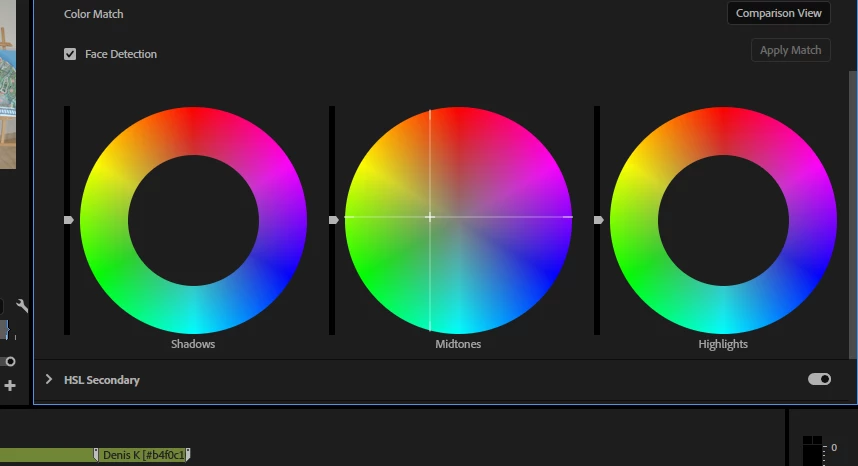
In Lumetri color of Premiere Pro v25 there's a bug with using color wheels. If you put your mouse cursor over one of them, click and drag it to change the color, the mouse moves about 5 milimetres and stops even though you are dragging it further on. When you release the mouse button, the cursor jumps to the position where you dragged it to. Reproduced easily, two of my collegues confirmed.
26 replies

Participant
October 20, 2024

I have the same issue; in fact, this issue is present in the beta as well.

Participant
October 20, 2024

Yeah, unfortunately I have the same problem in Lumetri panel and also working with curves

Participant
October 20, 2024

When we start color grading, this shadow part is not reducing properly. Please check this once.

Participant
October 20, 2024

Premiere pro 2025

AndrewTheGreat
Known Participant
October 18, 2024

Good to know. If someone merges my discussion to the one mentioned by Neil, I'll be much obliged

Stop trying to edit and EDIT!
R Neil Haugen
Legend
October 17, 2024

This has been reported by someone else yesterday, and I confirmed it on my machine. So there's already a thread about this issue.

Everyone's mileage always varies ...
Inspiring
October 15, 2024

Updated to PrPro 2025 and brought in single MXF (Sony XAVC LongGOP @35Mbps)

Testing out program

Applied Lumetri Color to Clip & "Basic Correction" controls worked fine. Reset those controls.

Used Color Wheels under "Color Wheels & Match" and the Shadows/Mids/Highlights sliders only move a 1/8 of the slide distance when clicking & dragging the control


If I keep dragging the Controller, the image in the Program monitor doesn't change until I release the Controller, and then it pops to where I selected, but I can't control it enough in real-time to do color adjustments.

System: Win11 Pro (i9-9900k @3.60GHz) 
RAM: 64 GB
GPU: NVIDIA GeForce RTX 2070 Super (8 GB vRAM); Studio Driver version 565.90
Premiere Pro 2025

R Neil Haugen
Legend
October 15, 2024

Yea, that's weird.


Simply clicking anywhere, it jumps to where you click.


Using an Elements panel, the wheels work as expected.


It is ONLY in click/drag, that the + dign stops moving pretty quick. BUT ... on letting up on the mouse button, it jumps to where you had dragged it.


Thanks for posting!


Edit: calling! @mattchristensen to get this to correct team devs.

Everyone's mileage always varies ...