
Participant
October 15, 2024

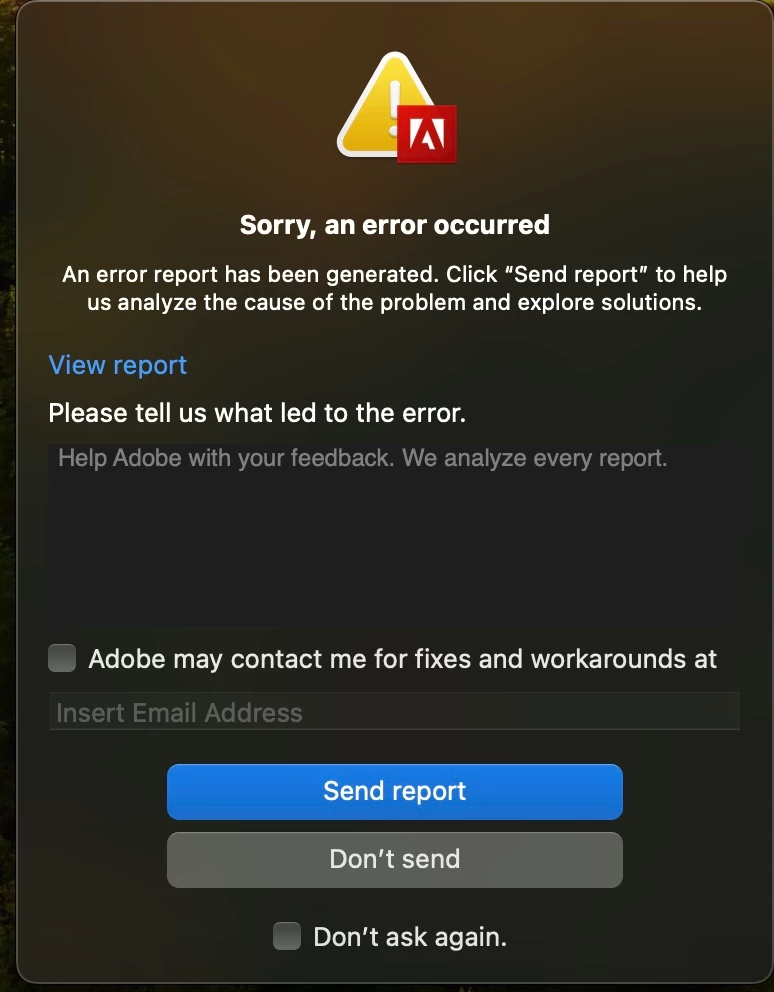
P: Receiving an error message even though there's no obvious error and the application works.

  • October 15, 2024
  • 12 replies
  • 1416 views

I continually get a pretty generic error message from Adobe any time I am using an application, yet there never seems to be an actual error as the application runs and works as normal. It's become an incrreasingly bigger nuisance as it can pop up multiple times when I'm working on an edit in premiere pro, and even comes up on AE and the like. My applications are all updated to the newest versions, which makes the error message make no sense as it suggests to me that I should update the application. Does anyone know how to get rid of this bug? Thanks.
This topic has been closed for replies.

12 replies

jamieclarke
Community Manager
Community Manager
October 23, 2024

updating status

Participating Frequently
October 18, 2024

i have same issue. no compatibility issues either. atibility issues. 

rachelcenter
Legend
October 18, 2024

Kevin it wont let me click "view report". I uploaded a private youvideo to you show you but Adobe says "You have reached the limit for number of private messages that you can send for now. Please try again later." So if I right click on the words "view report" it gives me a .DMP file. Can you please private message me your email address so I Can send you this report? I dont know what this report contains (i.e. private information about my computer?) so I dont feel comfortable posting it publically on this forum.

rachelcenter
Legend
October 18, 2024

HELP! I'm clicking view report and nothing is happening!! I'll take a private video to show you

jamieclarke
Community Manager
Community Manager
October 17, 2024

Hi @William35099596z2gh - This is an open bug and we are investigating.  Thank you for your patience.

Participant
October 17, 2024

I've entered my email to contact now, thank you for the support.

jamieclarke
Community Manager
Community Manager
October 17, 2024

Hi @William35099596z2gh - im asking because there is a known issue where Vimeo will crash in the background if you are signed in under the export panel.  Can you select the checkbox "Adobe may contact me" enter your email address and send report so that we can look it up on our end.  Thank you for your help.  

Participant
October 17, 2024

I haven't used vimeo but I am able to access it if that's any helpful information. I am using Premiere Pro v 25.0 however this issue was prevalent before the update. CPU settings are Apple M3 Max, 36GB, serial number JLK6T2HJ0H macOS 14.6.1 (23G93)

Kevin-Monahan
Community Manager
Community Manager
October 16, 2024

Updating the status of this bug report.

Kevin Monahan - Sr. Community & Engagement Strategist – Pro Video and Audio
rachelcenter
Legend
October 16, 2024

"sorry an error occured" pop up has become a daily occurence. It happens a few times a day. It has an adobe icon but doesnt seem to be crashing premiere or after effects.  See attached screenshot. I've reported it almost every day, multiple times a day, for at least a week now. Please tell me how to make it stop.

Kevin-Monahan
Community Manager
Community Manager
October 16, 2024

Hi @rachelcenter,

It's showing a crash report dialog box. Sorry. Next time this occurs, click the "View Report" blue text, save it as a text document, and attach it to this forum message, if possible. You can also send me a private message with the crash report.


Thanks,
Kevin

Kevin Monahan - Sr. Community & Engagement Strategist – Pro Video and Audio