
IMJMSF
Participating Frequently
April 2, 2025

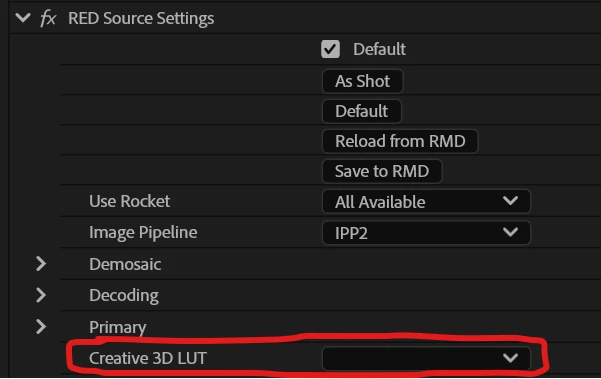
P: RED Source Creative 3D Luts missing from all R3D footage in all projects

  • April 2, 2025
  • 14 replies
  • 1170 views

Anyone else running into this issue?


All the source LUTs in my RED files are disconnected/missing in any project I open as of 25.2.0


When I attempt to reconnect LUTs within the RED Source settings, Premiere immediately crashes.


For now, I can use a Lumetri layer and add the LUT as an input LUT there as a work-around.
 

--
Premiere 25.2.0 (Build 147)

  • Hardware specifications:
    • Intel i9-12900K
    • NVIDIA GeForce RTX 3080 Ti (driver 566.24)
    • 64 GB RAM
    • most media stored on internal nvme SSD's, but this issue is occurring with NAS footage as well.
    • Windows 11 Pro (OS Build 22H2 version 22621.4317):
  • R3D raw files from various DSMC2 cameras


14 replies

IMJMSF
IMJMSFAuthor
Participating Frequently
April 23, 2025

That's great news, thank you for your attention and communication, Fergus!

Fergus H
Community Manager
Community Manager
April 23, 2025

Hi all, 


This issue has been fixed in the v25.2.3 versions of our video products. More information about this and other fixed bugs is available here: https://helpx.adobe.com/premiere-pro/kb/fixed-issues.html


Thanks for reporting this bug and thanks for your patience while we fixed it!


Regards,

Fergus

Known Participant
February 3, 2026

This bug is re-introduced in v26.0

IMJMSF
IMJMSFAuthor
Participating Frequently
April 16, 2025

Thank you for your attention and the fix, Fergus. I'm knee deep in post right now so will stick with the reverted version for the moment, but can check out the Beta over the weekend and look forward to v25.2.2


Fergus H
Community Manager
Community Manager
April 15, 2025

Hi all, 


We have a fix for this issue and, if you'd like to try it out, it is available in Premiere Pro Beta. We plan on releasing an update to Premiere Pro - a v25.2.2 - very soon that will include the fix. 


Thanks for your patience and we're very sorry for the inconvenience that this bug has caused. 


Regards,

Fergus

LightDive
Participant
April 14, 2025

Ya that did the trick for now. I've just opened one project so far but the LUTs came back online after downgrading to 25.1.0. Will have to stay there till a fix happens. 

- LightDive
IMJMSF
IMJMSFAuthor
Participating Frequently
April 8, 2025

Hey, sounds like you experienced the same bug that I did. For now, reverting to the latest version of 25.1 fixed the issue for me. I had to open an old auto-save rather than opening the 25.2 project in 25.1.


Adobe is aware and working on it. But for now I'm just working in the older version of Premiere.

LightDive
Participant
April 8, 2025
I'm in a large Premiere Productions environment running off of LucidLink with native RED raw files on a local disk.
 
I had previously gone through with the native files linked and applied a RED LUT to my source footage and spent a lot of time balancing three cameras across a number of shoot days. I have the source footage in their own projects and the edits in their own projects depending on the person. The edits are using synced multicam clips.
 
Now I'm loading up the same projects for finishing and titles.... and all the LUTs are missing from the source RED raw settings. Hard drives haven't changes, LUT locations haven't changed, etc. Nothing has changed, but Premiere has decided they should all go away. I'm hoping all my individual tweaks to the RED source clips are still there as well as I spent a lot of time balancing the individual cameras.
 
I tried re-adding all of the LUTs for one of the shoots to the three cameras. I then went back to the end use project and only one camera angle displayed the LUT change. Even though inside the multicam all the angles showed the change.
 
I saved and then quit and restarted to see if that would help. Instead it reset all the LUTs again. They were just gone from the source clips... again.
 
This is a project stopping level bug. I can't deliver log footage. Any troubleshooting ideas?
 
Was Premiere Pro 25.2.0, tried updating and same issue in 25.2.1
macOS Sequoia 15.4
- LightDive
IMJMSF
IMJMSFAuthor
Participating Frequently
April 4, 2025

Thank you for your attention to this!

jamieclarke
Community Manager
Community Manager
April 4, 2025

Updating Status to Acknowledged

Fergus H
Community Manager
Community Manager
April 4, 2025

@IMJMSF Thank you very much for reporting this issue! We are currently working on a fix for this bug and we will update this thread when we have more information. We are also updating our Known Issues documentation. We're very sorry for the inconvenience this has caused. A crash is bad but showing project from a previous version incorrectly is almost worse. 


Regards,

Fergus