
IMJMSF
Participating Frequently
April 2, 2025

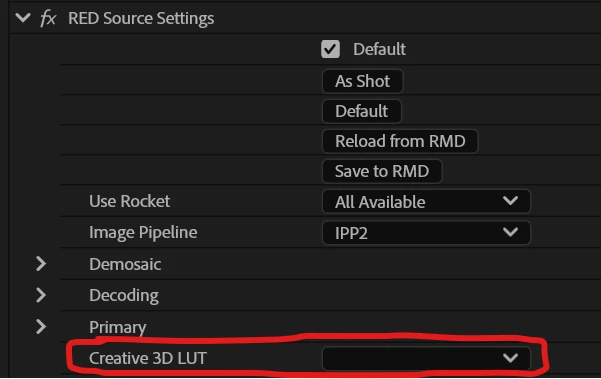
P: RED Source Creative 3D Luts missing from all R3D footage in all projects

  • April 2, 2025
  • 14 replies
  • 1170 views

Anyone else running into this issue?


All the source LUTs in my RED files are disconnected/missing in any project I open as of 25.2.0


When I attempt to reconnect LUTs within the RED Source settings, Premiere immediately crashes.


For now, I can use a Lumetri layer and add the LUT as an input LUT there as a work-around.
 

--
Premiere 25.2.0 (Build 147)

  • Hardware specifications:
    • Intel i9-12900K
    • NVIDIA GeForce RTX 3080 Ti (driver 566.24)
    • 64 GB RAM
    • most media stored on internal nvme SSD's, but this issue is occurring with NAS footage as well.
    • Windows 11 Pro (OS Build 22H2 version 22621.4317):
  • R3D raw files from various DSMC2 cameras


14 replies

IMJMSF
IMJMSFAuthor
Participating Frequently
April 3, 2025

Hi Kevin, I think my post covered everything except for the numbered list to reproduce?  for me that would be:


1. Open a Project in Premiere 25.2.0 that contains R3D footage that was shot with a LUT applied in-camera.

2. The previously connected LUT is missing from the RED Source settings on all clips

3a. Attempt to reconnect the LUT contained in the R3D clip's folder via the RED Source Settings.

4a. Premiere crashes.


OR


3b. Select "browse" in the 3D Creative LUT drop down in the RED Source Settings

4b. Do not select a LUT. Instead, click cancel.

5b. After a moment, the clip appears to now have the in-camera LUT applied, but the LUT is not listed in the RED Source Settings 3D Creative LUT drop-down.


or, skip all of the above and revert to the last version of 25.1, and everything functions as expected.


the rest of the bug report details should be in my original post, please let me know if the team has any specific questions and thanks for your help.

Kevin-Monahan
Community Manager
Community Manager
April 3, 2025

Thanks for letting the team know. Please give them full details. See, How do I write a bug report? Sorry for the frustration.


Thanks,
Kevin


Kevin Monahan - Sr. Community & Engagement Strategist – Pro Video and Audio
IMJMSF
IMJMSFAuthor
Participating Frequently
April 2, 2025

Reverting to 25.1.0 (Build 73) fixes the issue for now.

IMJMSF
IMJMSFAuthor
Participating Frequently
April 2, 2025

Update, and a weird one at that.

If I go into the Creative 3D LUT dropdown and select "Browse", then I click 'cancel' in the the Windows File Explorer window, when I come back to Premiere, Voila! The Red Source Settings LUT seems to apply to the footage. However, the LUT's name still does not appear in the Red Source Settings LUT dropdown. Instead, "Browse" has the blue checkmark.

This is marginally less painful than the Lumetri input LUT workaround, so I'll take it for now, but this is still clearly broken.