
Participant
November 22, 2025

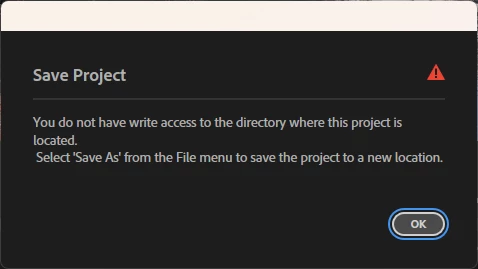
P: Saving in 25.6.2 You do not have write access to the directory And Save As Crashes Premiere Pro

  • November 22, 2025
  • 13 replies
  • 1904 views

After updating to Premiere Pro 25.6.2 if I open and edit any project, when I attemt to save, I receive the error "You do not have write access to the directory where the project is located". If I choose to "save as" the project appears to save but my premere desktop then turns black with no visable panels.


I have confirmed that I do not have an access issue. As the only user/administrator on this PC I have FULL CONTROL of all drives. All other Adobe products I use (After Effects, Photoshop, Audition, Media Encoder, LRC) can, Open, edit, save, & write to the same directory. 


If I uninstall Premiere and install version 25.5, Premiere works as expected and I do not receive any write access error messages.


I also attempted to uninstall and then install 25.6.1 and again received the "You do not have write access to the directory where the project is located" if I attempt to edit and then save a project. I again uninstalled and re-installed 25.5 and the issue goes away.


This issue is clearly introduced in version 25.6.1 and is also present in 25.6.2


I am running the latest version of Windows 11 Pro (Version 25H2 - OS build 26200.7171)
 

I am running on the following hardware:

MSI Z390 GAMING PRO CARBON AC Motherboard
Processor Intel(R) Core(TM) i9-9900K CPU @ 3.60GHz (3.60 GHz)
Installed RAM 64.0 GB
System type 64-bit operating system, x64-based processor
Display Adapter: NVIDIA Quadro RTX 4000 (8GB)

13 replies

Participant
January 10, 2026

Hi Ian, I am on 26.0 and still it doesn't let me save projects that are in the root directory but only with "save as". As soon as I moved the projects into a folder the projects are savable.
SH

IanB_360
Community Manager
Community Manager
January 5, 2026

I'm happy to report that a fix for this issue has been implemented in Beta v26.0. You can try it out in the Beta versions for now, while it is being integrated into a future stable release. 
Here to help.
Ian

December 18, 2025

I have also had this issue, and I can confirm that moving the project files from the root folder of my shuttle drive to a project folder with read access enabled solves this problem in the current version of Windows 11 and Premiere. It's been a huge headache.

Participant
December 16, 2025

I am having this issue too.  Are there any updates on this bug?

RobbieGarrett_0-1765894739709.png


IanB_360
Community Manager
Community Manager
December 9, 2025

This is a known issue, and the team is currently working on a fix. This post has highlighted two separate issues we are aware of. The save permissions error and the crash that occurs when using 'Save As'. For now, the workaround to avoid crashing when using 'Save As' is to avoid replacing the existing project file with the same name. You will not crash if you choose the options to Quick Save, Save, or Save a Copy. 
Here to help

Community Manager
December 5, 2025

Hi @bobb35642846

The team is aware of this issue now and will update the thread as we learn more. 

Thank you for all of the information provided, 

Dani

Yani Torres
December 9, 2025

Primier Pro

Version 25.6.3 Build 2


During the processes of Save AS if you the same file name in in Use, afte the warning messeges file already exist. Do yo wanto to replece it?. if yes is select project is lost and the original project get blank

Screenshot 2025-12-09 133905.png

Screenshot 2025-12-09 134012.png

Participant
December 5, 2025

@Dani_V. I provided the requested feedback promptly (on Nov 24), but have not heard back from you. Are you still looking into this?


I look forward to your replay.


Bob

December 2, 2025

Premiere has been giving me the same exact error as well, I cant save ANY projects to my main drive. Same issue with me

LuMags
Inspiring
December 2, 2025
Hi,
What's your filename /. Address like? Is it full of dashes as mine was?
The problem seems intermittent. On my laptop again today, different project
working fine. Need to test later if it's that particular project the other
day that's the problem.
LuMags
Inspiring
November 26, 2025

I'm trying to save a project on my laptop when working remotely and getting the attached error.

It doesnt explain as to what the actual error is and how to fix it other than to use a different file name.

Which I do. However, I cant overwrite the newly created Project filename and have to do Save As which is getting silly as I Ctrl+S automatically because I'm paranoid / do a lot of changes per minute!


 Totally fine on my rig in the office. Have tried turning Dropbox off in case thats clashing/tmp raging but no difference. Any ideas please how to fix?


Cheers

Ann Bens
Community Expert
Community Expert
November 26, 2025

Try and change all the - (dash) characters for _ (underscore)

And save to a local drive instead of Dropbox.

Participant
November 24, 2025

Hi Dani,


This happens with BOTH new and exsisting projects. If I create a New project on the root of ANY drive Premeiere throws the error message, but actually creates the project file. If I open the file, it's an empty project that I can add media to and use normally but if I try to save, I get the same error and my changes are never saved. If I move that same file to any directory in that same drive, everything works as normally. I can edit save etc. I have take that same edited file from the directory and move it back to the root of the drive, the project opens up as I lasted edited it, but I can no longer save (I get the "you don't have wrote access"... error)


If I roll back to version 25.5 I am able to create/edit/save on the root of any drive.


I have tried this on ALL of my drives and it happens on every one. I have the following drive types on my system:

  1. C-Drive SSD 2 TB - NTFS
  2. D-Drive HDD 4 TB - NTFS
  3. E-Drive SSD 2 TB - NTFS (Primary drive used for video editing)
  4. F-Drive SSD 1 TB - NTFS (Primary Scratch drive)
  5. G-Drive External USB HDD 18 TB - (Primary storage drive)
  6. H-Drive External USB HDD 18 TB - (mirred with G Drive)

The highlighted drives are the F-drive & E-Drive respectively. These are my primary drives used for editing/scratch.