
Participant
November 22, 2025

P: Saving in 25.6.2 You do not have write access to the directory And Save As Crashes Premiere Pro

  • November 22, 2025
  • 13 replies
  • 1904 views

After updating to Premiere Pro 25.6.2 if I open and edit any project, when I attemt to save, I receive the error "You do not have write access to the directory where the project is located". If I choose to "save as" the project appears to save but my premere desktop then turns black with no visable panels.


I have confirmed that I do not have an access issue. As the only user/administrator on this PC I have FULL CONTROL of all drives. All other Adobe products I use (After Effects, Photoshop, Audition, Media Encoder, LRC) can, Open, edit, save, & write to the same directory. 


If I uninstall Premiere and install version 25.5, Premiere works as expected and I do not receive any write access error messages.


I also attempted to uninstall and then install 25.6.1 and again received the "You do not have write access to the directory where the project is located" if I attempt to edit and then save a project. I again uninstalled and re-installed 25.5 and the issue goes away.


This issue is clearly introduced in version 25.6.1 and is also present in 25.6.2


I am running the latest version of Windows 11 Pro (Version 25H2 - OS build 26200.7171)
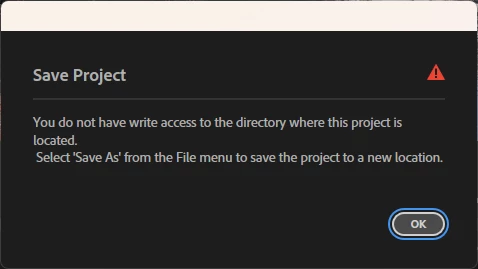
 

I am running on the following hardware:

MSI Z390 GAMING PRO CARBON AC Motherboard
Processor Intel(R) Core(TM) i9-9900K CPU @ 3.60GHz (3.60 GHz)
Installed RAM 64.0 GB
System type 64-bit operating system, x64-based processor
Display Adapter: NVIDIA Quadro RTX 4000 (8GB)

13 replies

Community Manager
November 24, 2025

Hi @bobb35642846

Thank you for reporting a problem and for the information provided. 

Is this happening only when creating new projects, or with existing projects as well? Could you provide any additional details about your drives (are they local/internal/external SSD or HDD, network, how are they formatted, etc)?

Sorry for the frustration, 
Dani

Participant
November 23, 2025

Hallo.

Seit den letzten beiden Updates, die ja kurz hintereinander kamen, habe ich Probleme beim abspeichern von Projekten. Vorallem wenn ich "Speichern unter" mache, wird Premiere Schwarz und man sieht nur noch oben die Leiste , jedoch ohne beschriftungen oder Menüs.

Wenn ich dann Premiere schließe und das Projekt was schonmal abgespeichert wurde, ist das Projekt nicht mehr vorhanden.

Man kann nur über die Autosave Sache, das Projekt wieder öffnen, jedoch muss man dann wieder etwas nacharbeiten, da ich auto save auf 5 min. gestellt habe.

Ich nutze Premiere Pro über Creative Cloude am PC der noch die Win 10 Version hat die in der verlängerung läuft und auf dem neuesten Stand ist.

Ebenso ist die Grafikkarte aktuell was treiber angeht.


Hat jemand noch die Probleme  und weis vielleicht zufällig Rat wie man das wegbekommt ?

Es ist frustrierend wenn man arbeitet und dann es nicht abspeichert außer eben beim Auto Save, aber das kann ja nicht eine dauer lösung sein.


Freue mich auf Antworten und Anregungen. Danke im Vorraus.

Wünsche einen schönen Abend. Gruss Markus

Peru Bob
Community Expert
Community Expert
November 23, 2025

Try saving to a different location.

Participant
November 22, 2025

Upon further investigation this seems to be an issue when placing the project file on the ROOT of ANY drive. If I create a directory and move the project file to the directory of any drive, save works as expected and I do not get the error message.


If I move the file back to the root of the drive the error returns. I also noticed an anomoly that I cannot explain. If the project file is on the root of ANY drive and I look at Project Settings | Scratch Disks the path is incorrectly displayed. You can see by the screenshot below that the path is displayed as Path: \\?\E: This happens on ALL drives on my system. If I move the file inside of a directory on the same drive and then open the project, it saves without error and the path on the scratch disks settings screen are also displayed properly.


If I close Premiere after initially opening a project file on the root of any drive and close Premiere and once again open Premiere and try to create a new project, it defaults to the root of my disk with this incorrect path displayed:


This happens with all disks on my systems and ONLY appears to be happening with Premiere.


FWIW this odd behavor happens in BOTH 25.5 and 25.6.2 but 25.5 does NOT throw the error abount not having write access when the project file is on the root of a drive and 25.6.2 always throws the error.


I do have a work around and can use 25.6.2 now. I just need to ensure each project has it's own directory and avoid using the root of any drive, but I cannot explain this issue.