Victor5CD3
Known Participant
January 14, 2026

Performance issues with the new video card.

  • January 14, 2026
  • 28 replies
  • 1346 views

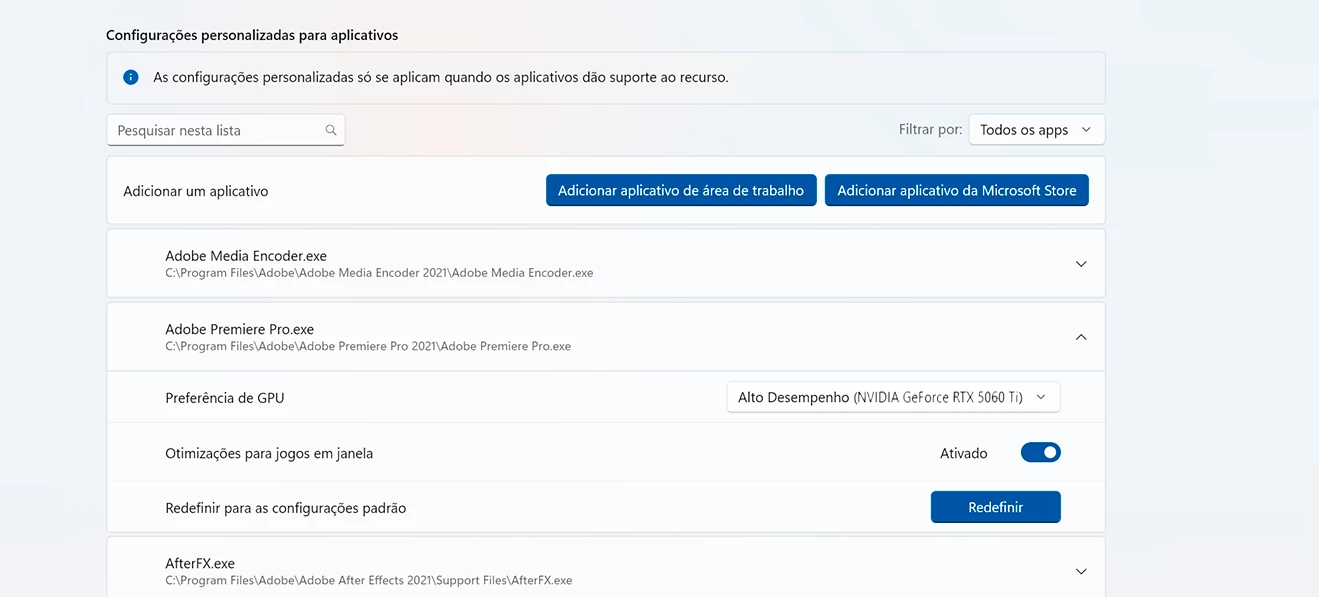
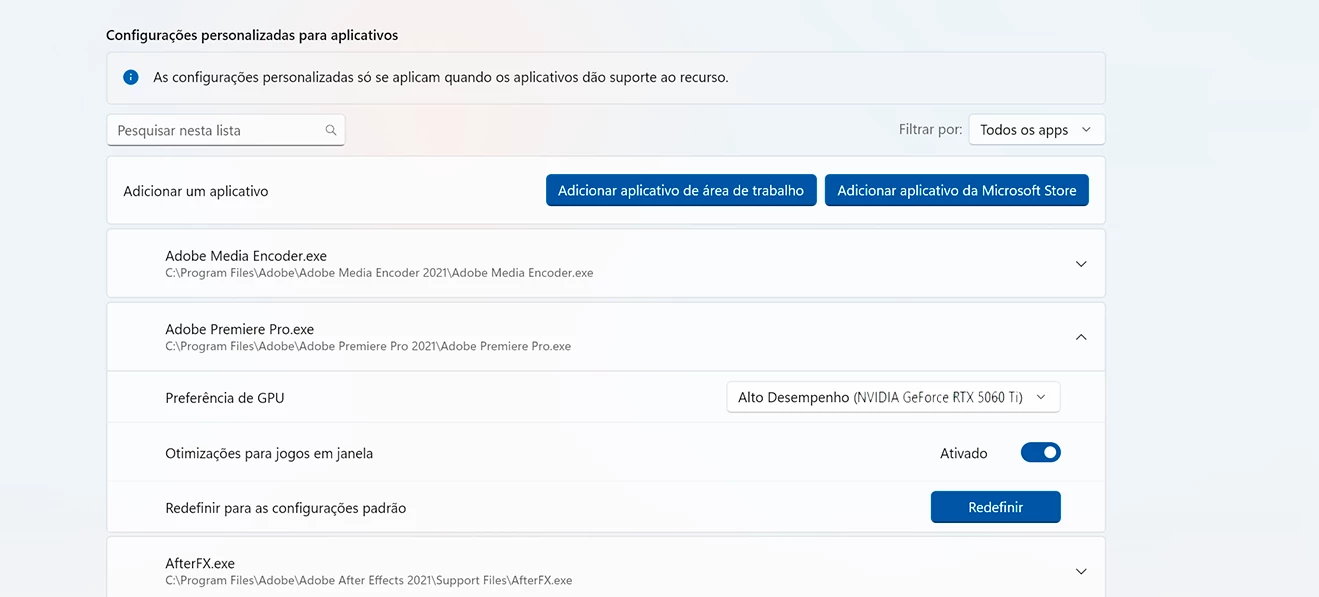
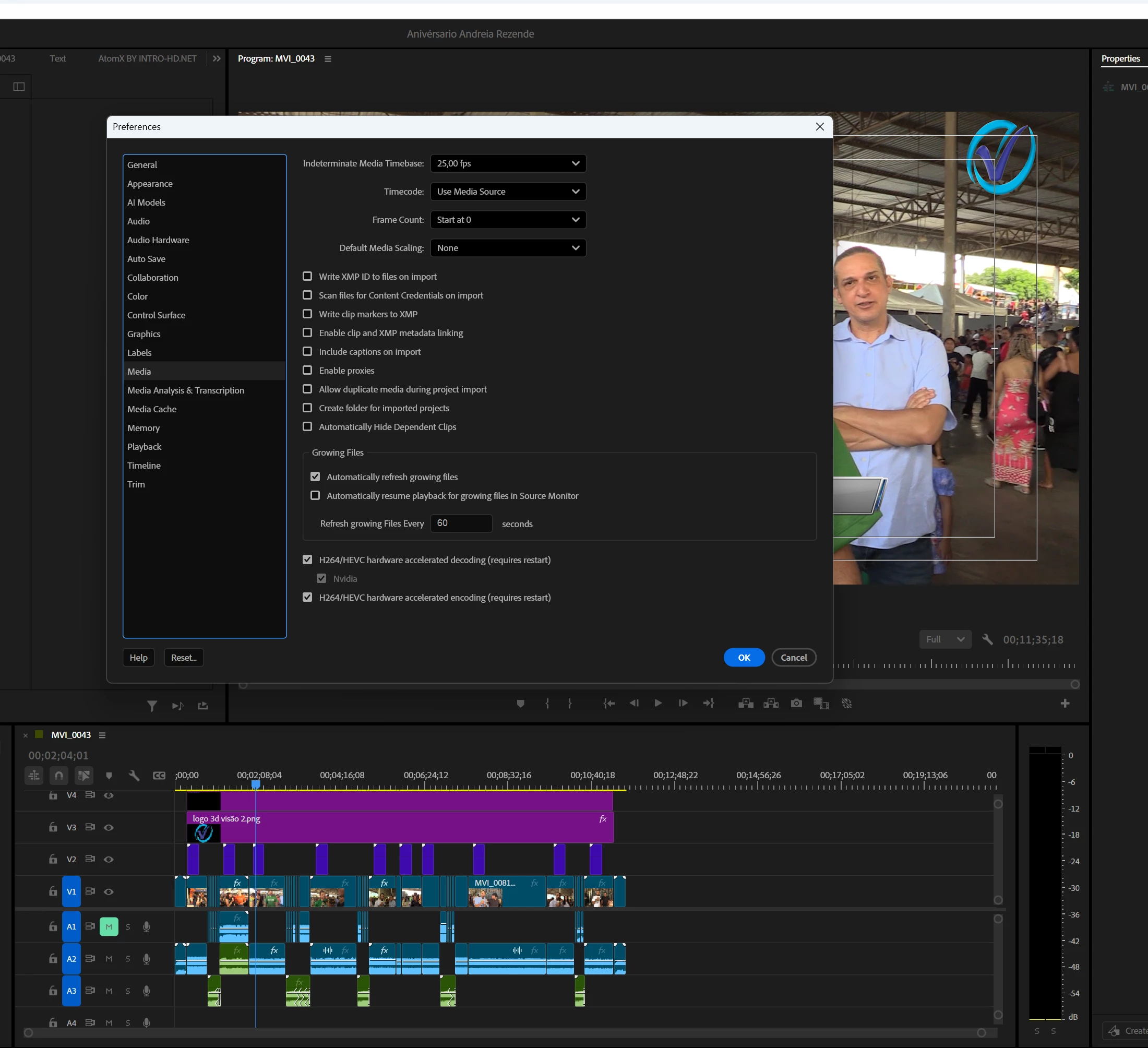
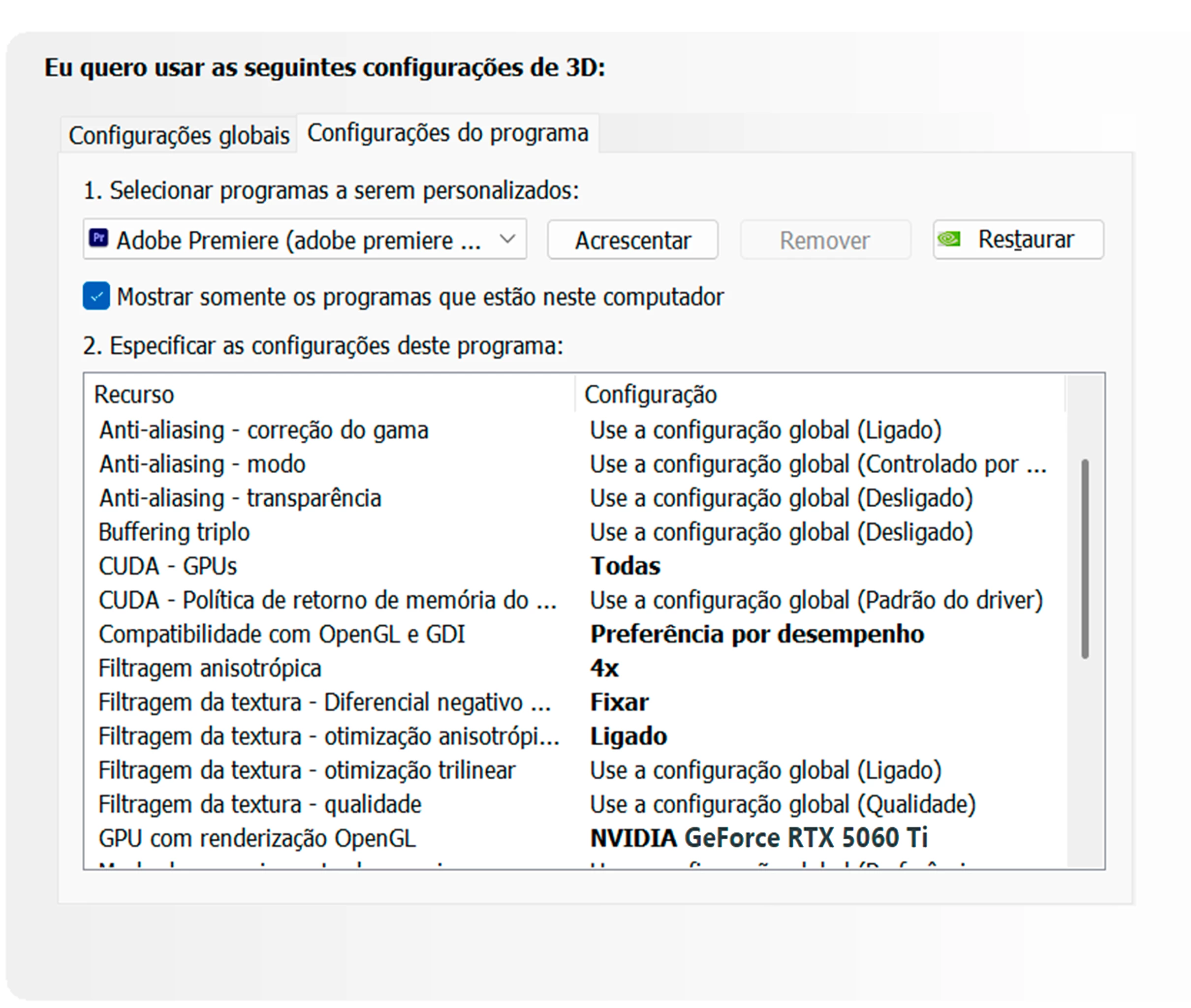
As I recently reported here on the forum, I bought a new video card, the RTX 5060 Ti. I was having problems with crashes and black screens during export, which was resolved with the new Nvidia driver from January 5th. However, I hadn't checked its performance in the Windows Task Manager. Today, while editing a video of just over 10 minutes in Full HD, I decided to open the Task Manager to check its performance. I saw that it was being used between 19% and 22%, and the processor was under higher load, sometimes reaching 100%. The usage between CPU and GPU should be balanced. The low video card usage is extremely frustrating. I am waiting for an Adobe moderator to tell me something. I respect the export process, which took 12 minutes to complete, and the video card usage varied between 19% and 22%. Below are some screenshots of how I configured the video card after installation. Remember that the old driver was uninstalled using DDU, resulting in a completely clean installation, following Adobe's standard recommendations for Premiere users. I'm waiting for someone from Adobe to respond.painel de controle Nvidia.pngwindows nvidia.pngwindows nvidia.pngCaptura de tela 2026-01-14 172808.png
28 replies

Victor5CD3
Known Participant
January 22, 2026

Well, Stan, it seems like everything that was working fine suddenly stopped working, haha. I edited .mts files from Panasonic AG-AC90, AG-AC30, and AG-AC8 camcorders in AVCHD for many years and never had any performance issues. When I did my first hardware upgrade and swapped a GTX 1080 for an RTX 3060, I was editing on an AMD 3800 FX. Later, when I upgraded the processor and motherboard, I kept the RTX 3060, which I used until November of last year. It edited very well, with few bottlenecks. Older versions of Premiere CC worked well, of course, they also had bugs, but they were easily workarounded. I don't understand how a computer powerful enough for Adobe Premiere can no longer use all its features. Of course, anyone who puts an RTX 5060 Ti in a computer during upgrades must have a computer that isn't a basic workstation for editing in Adobe Premiere; This video card isn't cheap. Considering it's not a basic model, it's a mid-range model for professional use.

This week I got quite tired trying to optimize my system and my friends' systems to work well with Adobe Premiere. After February, the demand for video editing usually increases, and it's important to have a system optimized to work well throughout the year.

I hope the Adobe team fixes and implements what's missing; the new hardware should work well with Premiere.

Build CPU Ryzen 5700X,64 GB ram,Nvidia geforce 5060 Ti 16 Gb,SSD nvme 1tb + ssd sata 2Tb HD Disc 2Tb Win11 24h2
Stan Jones
Community Expert
Community Expert
January 22, 2026

@RjL190365,


I've been drafting a question about systems, not unlike the several in the hardware forum about various graphics cards and processors. Your posts have been very instructive. (For context, I have an unidentified hardware issue that affects everything - not just PR - when it shuts down! I am working on a computer fix vs upgrade vs new system.)


I'm curious about your thoughts about the issues in this thread. It is a bug report, but otherwise is like one of the various video hardware threads. My impressions have been that the issues are not only PR optimizing cards, but the cards/drivers themselves getting sorted.


Stan


Victor5CD3
Known Participant
January 21, 2026

When I referred to the .mxf.avc file, it's because it's a native codec that's in my camera's theme, but 99% of the time for my workflow I use .mp4, which in my camera's codec appears as .MVI. The use of 4k is very specific, I hardly use it. I don't know the standard that you at Adobe use to do the performance test, do a test with videos longer than 20 minutes and you will see the rtx 5060ti losing performance. When I refer to my old rtx 3060, I didn't have these performance bottlenecks like I'm having with the rtx 5060 ti.

In my test using an all am5 platform with my card, during the export process the CPU usage was always high and the video card usage variable, and at some moments everything was very low. I didn't face these bottlenecks with the rtx 3060 and I edited .mp4 and avchd very well.
I hope you will look into resolving this problem carefully. This week has been quite tiring for me trying to optimize the system to make it work like before, but I haven't had much success.
My last attempt this week will be to uninstall the Nvidia Studio drivers with DDU and reinstall them. Do a clean install; I'm already quite tired. Thank you Jamie.

Build CPU Ryzen 5700X,64 GB ram,Nvidia geforce 5060 Ti 16 Gb,SSD nvme 1tb + ssd sata 2Tb HD Disc 2Tb Win11 24h2
jamieclarke
Community Manager
Community Manager
January 21, 2026

Hi @Victor5CD3 -  I'l try to address some of your questions here below


When you say “the RTX 50’s performance is much lower than that of an RTX 3060,” I think what you’re actually seeing is the difference in reported GPU utilization between the two cards. The RTX 3060 will likely show higher usage in Task Manager for the same workload, even if the real world performance is similar or better on the 50 series card.


When you say, “but I also sometimes film in 4K, which is a .mxf AVC file with a 150 Mbps bitrate,” it’s important to note that currently the 50 series cards do not hardware accelerate anything in an MXF container.


Here is a post: [Now Released] Improved support for NVIDIA Blackwell Architecture

Victor5CD3
Known Participant
January 21, 2026

Jamie, when I mentioned all those codecs, they're the ones most commonly used at the production company, not necessarily the ones that will always be used. In this case, since I was trying to optimize their new workstations, I tested with the codecs of all the cameras they had there, but I should mention that they mostly use Sony A7R cameras filming in S-Log.

Now, in my particular case, I have Canon and Panasonic cameras that use .mp4, .mxf .avc, and .avchd codecs. With my old video card, the RTX 3060, I didn't have these problems mentioned. I filmed for many years in .avchd with Panasonic cameras and edited and exported normally without any performance bottleneck. I remember that at the beginning with the RTX 3060 I was facing the same problems that I'm going through with my RTX 5060 Ti, because I also bought an RTX in the year of its release, upgrading from a GTX 1080. I know it took a while for it to stabilize in Premiere. Regarding the sequences, I've always used them normally when I film events or take footage from other videographers to edit. Usually, the file is from a single camera, not mixing codecs. Lately, I've been filming more in full HD with my Canon camcorder, .mp4 at 35 Mbps bitrate, but I also sometimes film in 4K, which is a .mxf.avic file with a 150 Mbps bitrate. When I have to edit in AVCHD from my Panasonic camcorder, its native bitrate is 28 Mbps. The standard bit sampling rate of my cameras is 8 bits 4.2.0 for Panasonic and 4.2.2 for Canon.
The RTX's 50 performance is much lower than that of an RTX 3060. Something is not normal, and I hope you at Adobe support can resolve this.

Build CPU Ryzen 5700X,64 GB ram,Nvidia geforce 5060 Ti 16 Gb,SSD nvme 1tb + ssd sata 2Tb HD Disc 2Tb Win11 24h2
jamieclarke
Community Manager
Community Manager
January 21, 2026

Hi @Victor5CD3 - As I mentioned, GPU hardware acceleration depends on very specific conditions. When you say you tested .mp4, .avchd, .mxf, .avc, and .mov files, not all of these formats are necessarily hardware accelerated. It depends on the container, codec, chroma subsampling, and bit depth, and not all GPUs behave the same way. You also need to check your sequence settings especially the preview codec as this can affect hardware acceleration.  We need additional details to understand what you are experiencing.

Victor5CD3
Known Participant
January 21, 2026

Hi Jamie, I ran tests with .mp4, .avchd, .mxf.avc, and .mov files. A friend's production company bought new workstations and was experiencing performance issues. Since my problem was similar, I went there to help them, but without success. Adobe Premiere is indeed having problems with the RTX 50 series. The configuration of the new workstations is AM5, with Ryzen 7700x, NVMe SSD, 32 GB of RAM (two 16 GB sticks), and RTX 5070 graphics cards. I did all the standard optimizations, just like I did on my system, and there is indeed a performance loss during export, requiring more processor load, and the GPU becomes unstable at 40% rendering. During export, the graphics card usage dropped by 10%, and at many points the processor reached 100% usage. Using Driver Studio from January 5, 2026 and
I updated their Premiere to 25.6.4 in the export following the normal procedure, selecting hardware encoding, Premiere enabled in preferences, H.264/Hevc media.

I took the opportunity to remove my RTX 5060 Ti and test it on their workstations, which are AM5. The same problem occurred. I spent an entire day there trying to optimize their workstation, but without success. They are considering returning the computers to the store where they bought them. I told them that, since these cards are newly released, they may not yet be fully optimized and 100% compatible with Adobe Premiere, and that they should wait a while to see if Adobe releases a patch that improves the performance and use of RTX 50 series cards with Adobe Premiere.

My platform, which is AM4, experiences a significant performance loss in videos longer than 20 minutes. I also deeply regret buying the RTX 5060 Ti. Adobe support, please test these video codecs; they are the most common ones we use here, present in Sony, Canon, and Panasonic cameras. After all these days conducting numerous tests here, there's definitely something wrong with the RTX 50 series.

Build CPU Ryzen 5700X,64 GB ram,Nvidia geforce 5060 Ti 16 Gb,SSD nvme 1tb + ssd sata 2Tb HD Disc 2Tb Win11 24h2
jamieclarke
Community Manager
Community Manager
January 21, 2026

Hi @Victor5CD3 - In order to help investigate this issue further, we’ll need a bit more information from you.

Hardware acceleration on the GPU depends on very specific conditions, including the container, codec, chroma sampling, and bit depth, and not all GPUs behave the same way. That’s why it’s important for us to know the exact GPU driver version you’re using, as well as the exact media used in your sequence.  From your description, it sounds like the GPU may initially be accelerating the media, but then something changes either the media is no longer eligible for hardware acceleration or effects are being applied that force it back to software.  Can you check your sequence settings as well?  There are a number of conditions that could affect performance in this way.  Thank you for all of the information you’ve provided so far it’s very helpful. With these additional details, we should be able to narrow this down further.

Victor5CD3
Known Participant
January 21, 2026

I had the opportunity to test both the RTX 5060 Ti and the 5070 on brand new AM5 workstations complete with a Ryzen 7700x and 32 GB of NVMe SSD memory. Even without using almost any effects, just Lumetri Color and Premiere's own transitions, during export the use of the video card and processor starts to become quite balanced. However, when the export reaches 40%, the video card starts to lose performance and drops to 10%, requiring more processor load. Speaking of an edit of more than 20 minutes in Full HD, a production company bought new workstations because they weren't getting good results. They called me to see if I could solve the problem, since I told them that my problem was very similar. I optimized the entire system, both in Windows and in the Nvidia control panel. I also updated their Premiere to version 25.6.4. My computer is older. With PCIe 4.0, from what I've heard, there's a slight performance drop when using a PCIe 5.0 card, but on a brand new AM5 system, I don't understand; everything should work perfectly. Hello Jamie Clark from Adobe support, please check with the team to improve Adobe Premiere's performance and compatibility, as the RTX 50 series cards are still causing significant bottlenecks. If you, from support, have the opportunity to perform the tests here, as I did, you will see that the performance is not working correctly, which leads me to believe that something is really wrong; Premiere's compatibility is not 100% optimized. The production team spent over $15,000 on new workstations. I spent all day there today trying to help them, but without a satisfactory result. There is some problem with the RTX 50 series and Premiere. I know it hasn't even been a year since these graphics cards were released, and it's too early to reach a consensus; I hope the Adobe team resolves this.

Build CPU Ryzen 5700X,64 GB ram,Nvidia geforce RTX 5060Ti,SSD nvme 1 Terabyte + ssd sata 2Tb e hd Disc 2tb Win11 24h2
Build CPU Ryzen 5700X,64 GB ram,Nvidia geforce 5060 Ti 16 Gb,SSD nvme 1tb + ssd sata 2Tb HD Disc 2Tb Win11 24h2
Victor5CD3
Known Participant
January 21, 2026

I had the opportunity to test both the RTX 5060 Ti and the 5070 on brand new AM5 workstations complete with a Ryzen 7700x and 32 GB of NVMe SSD memory. Even without using almost any effects, just Lumetri Color and Premiere's own transitions, during export the use of the video card and processor starts to become quite balanced. However, when the export reaches 40%, the video card starts to lose performance and drops to 10%, requiring more processor load. Speaking of an edit of more than 20 minutes in Full HD, a production company bought new workstations because they weren't getting good results. They called me to see if I could solve the problem, since I told them that my problem was very similar. I optimized the entire system, both in Windows and in the Nvidia control panel. I also updated their Premiere to version 25.6.4. My computer is older. With PCIe 4.0, from what I've heard, there's a slight performance drop when using a PCIe 5.0 card, but on a brand new AM5 system, I don't understand; everything should work perfectly. Hello Jamie Clark from Adobe support, please check with the team to improve Adobe Premiere's performance and compatibility, as the RTX 50 series cards are still causing significant bottlenecks. If you, from support, have the opportunity to perform the tests here, as I did, you will see that the performance is not working correctly, which leads me to believe that something is really wrong; Premiere's compatibility is not 100% optimized. The production team spent over $15,000 on new workstations. I spent all day there today trying to help them, but without a satisfactory result. There is some problem with the RTX 50 series and Premiere. I know it hasn't even been a year since these graphics cards were released, and it's too early to reach a consensus; I hope the Adobe team resolves this.

Build CPU Ryzen 5700X,64 GB ram,Nvidia geforce 5060 Ti 16 Gb,SSD nvme 1tb + ssd sata 2Tb HD Disc 2Tb Win11 24h2