
Participant
October 15, 2024

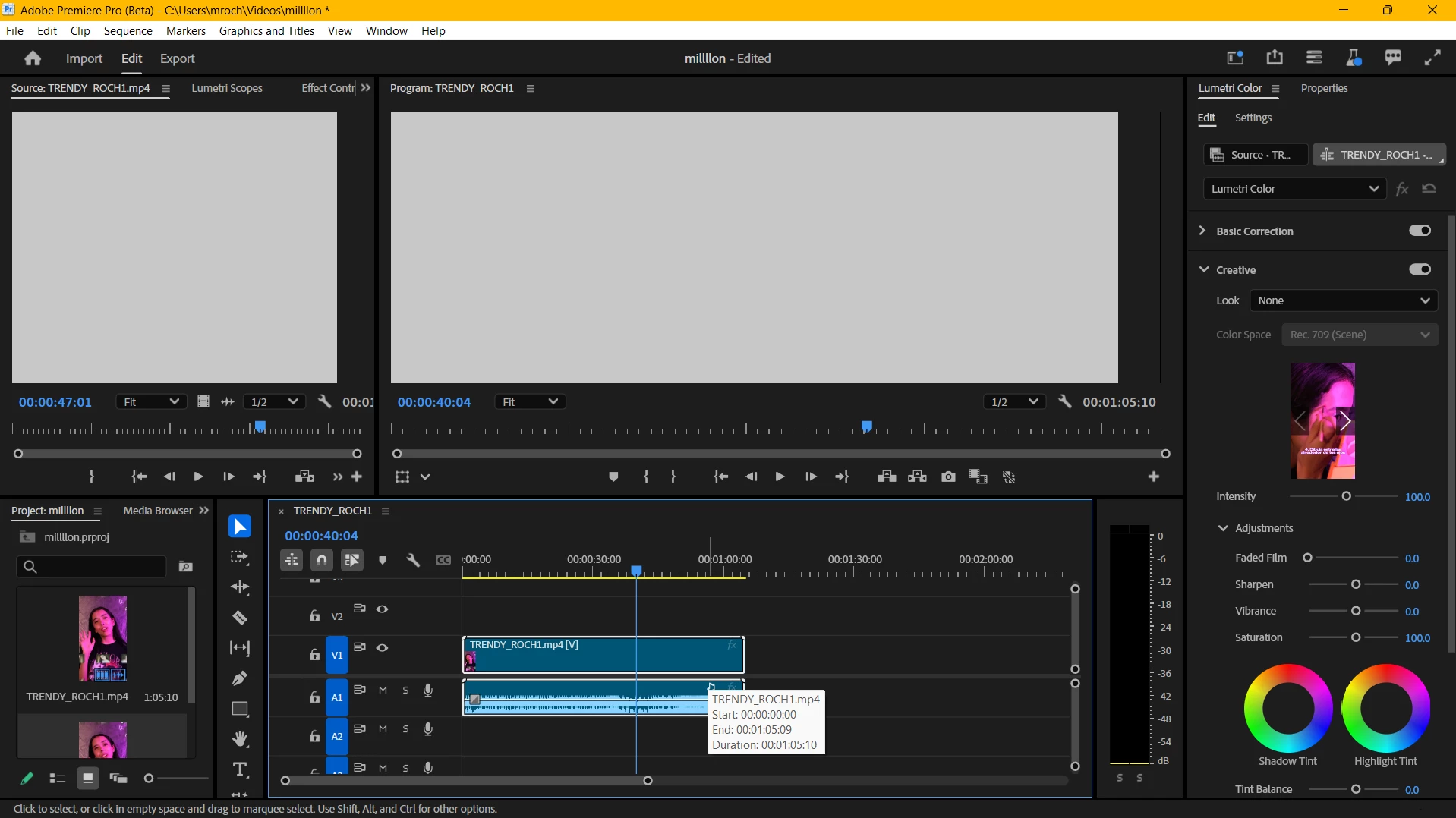
Playback not working AT ALL

  • October 15, 2024
  • 2 replies
  • 365 views

Hi everyone,

I'm experiencing a major issue where the playback of my projects won't show at all. It doesn't matter whether it's an existing project or a brand new one—my playback simply doesn't work. Here's a list of everything I've already tried, but none of it has worked:

  • I checked my NVIDIA drivers (they're all up to date).
  • I uninstalled and reinstalled both Premiere and the entire Creative Cloud.
  • I followed the "file > project settings > general > renderer" tip that's all over YouTube.
  • I even went to an HP store, but the technician had no clue.
  • I contacted NVIDIA customer service, and they recommended installing the "Creator" driver, but that didn’t solve it either.
  • I swear I've watched EVERY relevant YouTube video.
  • I reset my workspaces to the "saved layout."
  • I updated Windows.
  • I changed the playback resolution.
  • I toggled my proxies on and off.

Some details that might help:

  • I bought this computer in May 2024. It has 32GB of RAM, an i7 processor, and an NVIDIA graphics card, so I highly doubt it's a hardware issue.
  • Premiere is the only Adobe app giving me trouble.

If anyone has any idea what's going on or how I can fix it, I'd be incredibly grateful. I’m desperate—editing videos is my full-time job, and I can’t afford to deal with this issue much longer. If I don't find a solution soon, I might have to switch to DaVinci Resolve.

Thank you so much for taking the time to read this!


This topic has been closed for replies.

2 replies

Participant
October 15, 2024

Hi, @Kevin-Monahan heres the full information, please let me know if more information is required or if i need to start a new discussion from scratch with all the info


Issue: My Adobe Premiere playback won't show

Adobe Premiere Pro version:

  • Premiere Pro 25.0
  • Premiere Pro Beta 25.1
  • Premiere Pro 24.6.1

Operating system: Windows 11

System Info:

  • CPU: Intel R UHD Graphics
  • GPU: Nvidia GeForce RTX 4060
  • Driver: Nvidia Studio Driver 561.09
  • RAM: 32GB
  • Storage: Internal SSD

Video format:
I’m experiencing this issue with every type of video format and every single project I’ve ever created. It even happens with simple PNG images. However, if specific details are needed, here's the info on a video type I was editing successfully last week but can no longer work with:

  • MOV files, 24fps, 4K, 10-bit.

Workflow details:
This problem occurs with every Adobe Premiere project, whether it's an existing project or a brand new one. Playback won’t work with any media, from simple PNG images to 4K MOV files.

Steps to reproduce:
To reproduce the issue, all I have to do is open any project—playback always looks the same (it doesn’t show).

Expected result:
I should be able to see the playback.

Actual result:
I am unable to see the playback at all.

I posted more info about my issue here 

Kevin J. Monahan Jr.
Community Manager
Community Manager
October 15, 2024

Hi @Mildred38202553gy1u ,

Great start, but can the team have more info? See, How do I write a bug report?


More precise system info and media info would help.


Thanks,
Kevin

Kevin Monahan - Sr. Community and Engagement Strategist – Adobe Pro Video and Audio