

AndrewTheGreat
Known Participant
April 19, 2026

Premiere 26.2 pixel aspect ratio bug

  • April 19, 2026
  • 2 replies
  • 33 views

Got this today. My sequence pixel aspect ration is 1.0, the footage I use has 1,7. Normally Premiere has no problems with that and define pixel aspect ration correctly. No the interpret footage says the PAR is unknown and brings the clip into the project in this state:
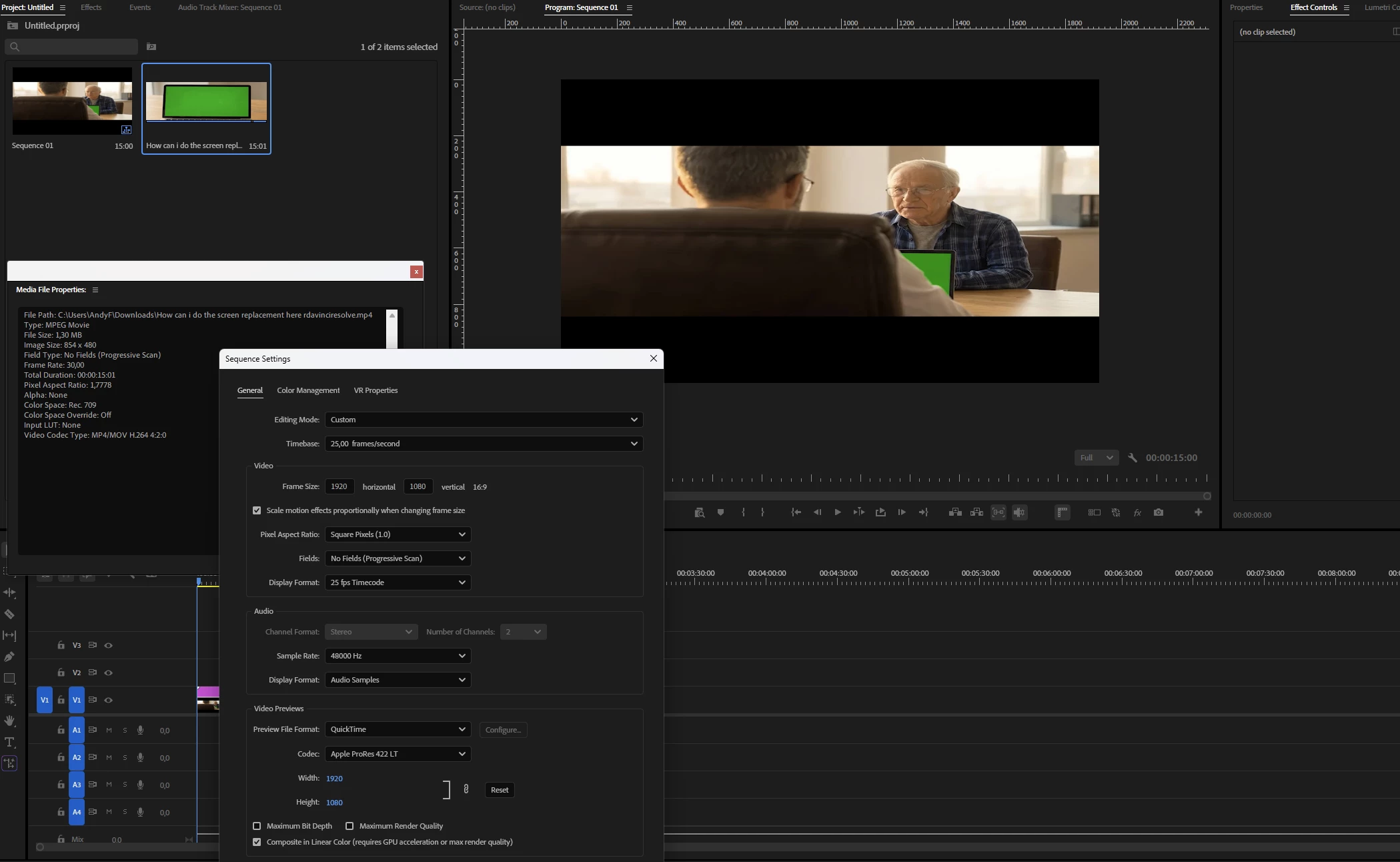
 

A fix is manual interpreting. Version 26.0.2 had no problem with the same file.

    2 replies

    jamieclarke
    Community Manager
    Community Manager
    April 20, 2026

    Hi ​@AndrewTheGreat -   Thanks for submitting your bug report. We need a few more details to try to help with the issue.  Please see, How to Report a Problem?

    Do you have this issue in Premiere version 26.2?

    Can you send the media file to jamiec@adobe.com so that we can take a look.

    AndrewTheGreat
    Known Participant
    April 20, 2026

    Hi, ​@jamieclarke 

    Here’s the file, but you can use any that has a non-standard AR: https://drive.google.com/file/d/10FJ_CROBcW5N8k0tH-maxmHScQuatIfS/view?usp=drive_link

    The file is ex-stock, so I don’t mind posting it publicly.

    The issue is present in Pr 26.2 and is absent in Pr 26.0.2. Several people could reproduce it.

    • Issue: Premiere 26.2 does not automatically define pixel aspect ration and squeezes a video with the non-standard PAR in a 1.0 PAR timeline whereas Premiere 26.0.2 does it correctly.
    • Steps to Reproduce: launch Premiere, create a project and a 1080p timeline, import the footage in question and add it on the timeline. Even after you import it you will see that something is wrong with the clip AR even in the project bin.
    • Expected Result: the clips aspect ratio should be defined correctly, it should not be squeezed in the project bin or on the timeline.
    • Actual Result: The video is squeezed both in the project bin and on the timeline.
    • Screen Recording: 


    • Premiere Version: 26.2(issue), 26.0.2 (no issue)
    • Operating System: Win11 25h2.
    • GPU Driver (Windows only): NV GR 596.21 (Studio gives the same result)
    • Video Format: Any.

    Workaround: go to the clip preferences and interpret it as 1.0 aspect ratio.

    Stop trying to edit and EDIT!
    AndrewTheGreat
    Known Participant
    April 19, 2026
    1. 26.0.2 for comparison:


    Stop trying to edit and EDIT!