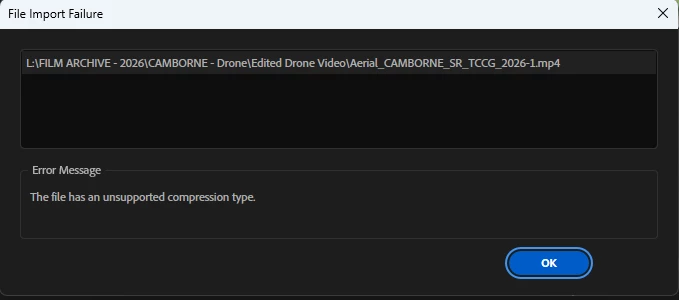
I get these errors when I import drone content into Premiere 26.5.2. The video files are playable in windows explorer and MacOs. However they fail to import into Premiere. If I do ever manage to get them to import the videos show the first frame but are unplayable even with a high spec machine. They will not even move one frame. Again like the issue I had with the GoPro files that showed only as audio I had to roundtrip my DJI videos through windows clipchamp to make them viewable by premiere. This causes a degradation in quality. Again if I re-export with encoder it doesnt seem to resolve the issue.
Welcome to the Premiere forums! We need a few more details to help us understand the issue. Please see,How do I write a bug report? A screenshot of the Mediafile Properties could help. Have you tested this issue on both Mac and PC machines, if so, could you list both of those system specs for us? We could also use your Adobe Media Encoder version numbers. Has this media worked in a previous version of Premiere and AME?
If you’re willing and able to supply us with test files from your DJI Mini Drone 5, I can DM you a private upload link.
Thanks for getting back to me, and apologies for the delay in responding. Unfortunately, my Adobe Community account was accidentally banned due to what appears to have been a forum glitch. After exchanging a few messages with the support team, my account was reinstated, so I'm finally able to respond!
I've now updated to Premiere Pro 27.0, and unfortunately I'm still experiencing exactly the same problems importing DJI Mini 5 Pro footage.
One important detail I've since established is that the footage appears to import correctly into Premiere Pro on macOS, but fails on my Windows workstation. This makes me wonder whether the issue is specific to the Windows installation or configuration rather than the footage itself.
The files play perfectly well in Windows Explorer and other media players, but Premiere refuses to import them, displaying an "unsupported compression type" error.
I've also tried Adobe Media Encoder, but encountered similar problems, including black or unplayable video output.
The only reliable workaround I've found is to run the footage through Windows Clipchamp and export it again. Premiere then recognises the files, but this introduces another compression stage and potentially reduces the quality of the original 4K footage.
I don't know whether it's related, but I've also experienced very similar issues with GoPro footage, where Premiere imports only the audio without any video. I've documented that separately here:
It makes me wonder whether there's a wider issue with how Premiere handles certain codecs or compression formats on this particular Windows machine.
Windows workstation specifications
System
Model: Dell Precision 7780
Operating System: Windows 11 Education, 64-bit
Windows Version: 10.0.26200 (Build 26200)
Processor: 13th Gen Intel Core i7-13850HX
CPU: 20 cores / 28 logical processors
RAM: 32 GB
BIOS: Dell 1.23.6 (15 July 2025)
BIOS Mode: UEFI
Graphics
Dedicated GPU: NVIDIA RTX 3500 Ada Generation Laptop GPU
NVIDIA Driver Version: 32.0.15.9658
Integrated GPU: Intel UHD Graphics
Intel Graphics Driver Version: 32.0.101.7088
Adobe Software
Premiere Pro: 27.0 (previously 26.5.2, with the same issue)
Adobe Media Encoder: Similar problems with importing and rendering footage
Additional observations
This Windows workstation is managed by an organisation's IT department, so there may potentially be security policies, permissions or system configurations affecting Premiere's ability to decode certain video formats.
I noticed that Windows reports the following security features as enabled:
Virtualisation-based security (VBS)
Hypervisor-enforced Code Integrity (HVCI)
Credential Guard
I don't know whether any of these are relevant, but thought they might be worth mentioning given that the same footage appears to work correctly in Premiere on macOS.
Given the hardware specifications, I wouldn't expect this machine to struggle with importing standard DJI or GoPro footage.
I'd be happy to supply original DJI Mini 5 Pro footage for testing if you can send me a private upload link.
I'd really appreciate any suggestions for narrowing down the cause, particularly whether this could be related to Windows codec support, GPU drivers, hardware decoding or an IT-managed system configuration.
Thanks again for your help.
Errors when importing DJI Mini 5 Pro footage.File properties of one drone shot.
@SJRich Ah thank you for this info! I’ll apply it to the other ticket as well, but I hope you can upload clips to the link I privately messaged you. That will help immensely. If you cannot see that upload link, please privately message me an email and I can reach out to you that way. We would love to address problems users are facing.

 AdChoices