

_nicdean
Community Expert
Community Expert
June 4, 2026

Premiere Pro 2026: MOGRT Compatibility Dialog

  • June 4, 2026
  • 1 reply
  • 17 views

The compatibility dialog needs to be updated to include all the Film Impact effects now that they are bundled in Premiere.


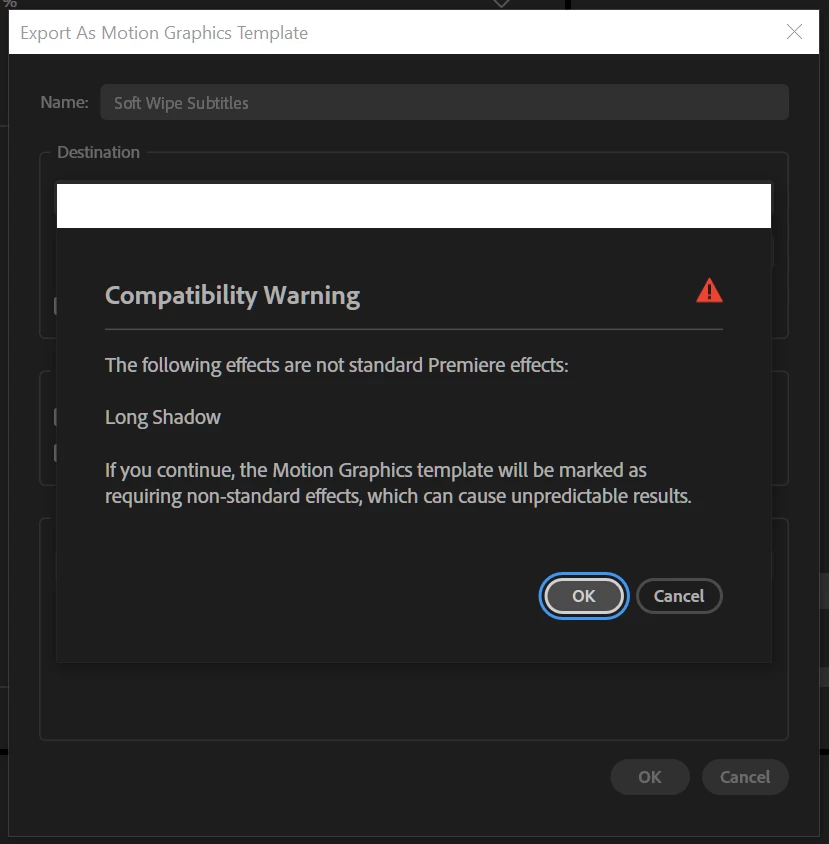
When exporting Premiere Pro graphics to .mogrt with the command “Export to Motion Graphics Template...”, this is the compatibility warning that shows.


It should not show, because the Film Impact effects are now “standard” as they are included in all versions of 2026+.


    1 reply

    KatieToo
    Community Manager
    Community Manager
    June 5, 2026

    Hi ​@_nicdean 

    Welcome to the Premiere Pro forums! We are glad to see you here. Thank you for including that compatibility warning screenshot of your issue with the Long Shadow effect (part of Film Impacts) while doing a .mogrt export. 

    We need a few more details to try to help, like what version/build of Premiere, if Mac or PC and computer specs, etc to help narrow it down. Please see, How do I write a bug report?

    Sorry for the frustration and hope we can help soon!

    Appreciate your post,
    Katie