
Participating Frequently
June 11, 2025

Premiere Pro CONSTANTLY Freezing with Sufficient Specs (Upgraded to RTX 5090)

  • June 11, 2025
  • 44 replies
  • 4721 views

I recently upgrade my computer to a RTX 5090 and have been experiencing a lot of playback and rendering issues within Premiere pro specifically. I've already done a lot of trouble shooting to make sure i do not have overlapping drivers (removing drivers with DDU while in safemode) and I made sure all of my drivers are up to date, even installing the newest available studio drivers that Nvidia offers. I'll put a full spec list down below.

Problem:
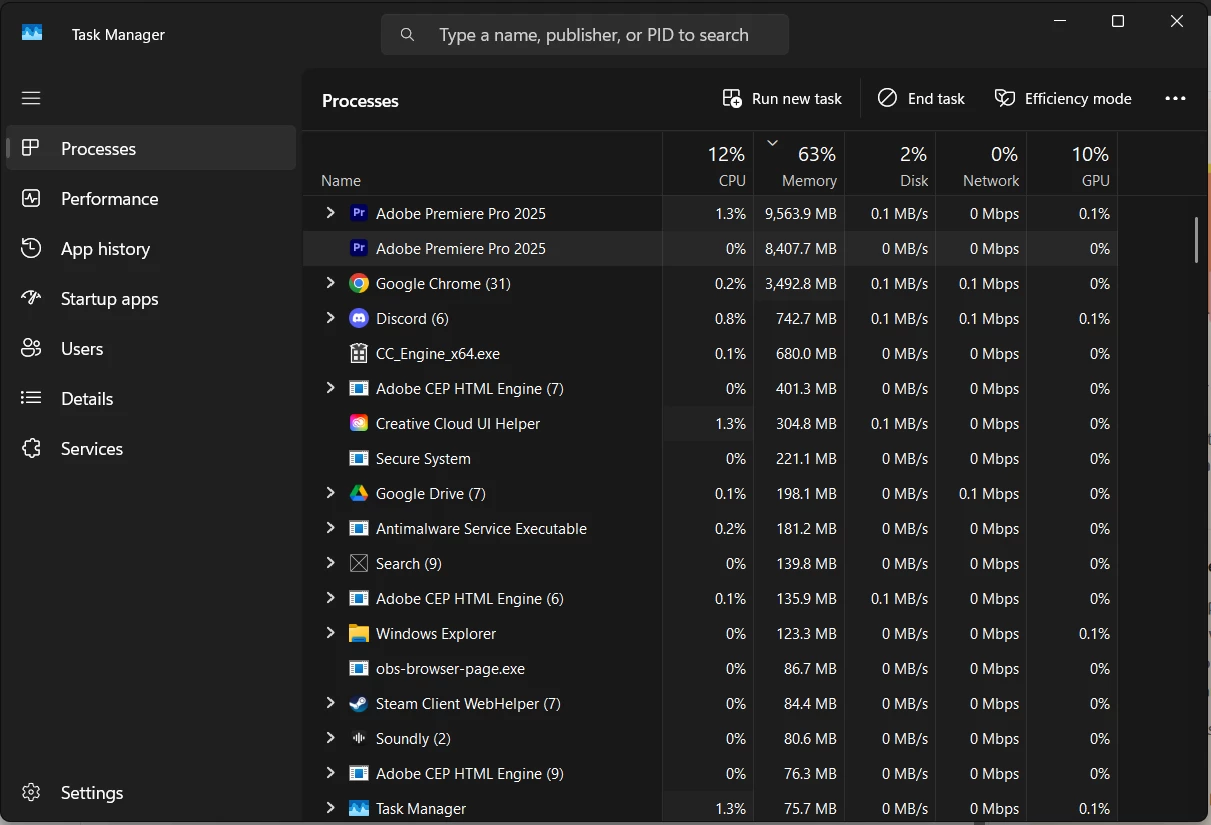
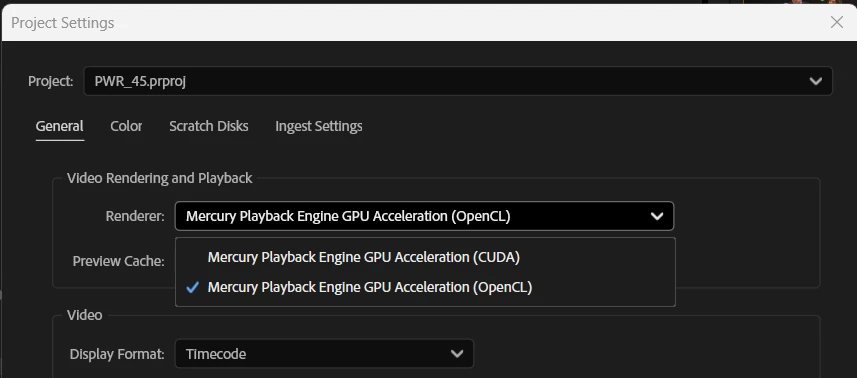
I have been editing for years without these major issues, so I'm assuming my issue is related to my recent GPU upgrade or it's drivers. Whenever I'm editing a video and watching it back on the timeline, it will randomly freeze on one of the frames I was on and stay like that for upwards of 2 minutes until it catches up or I get impatient and try to restart the program. It feels as if my computer is hitching or trying to catch up. I read online that if I switched the video renderer to OpenCL instead of CUDA, it may help and would indicate there is a driver issue. While this is a work around, this makes my playback extremely skippy/laggy due to it not using the GPU. I then go to try to render the video and it will start the render, but somewhere in the middle of the render, it will get completely stuck and stop rendering, although the footage it's rendering is not hardware intensive at all. The way I'm currently working around this is to transfer all my files to a different computer via google drive desktop and then render it there, where render times are fine, and no freezes happen. Also, one last issue i'm constantly running into is that whenever the program is in this "hitching/freezing" state, it is IMPOSSIBLE to fully close out of the program. I will open task manager and force close it and it will still not close. I have to click the power button on my pc and then cancel the shutdown in order for it to close and then it will still be open in the background, stuck at whatever the memory bandwidth was at when it was first shutdown, until the computer is fully restarted. This makes it extremely difficult to relaunch the program normally cause my computer is thinking it's still active I guess(50/50 chance it will launch). please help me. I'm on the latest version of drivers, and adobe software as well.

I do use a decent amount of extensions, which I will list here: (I don't think extension effect anything, but I could be wrong)
- Film Impacts
- Excalibur
- VideoVault3

Full specs list:
CPU: AMD Ryzen 7 7800X3D
GPU: NVIDIA GeForce RTX 5090
Memory: Corsair CMH32GX5M2B6000Z30 (64gb @ 6000MHz)
Storage: Samsung SSD 980 PRO 2TB
Motherboard: B650 GAMING PLUS WIFI (MS-7E26)
BIOS Version/Date: American Megatrends International, LLC. 1.30, 8/10/2023
44 replies

danm32376722
Known Participant
July 21, 2025

I'm having most of these issues after upgrading to a 5090. Had 0 issues with adobe products on my 4080 super. Can only render content out with software encoding. System has been stable for months until this.

Participating Frequently
July 21, 2025

@jamieclarke The studio driver does not work I have tried with both studio and game drivers to no avail. They were both the latest drivers as of today. I have no plugins installed or third party panels. 

jamieclarke
Community Manager
Community Manager
July 21, 2025

Hi @Albo Gravity - Thanks for submitting your bug report. We need a few more details to try to help with the issue.
As others have said Adobe recommends using the "Studio" driver version when working in Premiere Pro.


What driver version do you have installed for your 5090?


Can you let us know the versions for your plugins that you have installed?


Do you have any third party panels installed?  Can you try uninstalling them and let us know if you still have issues.

Sorry for the frustration.

Participating Frequently
July 17, 2025

I have a 5090 and am having the exact same problem. It seems to be an issue with the Blackwell cards and Adobe. There's another thread open with someone having the same issue with a 5070. Adobe says they've been able to reproduce the issue and are working on a fix, but I think that was a few weeks ago.


I haven't seen anyone come up with a consistent workaround. Every once in a while I can complete an export, but for the most part I'm at a loss at what to do. You'd think this would be an emergency hotfix to whatever is causing it.

Participating Frequently
July 16, 2025

@Albo Gravity Last night I did everything mentioned: DDU steps, clear adobe cache (both premiere and media encoder), downloaded and used Beta versions of the apps, check for updates (everything on my pc is updated even chipset, motherboard etc). Today after using the apps I still run into the same issues, PP playback freezing and then crashing when closing, media encoder and PP only rendering when on software only, and full functionality when using OpenCL and not CUDA. I have a 12tb external drive on the way and will back up my files there and on Google Drive Cloud to have 2 backups. Then I am going to wipe my PC and start fresh. If that doesn't work THEN CURSE ADOBE because I'm at my wits end here..

Participant
July 16, 2025

I wiped everything from my harddrive after saving the things I needed onto an 2tb external harddrive I got recently. 12tb's is quite a lot of footage though. My recommendation would be to just do the DDU steps if you haven't already, clear your adobe cache, and download the latest GAME READY drivers THROUGH THE NVIDIA APP, not direct download of studio drivers from their site. From there, try using the beta versions of adobe products. That's atleast what I've been doing in hopes that they add better support for 50 series cards and so far, I haven't had many issues.

However, in the process of fully reinstalling windows, I made sure to update my bios and chipset drivers to their latest versions. You can do all this without wiping your pc clean. If you accidentally tweak a setting that makes your pc not boot (happened to me multiple times during this process), you can unplug the CMOS battery for 10 seconds and plug it back in to reset your bios to default settings.

I'm still not 100% sure what the source of the issue was, but I had a few other unrelated PC issues that were cleared up after reinstalling windows fully. The only reason I committed to a full reinstall was because I knew these other issues existed and I figured it couldn't hurt to start fresh and fully monitor what software I put onto this PC.

Participating Frequently
July 15, 2025

Sam here, Im having issues on a pretty high spec brand new Z790 Gigabyte Aorus AX Elite, all other components are up to spec. I did see an improvement recently ditching an external DAC I was using for audio though, and going back to the onboard soundcard output.

I have my fingers this stays more stable as its been much better with both Premiere and AFX.  The same DAC never had an issue on Windows 10, Win 11, not happy...  I miss the rock solid stability of Windows 10.

Don't know if that might help someone else out there? but worth mentioning. 

Participating Frequently
July 15, 2025

@Albo Gravity When you reinstall windows did you do a full reinstall or did you choose to "keep your files" I have like 12tb of footage on my PC I cannot afford to lose.

Participating Frequently
July 15, 2025

This is not true for everyone. I have had the same issues and I have a asus rog crosshair x870e hero. Not motherboard related with power. 

Participating Frequently
July 15, 2025

I had to reinstall windows in order to get this fully working. i initially tried to install studio drivers, but quickly realized that I was still having massive issues, even after all effort put in. So I gave up on studio drivers and just downloaded the Nvidia app and downloaded game ready drivers through the Nvidia app. The studio drivers weren't through the Nvidia app previously. I was just searching for the drivers manually through the website options. I've been editing and gaming with no interruptions, but the recent reply about motherboards has me second guessing things a little.