
Participating Frequently
June 11, 2025

Premiere Pro CONSTANTLY Freezing with Sufficient Specs (Upgraded to RTX 5090)

  • June 11, 2025
  • 44 replies
  • 4721 views

I recently upgrade my computer to a RTX 5090 and have been experiencing a lot of playback and rendering issues within Premiere pro specifically. I've already done a lot of trouble shooting to make sure i do not have overlapping drivers (removing drivers with DDU while in safemode) and I made sure all of my drivers are up to date, even installing the newest available studio drivers that Nvidia offers. I'll put a full spec list down below.

Problem:
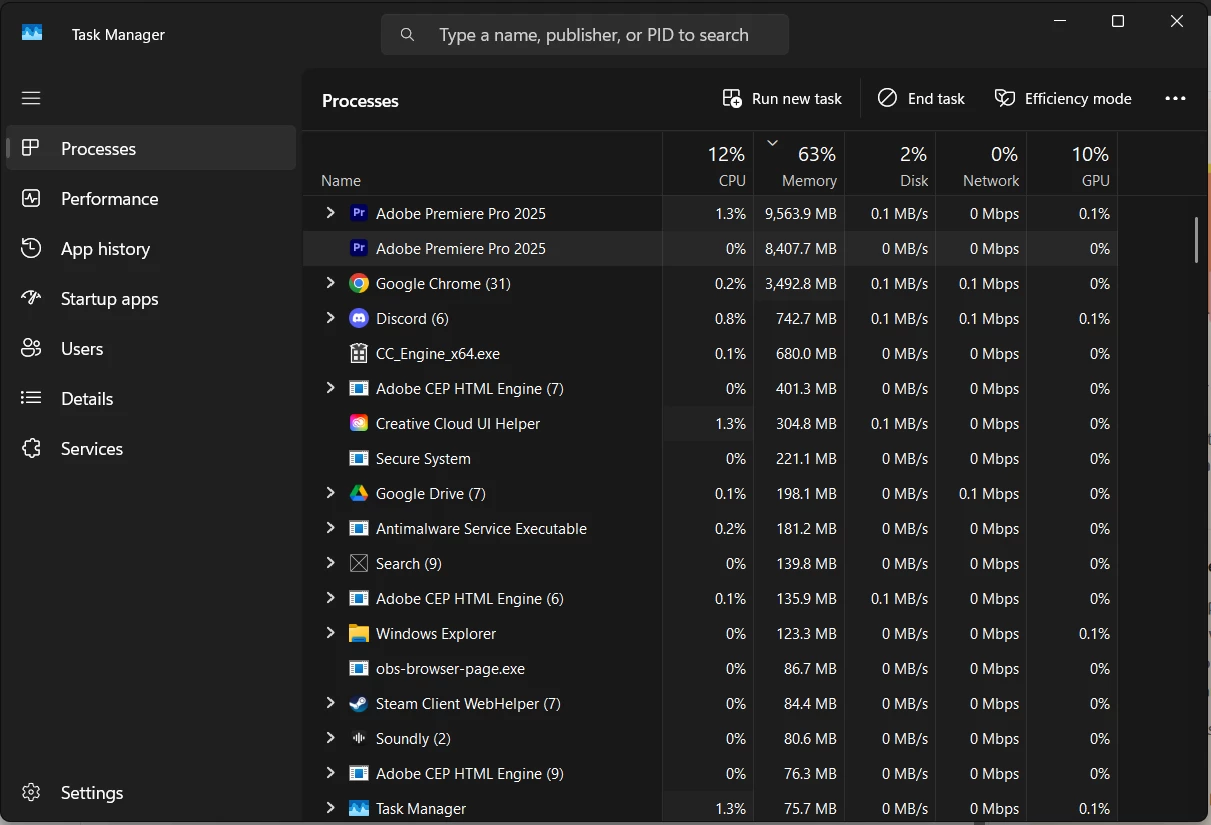
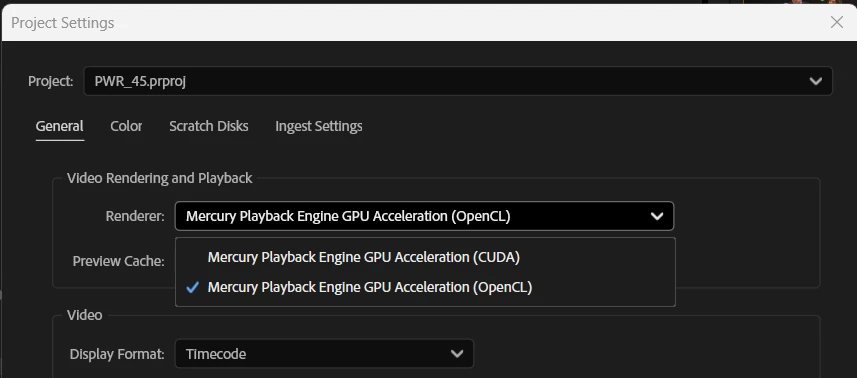
I have been editing for years without these major issues, so I'm assuming my issue is related to my recent GPU upgrade or it's drivers. Whenever I'm editing a video and watching it back on the timeline, it will randomly freeze on one of the frames I was on and stay like that for upwards of 2 minutes until it catches up or I get impatient and try to restart the program. It feels as if my computer is hitching or trying to catch up. I read online that if I switched the video renderer to OpenCL instead of CUDA, it may help and would indicate there is a driver issue. While this is a work around, this makes my playback extremely skippy/laggy due to it not using the GPU. I then go to try to render the video and it will start the render, but somewhere in the middle of the render, it will get completely stuck and stop rendering, although the footage it's rendering is not hardware intensive at all. The way I'm currently working around this is to transfer all my files to a different computer via google drive desktop and then render it there, where render times are fine, and no freezes happen. Also, one last issue i'm constantly running into is that whenever the program is in this "hitching/freezing" state, it is IMPOSSIBLE to fully close out of the program. I will open task manager and force close it and it will still not close. I have to click the power button on my pc and then cancel the shutdown in order for it to close and then it will still be open in the background, stuck at whatever the memory bandwidth was at when it was first shutdown, until the computer is fully restarted. This makes it extremely difficult to relaunch the program normally cause my computer is thinking it's still active I guess(50/50 chance it will launch). please help me. I'm on the latest version of drivers, and adobe software as well.

I do use a decent amount of extensions, which I will list here: (I don't think extension effect anything, but I could be wrong)
- Film Impacts
- Excalibur
- VideoVault3

Full specs list:
CPU: AMD Ryzen 7 7800X3D
GPU: NVIDIA GeForce RTX 5090
Memory: Corsair CMH32GX5M2B6000Z30 (64gb @ 6000MHz)
Storage: Samsung SSD 980 PRO 2TB
Motherboard: B650 GAMING PLUS WIFI (MS-7E26)
BIOS Version/Date: American Megatrends International, LLC. 1.30, 8/10/2023
44 replies

Participant
July 14, 2025

Hi @Albo Gravity 


I encountered a similar issue after upgrading from the RTX 4090 to the RTX 5090. In my case, the root cause turned out to be a compatibility mismatch between the GPU and the motherboard.


The RTX 5090 is a highly advanced graphics card and demands a robust motherboard capable of handling its workload, especially during intensive tasks like 4K video rendering in Adobe Premiere Pro. While your system might perform normally under light workloads, heavy tasks can cause freezing or performance drops due to the motherboard’s inability to fully support the GPU.


Your current motherboard, the MSI B650 Gaming Plus, may handle the RTX 4090 reasonably well, but it is not fully equipped to support the RTX 5090 to its maximum potential. This limitation leads to performance instability.


I resolved the issue by upgrading my motherboard. After the switch, I was able to render a 1-hour 4K 50 FPS video without any freezing or lag.


Hope this helps!

Participating Frequently
July 8, 2025

Im also having similar issues on a fresh built high spec machine with an RTX 5090, I'm hopingh this is being worked on because we can't be the only ones struggling... my work machine is bordering on unusable at times its so laggy and unstable with the latest Premiere and After Effects builds, official and Beta which was never an issue with my old build on an RTX 3080 card. I firmly believe its a GPU driver issue.

Participating Frequently
July 3, 2025

I don't have any audio effects applied. 

Participant
July 2, 2025

Do you happen to have any audio effects applied? I was struggling with this exact thing for days, until I realized it was effects on my audio tracks. Even with the tracks disabled! 

Participating Frequently
July 2, 2025

Hello. I have had the same issues. Was a solution ever found for this yet?

FlyingFourFun
Inspiring
June 11, 2025

@Albo Gravity  if you have done the DDU, and the problem persists, and the same projects work on other machines.  It starts to lean towards something local to that machine, here are some other ideas to try.


Have you reset the driver and plug in cache?  (apologies if this is a basic question and you have done it already).

Reset preferences

I believe you will want ot try Shift: Reset plugin loading cache


You can also try and see if the problem persists with plug in disabled: Cmd or Ctrl + 3: Disable third-party video plugins


Short term, try resetting the cache for both premier and the plugin's.  if that doesn't improve, try loading premier with plug in disabled, and see what happens.  Also, look for updates to the plug ins you have, as maybe they are needed for Film impacts, I went to there site, and its not easy to find anything for version or updates, but when I download the free trial it says its version 25.2.6 if that helps;  they have no dates, but I'm sure there is a way to identify the installed version and update if needed.

FlyingFourFun
Inspiring
June 11, 2025

@Albo Gravity not sure that the Beta would help,  but it was a good idea.  I would still keep an eye out for the offical 25.3


Participating Frequently
June 11, 2025

I did the DDU program again in safe mode with studio drivers reinstalled, making sure that I 100% have the right drivers this time. I'm still getting the issue of my playback freezing while in CUDA and I'm pretty sure i've narrowed it down to certain projects that i'm using certain effects on. The effects i'm using are through the "Film Impacts" extension and I was using the camera shake effect, which has motion blur on it. However, I also noticed that the playback would freeze with other less intensive effects from this extension like a stroke effect on a PNG. So I think it's just any effect I use from this pack may freeze it up? But I also didn't start having this issue until the 5090 and don't have it on computers without the 5090.


Participating Frequently
June 11, 2025

Just want to add this as another example of the issues i'm encountering so someone could potentially help diagnose the issue
https://gyazo.com/32d2a6f01a7f6a64efab831087d257d0

Going to try the DDU stuff again in the morning and will update if it fixes.

Participating Frequently
June 11, 2025

Update: Downloaded premiere 25.4 Beta version and I'm still having these issues. Probably not a Premiere Pro issue and more likely a driver issue I'm thinking.