
Premiere Pro shows the correct capture date for Meta Smart Glasses MOV files in the Media Import screen, but the Project panel’s Creation Date column shows the later processing/export time. This causes clips to sort in the wrong chronological order.
Premiere Pro reads two different creation timestamps from the same Meta Smart Glasses MOV file.
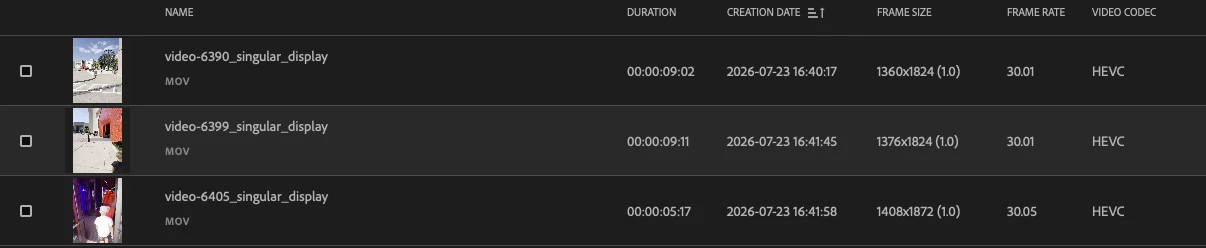
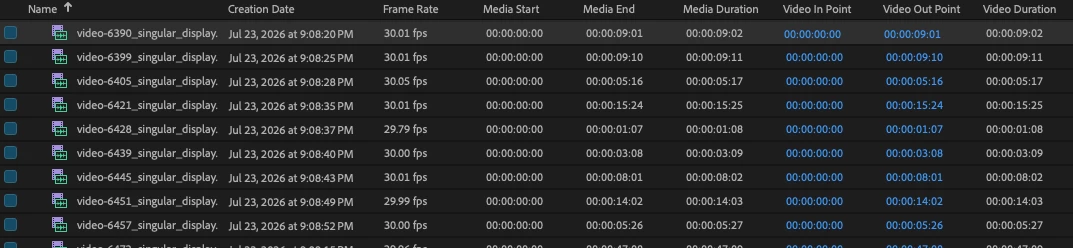
In the Media Import screen, Premiere correctly shows the original recording time. However, after the clip is imported, the Project panel’s Creation Date column shows a later timestamp associated with when the Meta app processed, transferred, or exported the file.
For example, one clip shows:
- Correct capture time in Finder and Media Import: July 23, 2026 at 4:40:17 PM
- Creation Date in the Project panel: July 23, 2026 at 9:08:20 PM
Because Meta Smart Glasses clips are not always processed in the same order they were recorded, sorting the Project panel by Creation Date places clips in the wrong chronological order.
The correct capture timestamp is already present in the file and Premiere’s Media Import screen can read it. The Project panel should either use that same timestamp or expose the original capture-date field as a sortable metadata column.
Import Tool:
Project Media Browser:


 AdChoices