



Visuales_FVST
Participant
April 17, 2026

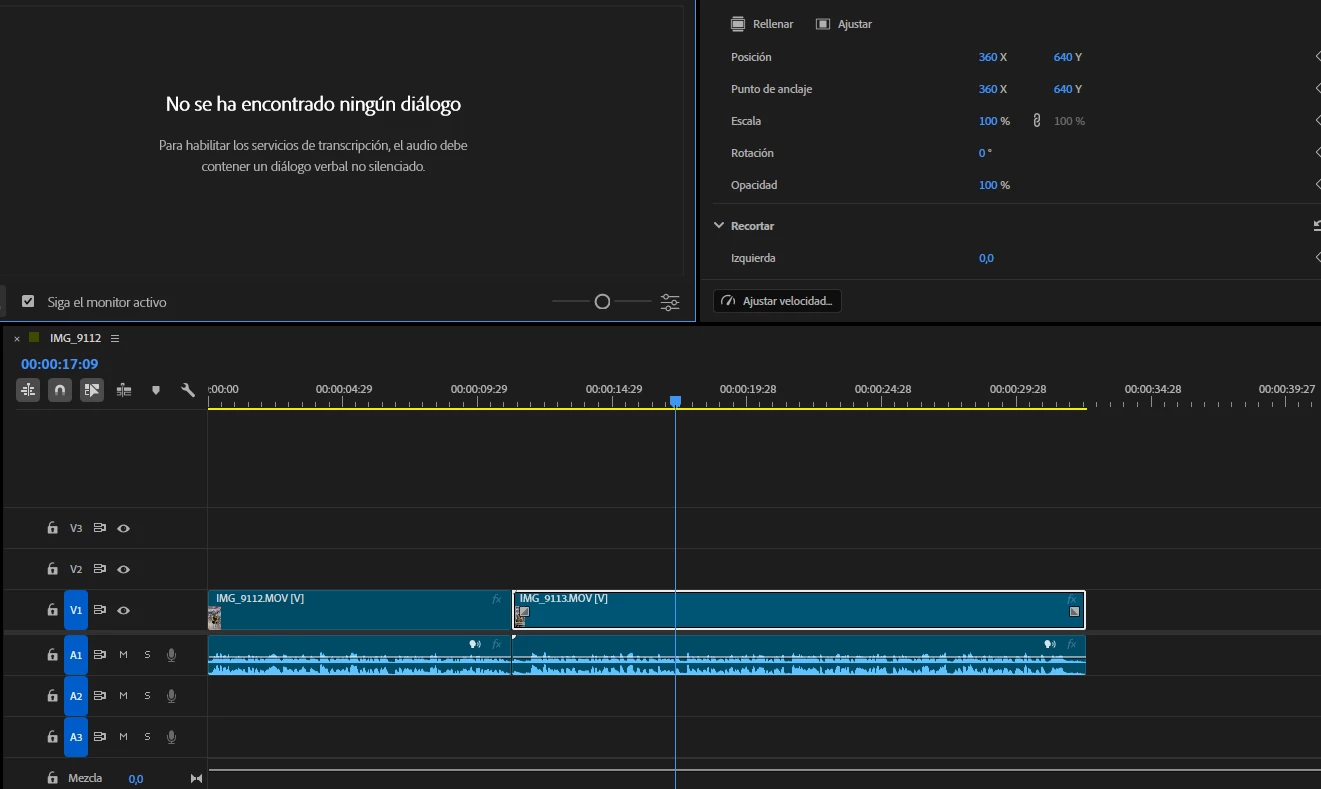
Premiere Pro y la version Beta tengo problemas con la funcion de transcripcion, no detecta nada y dice que las pistas de audio estan silenciadas, no transcribe ningun clip por mas audio que tenga
  • April 17, 2026
  • 9 replies
  • 169 views

Premiere Pro y la version Beta tengo problemas con la funcion de transcripcion, no detecta nada y dice que las pistas de audio estan silenciadas, no transcribe ningun clip por mas audio que tenga


    9 replies

    Stan Jones
    Community Expert
    Community Expert
    May 8, 2026

    @Visuales_FVST,


    I would continue in your bug report here:


    Let us know whether you are now on 26.2.2 (I don’t think this problem has changed there) and what specific build of the Beta you are on. The latest Beta is 26.3.0 Build 68.


    Stan


    Participant
    May 7, 2026

    This is happening across our team with multiple different computers and configurations. Not solved by updating.

    Stan Jones
    Community Expert
    Community Expert
    May 7, 2026

    @BC SW UK,


    This is frustrating a number of users, but I have am not experiencing this on Win 11 in any of the 26.x versions. 
     

    Because you have several computers all experiencing this, I wonder if that can help staff troubleshoot.


    Of the several 26.x versions (26.0.0, 26.0.1, 26.0.2, 26.2.0, and 26.2.2), which ones worked and didn’t? For some users, this started with 26.0.0, for others not until 26.2.0.


    I’m not at home to provide a link, but ​@mattchristensen1 reported that the 26.2.0 update was major for transcription, and the files are large. If the downloads did not complete, it might cause issues. I would try removing the plugin via the cloud desktop, and adding back. But this may not be adequate to fix that issue.


    Stan


    Participant
    May 7, 2026

    Hi thanks for reply - currently on v26.2.2 and not working. I updated yesterday when I first encountered the issue but still not working after update. Apologies, not sure how to check previous versions to confirm which version I was on when it first started.

    It did appear, however, that the issue arose without an update that I’m aware of, so it was working on the previous version and then suddenly it wasn’t - unless it updated in the background which I don’t think usually happens. 


    Visuales_FVST
    Participant
    May 7, 2026

    Con las ultimas actualizaciones tanto de Premiere Estable de 26.2 y la Beta 26.3 por mas audio y voces reconocibles que tengan los clips la transcripcion no se completa y dice que no hay voces reconocidas, este rror no ocurre en su version previa 26.1 estable

    Kirkjbarbera
    Participant
    April 28, 2026

    I’m getting this too.

    Stan Jones
    Community Expert
    Community Expert
    April 24, 2026

    @kbell33,


    There are several reports on this.


    Here’s one:


    Stan

    kbell33
    Participant
    April 24, 2026

    Since updating to Premiere 26.2, the transcript option is not recognizing any dialogue nor generating any captions or transcript. It’s not giving me the option to also generate a static transcript and fails before ever launching. I’ve done a full reboot of my system and of premiere multiple times since updating and still getting this issue. Tried it in multiple projects and even new sequences and still not populating or generating. There is very clearly audio there and I’ve tried tagging it as dialogue and still no captions.


    Mark Ch.
    Participant
    April 17, 2026

    I am having the same issue! 

    Visuales_FVST
    Participant
    April 17, 2026

    I can solve it downgrading to 25 version 

    jamieclarke
    Community Manager
    Community Manager
    April 17, 2026

    Hi ​@Visuales_FVST - Can you try the beta version of Premiere and see if you still have the same issue?

    We also just released 26.2 with a bunch of bug fixes so it would be helpful to update to the latest.

    jamieclarke
    Community Manager
    Community Manager
    April 17, 2026

    Hi ​@Visuales_FVST -   Thanks for submitting your bug report. We need a few more details to try to help with the issue.  Please see, How to Report a Problem?


    I wonder if it’s trying to use a different channel.  If you click the three dots in right corner of the text panel and select “Transcribe clips” Does it help changing the channel selection?

    Stan Jones
    Community Expert
    Community Expert
    April 17, 2026

    @jamieclarke,


    One of the users in this thread says they were told there is a bug. It is similar to what ​@Visuales_FVST is reporting, but I cannot replicate on Win11 in PR 26.0.2 or Beta 26.3.0.38.


    Stan