


Inspiring
June 4, 2025

Rendering heavy Effects Failing

For a little while now on the v25.4 beta I've been experiencing an issue when rendering sequences. Usually to prores (with alpha), but have also encountered it less frequently attempting to render to h264/5.
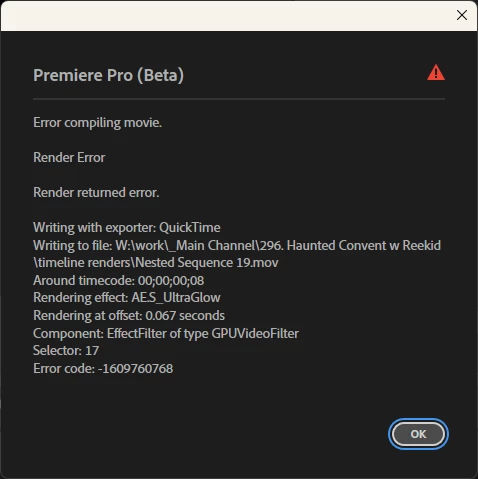
I'll try to render out a sequence and it will do seemingly nothing for anywhere from 10-30s then pop up with an error similar to the one I've attached below. The error below was generated by a sequence that contained nothing but a text element with the sapphire ultraglow effect applied

This issue does not occur if I hold shift during boot and set software only rendering, nor does it occur on v25.0

1. v25.4 (build 38)
2. Windows 11 | 10.0.22631 build 22631 - rtx 4080 (latest studio drivers), amd 7900x, 96gb ram, working off an ssd
3. I haven't completely locked down the pattern yet, but I seem to be running into it with sapphire's UltraGlow (latest version) a lot, but as noted previous versions of premiere do not encounter the issue with the exact same sequence, and disabling gpu rendering also results in no error
I will continue to investigate what might be causing the issue as it seems like only certain things are triggering the error currently
返信数 20

jamieclarke
Community Manager
Community Manager
January 28, 2026

This issue has been fixed in Premiere Beta version 26.1.1 build 31 or later and will be included in a future release of Premiere Pro. 

Tom_edit作成者
Inspiring
January 28, 2026

great to hear, thank you

jamieclarke
Community Manager
Community Manager
September 16, 2025

Hi @Tom_edit - We’re still looking into this issue and will share an update as soon as we have one. Thank you for your patience, and apologies for the trouble in the meantime.

Tom_edit作成者
Inspiring
September 11, 2025

@Fergus H  was there any updates regarding this issue? I'm still seeing all the same problems in 25.5 (and 25.6 build 62).. 

Tom_edit作成者
Inspiring
August 4, 2025

Hello @Fergus H  my apologies again for the delay,
I can confirm that there is no change on my end with Sapphire up to date, same error.

I just hope that my example using posterize time shows why it worries me that the software only workaround is being removed so soon - if it's possible to run into this issue with only premiere effects it may soon become impossible to render even basic sequences. With premiere beta cycles often lasting months this could potentially result in months of being unable to render who knows how many effects... I hope this error can be resolved outside of that change to hopefully mitigate these concerns but it does leave me a little uneasy currently.

Thanks again, I appreciate that it is being looked into.

Fergus H
Community Manager
Community Manager
August 1, 2025

@Tom_edit Thanks very much for the update and the details. When you get a chance, we'd certainly be interested in your experience with the later version of Sapphire. We're doing the same test right now and we're also in conversation with Boris, with whom we've got a close relationship. 


We're taking your feedback very seriously and have an active conversation going on internally about it right now. 


Regards,

Fergus

jamieclarke
Community Manager
Community Manager
August 1, 2025

Hi @Tom_edit - We have logged this bug and will keep you updated on the status. 


Tom_edit作成者
Inspiring
August 1, 2025

hey @jamieclarke  my sapphire version was either 2025.5 /or/ 2025.51, whichever was the latest at the time I first made the post (I can't seem to find dates of releases atm so it's a bit hard to know for sure) - I see they've since released 2025.52, but the changelog makes no mention really of this issue. I can't test it until I'm back in the office next tuesday my time unfortunately, I've been home this week.

As for the posterize time, I can't move it any lower in the effect stack or it no longer has any effect on the turbulent displace anymore and it acts like it's not even there.

jamieclarke
Community Manager
Community Manager
July 31, 2025

Updating Status to Acknowledged

jamieclarke
Community Manager
Community Manager
July 31, 2025

Hi @Tom_edit - What version of Boris FX do you have installed for the Glow effect? It looks like the Posterize Time effect isn’t GPU accelerated, which is causing a fallback to software rendering.  If you move the Posterize Time effect after your text layer in the Effect Controls panel, are you then able to export successfully?

Tom_edit作成者
Inspiring
July 31, 2025

Text layer also fails to render with Premiere only effects: mosaic, posterize time, turbulent displace...